26 | CFW300
English
First Time Power-Up and Start-Up
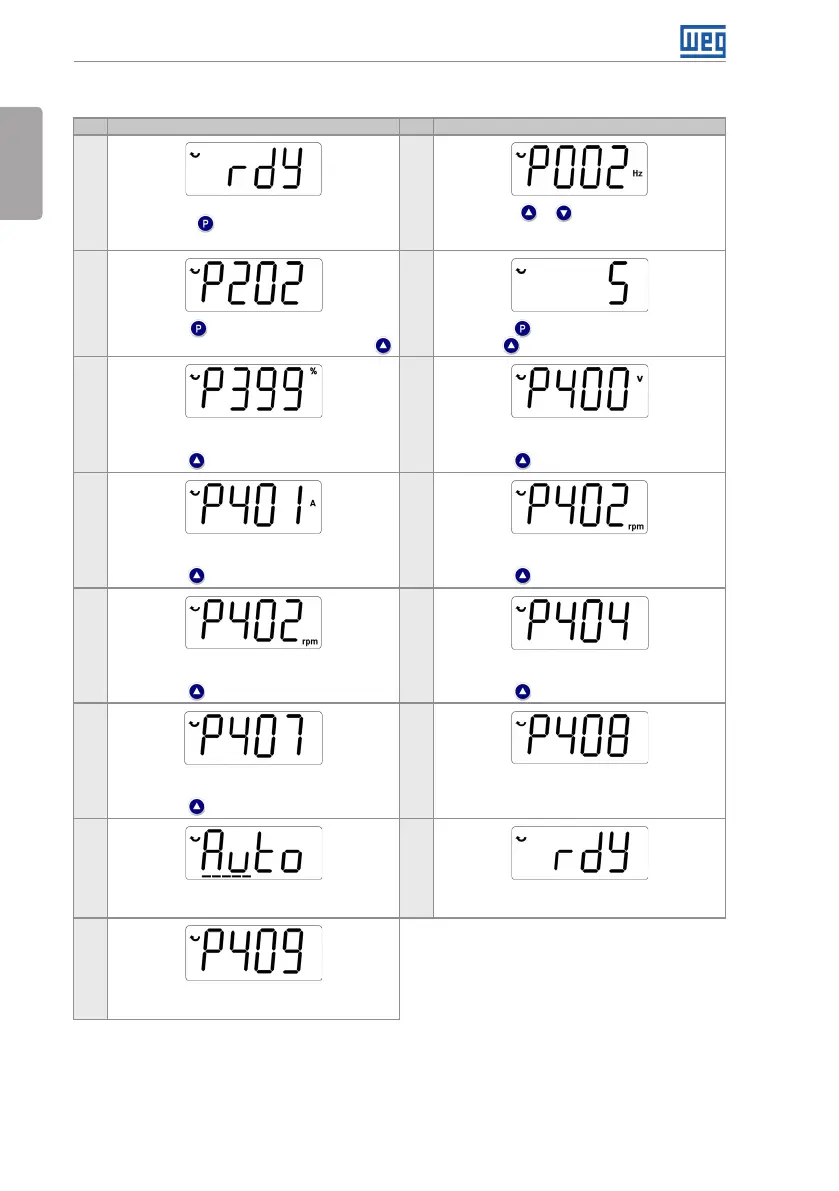
5.2.3 Control Type VVW (P202 = 5)
Seq Display Indication/Action Seq Display Indication/Action
1
2
Initialization mode
Press key to enter the first level of the
parameterization mode
Press keys or to select parameter P202
3 4
Press key to change the content of "P202 -
Type of Control" for P202 = 5 (V VW). Use key
Press key to save the change of P202
Use key to select parameter P399
5 6
If necessary, change the content of "P399 - Motor
Rated Efficiency" according to the nameplate
Press key for the next parameter
If necessary, change the content of "P400 - Motor
Rated Voltage"
Press key for the next parameter
7 8
If necessary, change the content of "P401 - Motor
Rated Current"
Press key for the next parameter
If necessary, change the content of "P402 - Motor
Rated Speed"
Press key for the next parameter
9 10
If necessary, change the content of "P403 - Motor
Rated Frequency"
Press key for the next parameter
If necessary, change the content of "P404 - Motor
Rated Power"
Press key for the next parameter
11 12
If necessary, change the content of "P407 - Motor
Rated Power factor"
Press key for the next parameter
If necessary to make the self-tuning, change the
value of P408 to "I"
13 14
During the self-tuning, the HMI will show "Auto",
and the bar will indicate the operation progress
When the self-tuning is completed, it will return to
the (comp) Initialization Mode
15
If necessary, change the content of "P409 - Stator
Resistance"
Figure 5.4: Sequence for VVW control



 To Next Page