24 | CFW300
English
First Time Power-Up and Start-Up
DANGER!
High voltages can be present, even after the disconnection of the power supply.
Wait at least 10 minutes for full discharge.
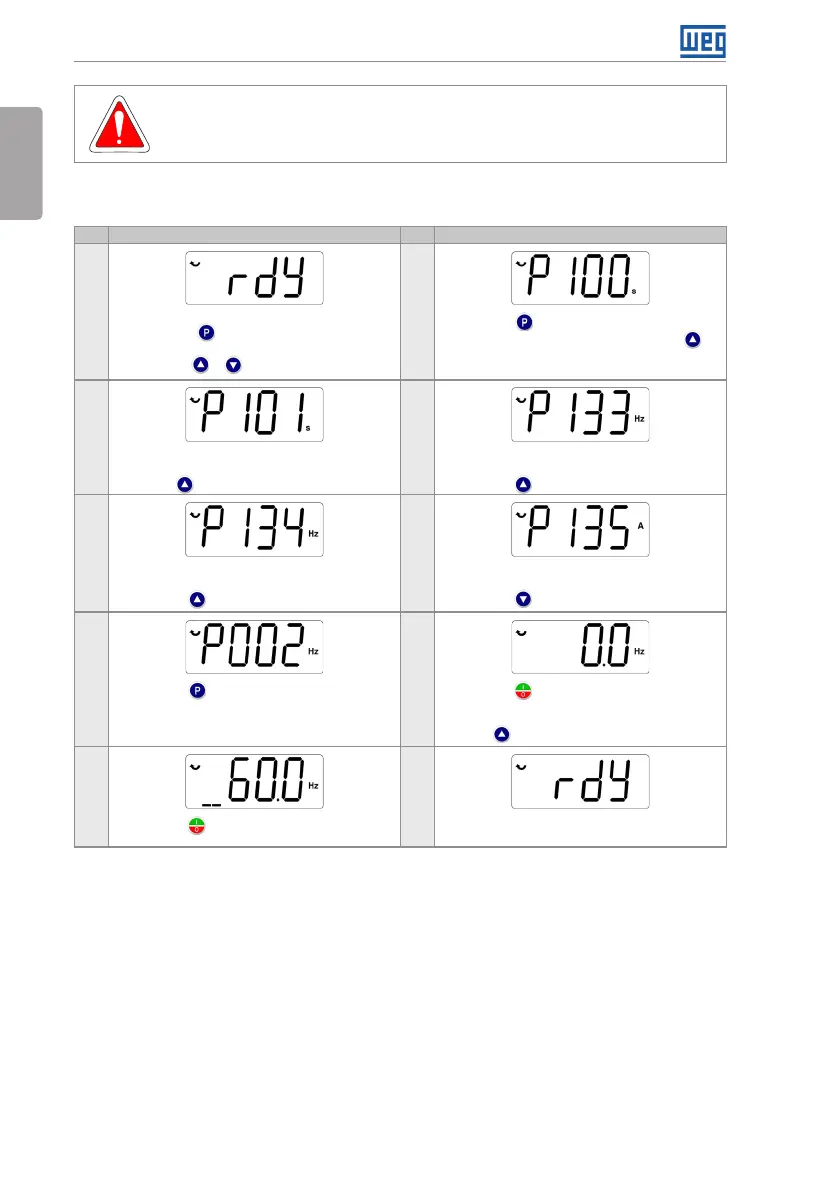
5.2.1 Basic Application
Seq Display Indication/Action Seq Display Indication/Action
1
2
Initialization mode
Press key to enter the first level of the
parameterization mode
Press keys or to select the parameter P100
Press key if you need to change the content
of P100 - "Acceleration Time" or press key for
the next parameter
3 4
If necessary, change the content of "P101 -
Deceleration Time"
Use key to select the parameter P133
If necessary, change the content of "P133 -
Minimum Speed"
Press key for the next parameter
5 6
If necessary, change the content of "P134 -
Maximum Speed"
Press key for the next parameter
If necessary, change the content of "P135 - Output
Maximum Current"
Press key to select parameter P002
7 8
Press key to view the parameter content
Press key that the motor will accelerate up to
3.0 Hz (factory default setting of P133 - Minimum
Frequency)
Press and hold it until it reaches 60.0 Hz
9 10
Press key . The motor will decelerate to a stop
When the motor stops, the display will indicate
"ready"
Figure 5.2: Sequence for basic application



 To Next Page