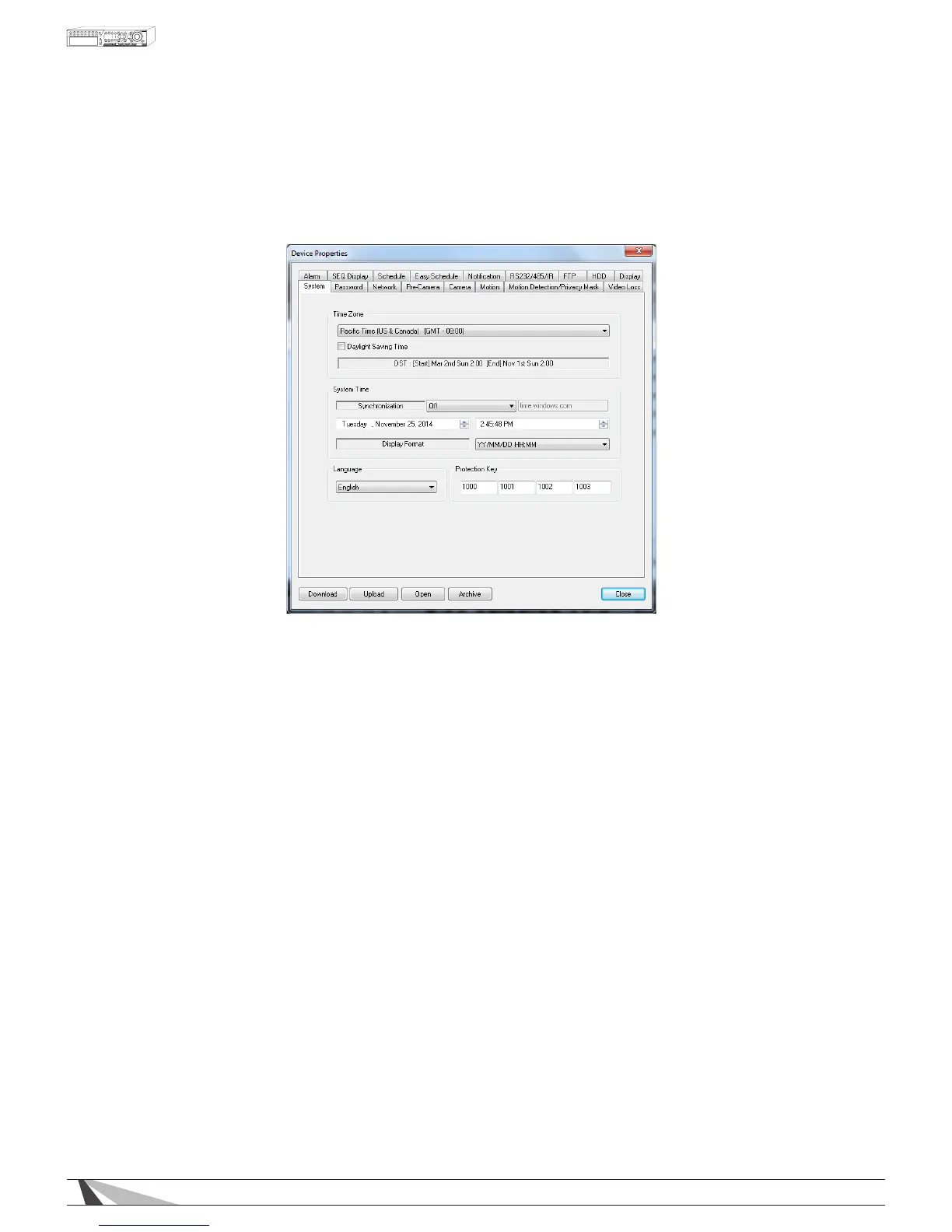
9.3.1. SYSTEM
The System Setup allows the administrator to set the system time, time zone, time synchronization,
language, etc.
Thefollowingisabriefdescriptionforeachiteminthismenuanditsspecicoperations:
• TIMEZONE
Select the appropriate time zone. The default setting is Eastern Standard Time.
• DAYLIGHTSAVINGTIME
Enable or disable DST by checking this box.
• SYSTEMTIME
- Synchronization
Enable or disable time synchronization with a TSP Server. The default setting is disabled.
- TSP Server
If Time Synchronization is enabled, select a Time Synchronization Protocol (TSP) server. The DVR will
synchronize with the specied TSP server.
- Date
System date
- Time
System time
- Display Format
Select the format used to display the system time in the camera windows
• LANGUAGE
System language
NOTE:Iftheselectedlanguageischanged,rebootthesystemforthenewlyselectedlanguagetotake
effect.
• PROTECTIONKEY
The Protection Key is used for secure remote access of the system.
NOTE:TheProtectionKeywillbeusedbysomesoftwareforauthenticationwhenaremotecomputerwants
toconnectwiththesystemthroughtheEthernetinterface,eitherLANorinternet.Thesameprotectionkey
mustbeenteredtoinstalltheremotesoftwareifitistobeusedtoaccesstheDVR.



 To Next Page