• LOG
By default, the DVR will log when video loss is detected to the Event Log.
• E-MAIL
This DVR can send an email message to a predened email address in the event video loss is detected for
this camera. The default setting is disabled. See Section 9.3.13 for more information on e-mail.
• FTP
This DVR can send the recorded video loss event for this camera to a FTP server. The default setting
is disabled.
• SCREENMESSAGE
By default, the DVR will display a video loss message in the System Status Bar (visible from the VGA
or BNC main monitor output only) when video loss is detected for this camera.
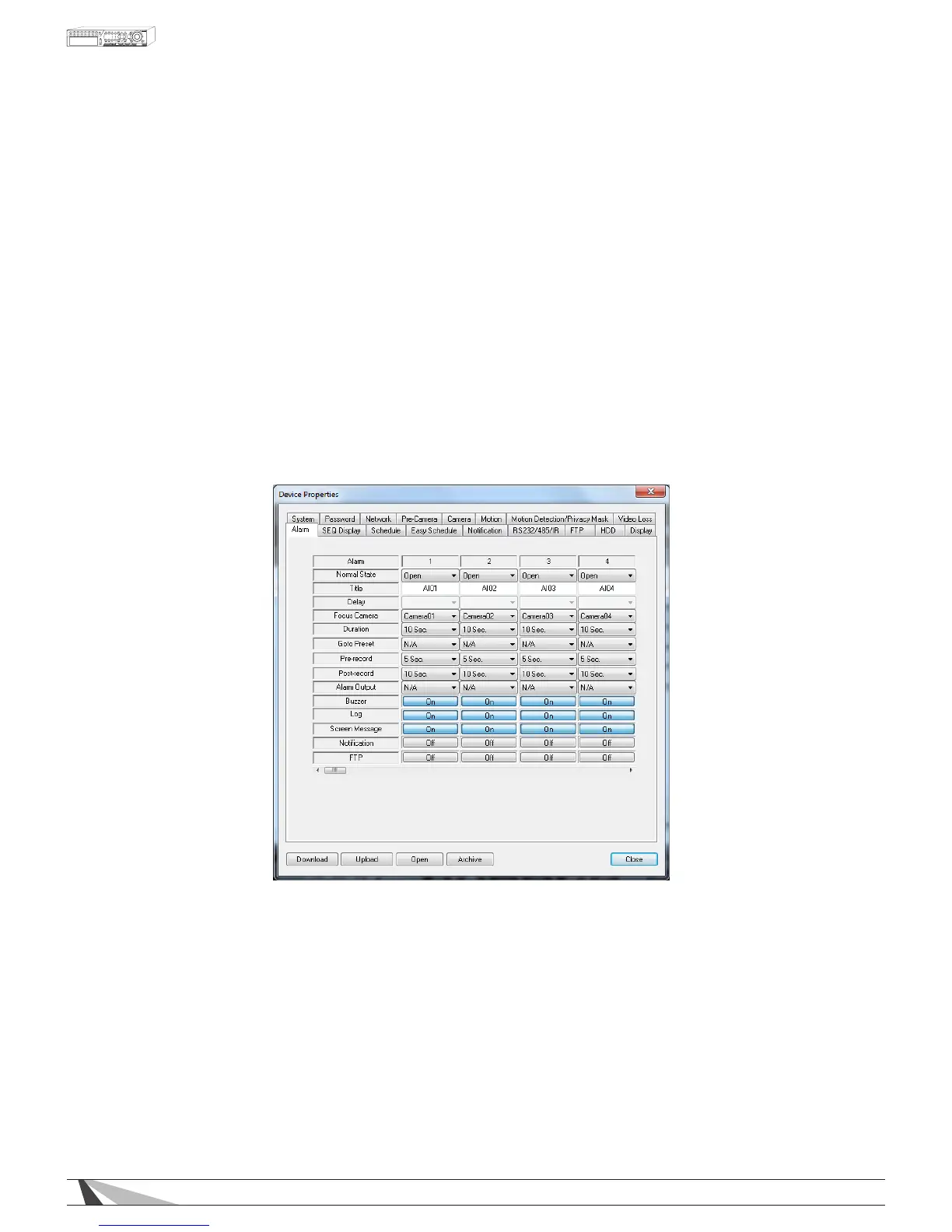
9.3.9. ALARM
The Alarm Setup allows the administrator to dene the attributes for each alarm input and the actions if it
is triggered. Up to sixteen alarm inputs such as motion detectors or door contacts that can be connected
to the DVR.
Thefollowingisabriefdescriptionforeachiteminthismenuanditsspecicoperations:
• ALARM
Non-congurable eld indicates the Alarm Input being congured.
• NORMALSTATE
Select N/A, Close or Open. The type of sensor connected to the DVR will determine the setting. For
example, motion detectors typically are normally open while door contacts are normally closed. Select
N/A (Not Available) if the input is not used and the following items will not be adjustable. The default setting
is Open.
• TITLE
Friendly name of alarm channel reported to the system log and Notications.
• DELAY
This feature has no function for this model of DVR.



 To Next Page