E-mail: sales@xtramus.com
Website: www.Xtramus.com
5.3. NuSet-MiniPG-Config Functions
5.3.1. NuSet-MiniPG-Config Functions Overview
If you choose Configuration for Hotkeys Operation from
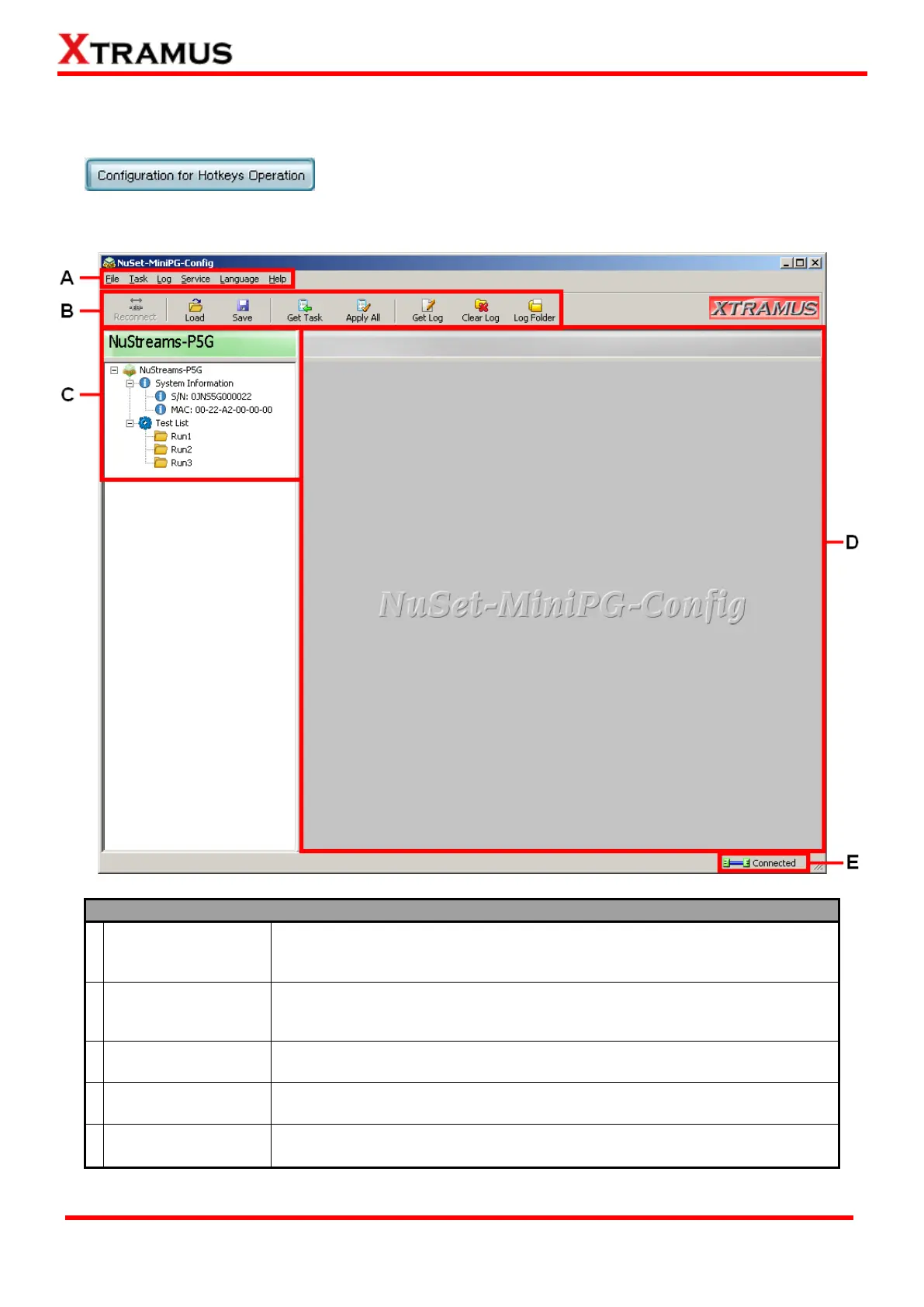
NuSet-MiniPG Option Menu, NuSet-MiniPG-Config’s main window
will pop up as shown below:
The Menu Bar allows you to access configuration files from your PC and
NuStreams-P5G/NuStreams-P9A, manage test logs, and perform system
maintenance.
With a simple click of these Quick Launch Buttons, you can access
configuration files from your PC/NuStreams-P5G/NuStreams-P9A and
managing test logs.
This section contains a selectable list of NuStreams-P5G or
NuStreams-P9A’s detailed system information and Test List.
This section displays detailed system information or all test parameters you
can configure for each Task in Run 1~3.
This icon shows the connection status between your PC and
NuStreams-P5G or NuStreams-P9A.



 To Next Page