E-mail: sales@xtramus.com
Website: www.Xtramus.com
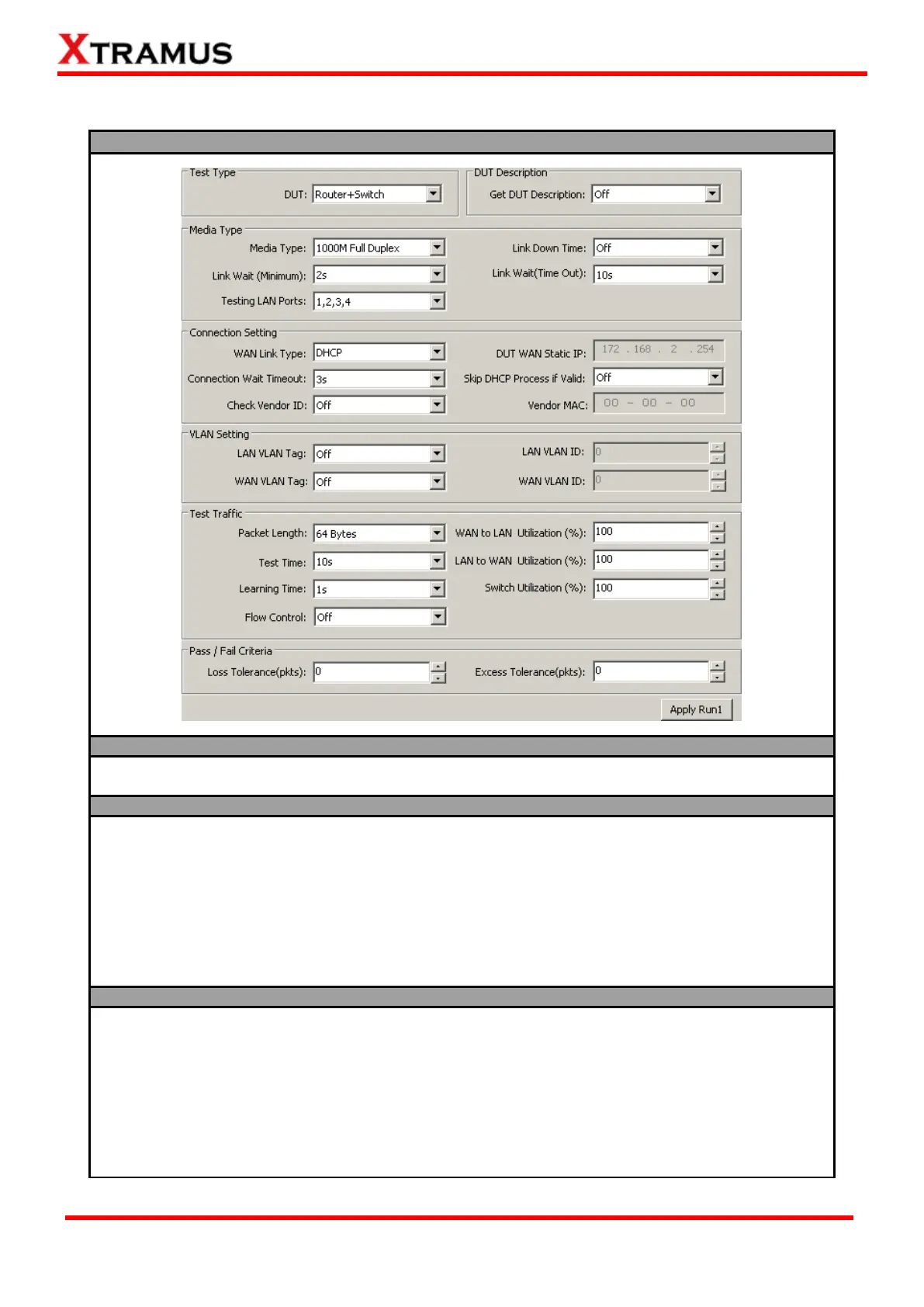
5.3.5.3. NuSet-MiniPG-Config Task Setting – Router + Switch
Test Type/DUT Description
DUT: Choose “Router + Switch” from this scroll-down menu to start configuring tests for both routers and switches.
Get DUT Description: Enable this function to acquire DUT information during test and output it to test logs.
Media Type: You can set the connection speed here
with the scroll-down menu.
Link Down Time: The connection link between DUT
and NuStreams-P5G/P9A will be forced to terminate
when this function is enabled.
Link Wait (Minimum): NuStreams-P5G/P9A will
attempt to establish connection with the DUT and wait
for the minimum time (seconds). NuStreams-P5G/P9A
will keep waiting until the minimum time is met even the
DUT has already responded.
Link Wait (Time Out): NuStreams-P5G/P9A will
attempt to establish connection with the DUT and wait
for a period of time until time out (second), and
NuStreams-P5G/P9A will not attempt to establish
connection anymore.
Testing LAN Ports: Please connect the DUT with NuStreams-P5G/P9A’s Switch Ports with Cat-5 cables
according to the Testing LAN Ports you set here.
WAN Link Type: Choose the WAN connection type for
DUT testing. Three WAN Link Types are available:
DHCP, Static IP, and PPPoE. The WAN Link Type set
here must be the same with the setting of the DUT.
DUT WAN Static IP: If the WAN Link Type is set as
Static IP, please input the static IP address you set in
the DUT here.
DHCP Wait Timeout: This function sets the duration of
time for attempting to establish connection with DHCP
server.
Skip DHCP Process if Valid: Disable or enable DHCP
server.
Check Vender ID: Enable this function to check DUTs’
MAC address and see if they match DUT vender’s
designated MAC address.
Vendor MAC: If Check Vender ID is enabled, please
input the vender’s designated MAC address here for
comparisons.



 To Next Page