E-mail: sales@xtramus.com
Website: www.Xtramus.com
6. Controlling Tests with NuPAD
NuPAD is an assistant extension keypad, especially designed for running
tests at mass production line.
With all test parameters set and stored in NuStreams-P5G/P9A, NuPAD
allows users to perform tests without changing pre-set parameters.
6.1. NuPAD Functions Overview
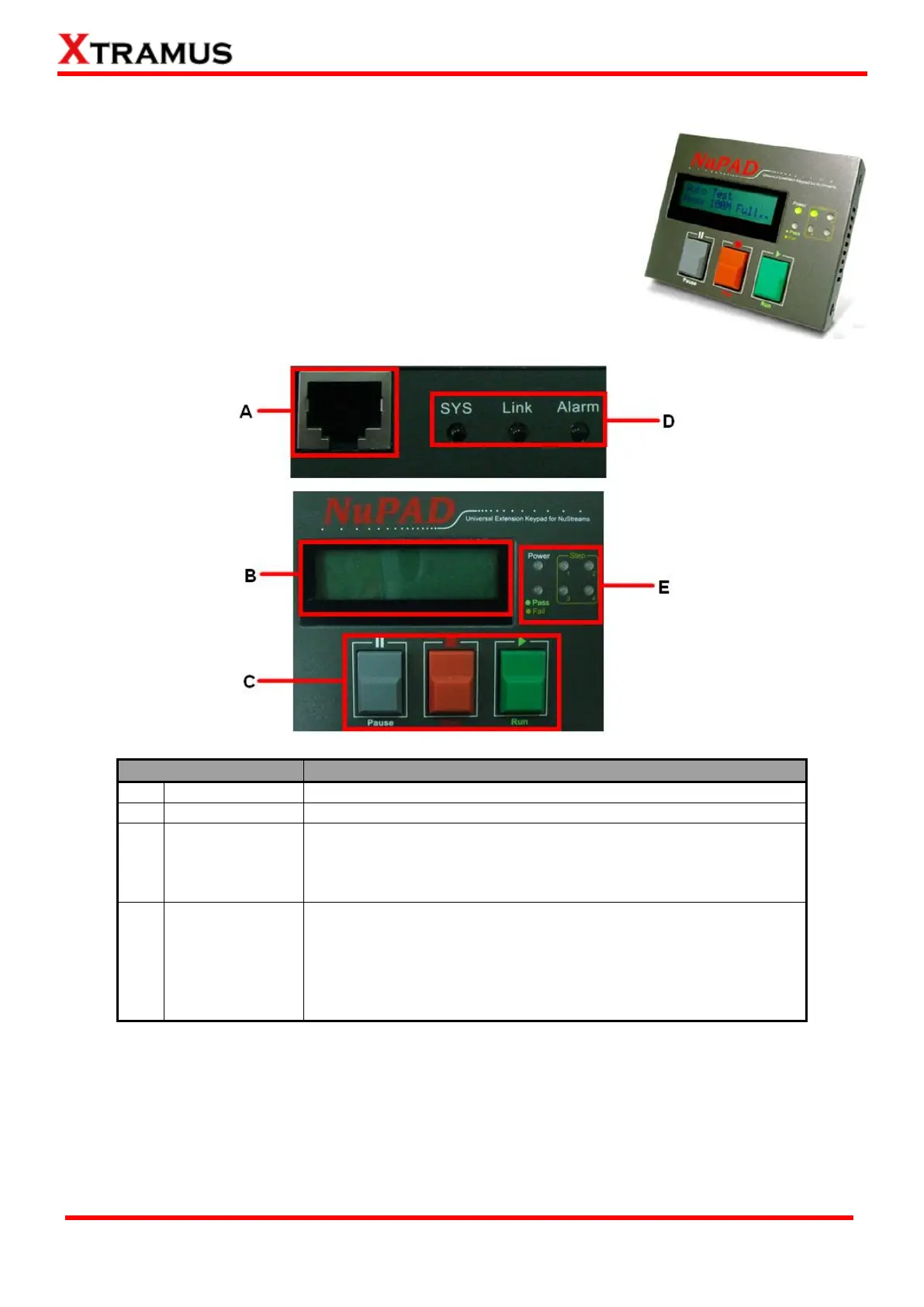
Connecting NuPAD with NuStreams-P5G/P9A’s Console Port.
Displaying system information, status, and test results.
|| Pause: Press this button to pause the current running test.
Press this button again to resume the test.
■ Stop: Press this button to stop the current running test.
► Run: Press this button to start test.
Sys/Link/Alarm: Showing NuPAD running status.
Power: When NuPAD is connected to NuStreams-P5G/P9A’s
Console Port, the Green Power LED will be ON.
Pass/Fail: If the test passed, the Pass/Fail Green LED will be
ON; if the test failed, the Pass/Fail Amber LED will be ON.
Step 1~4: Showing the progress of the test.



 To Next Page