E-mail: sales@xtramus.com
Website: www.Xtramus.com
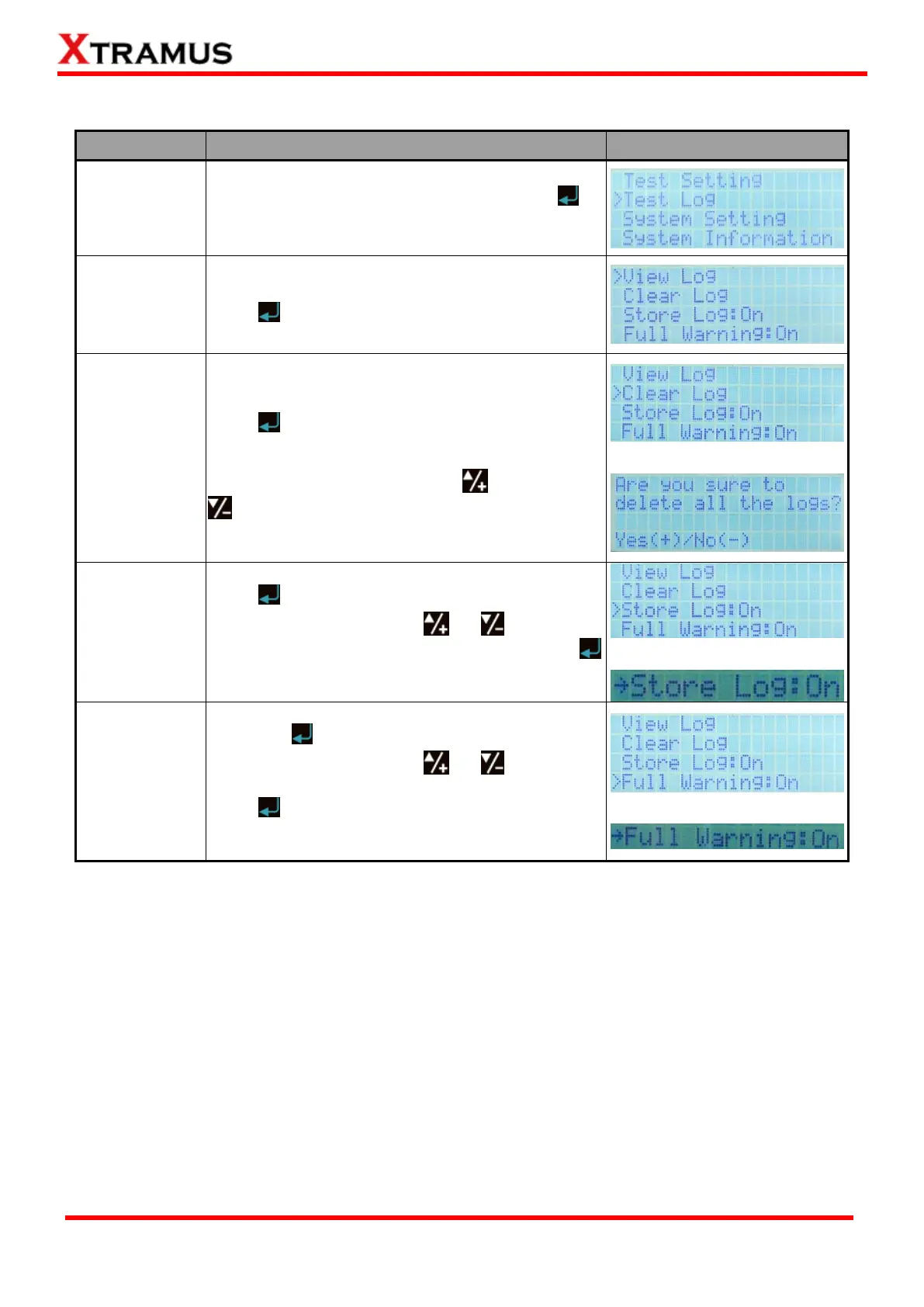
4.2.5. NuStreams-P9A Front Panel Functions – Test Log
Move the cursor > to “Test Log”, and press
button.
Choose “View Log” from “Test Log” menu list, and
press button.
Choose “Clear Log” from “Test Log” menu list, and
press button.
System will ask if you really want to delete all logs
stored in NuStreams-P9A. Press to confirm, or
to cancel.
Choose “Store Log” from “Test Log” menu list, and
press button. The select cursor “>” will be
changed to “→” icon. Using or buttons to
set Log Auto-Save function On or Off, and press
button to apply the changes. System will save all
test logs automatically if this function is ON.
Choose “Full Warning” from “Test Log” menu list,
and press button. The select cursor “>” will be
changed to “→” icon. Using or buttons to
set Memory Full Warning function On or Off, and
press button to apply the changes. System will
alert you when its log storing memory is about to
full if this function is ON.



 To Next Page