EasyManua.ls Logo

Xtramus NuStreams-P5G - Nustreams-P9 A Front Panel Functions - Basic Controls

Default Icon
73 pages
Print Icon
To Next Page IconTo Next Page
To Previous Page IconTo Previous Page
Loading...
31
E-mail: sales@xtramus.com
Website: www.Xtramus.com
XTRAMUS TECHNOLOGIES
®
4.2.3. NuStreams-P9A Front Panel Functions Basic Controls
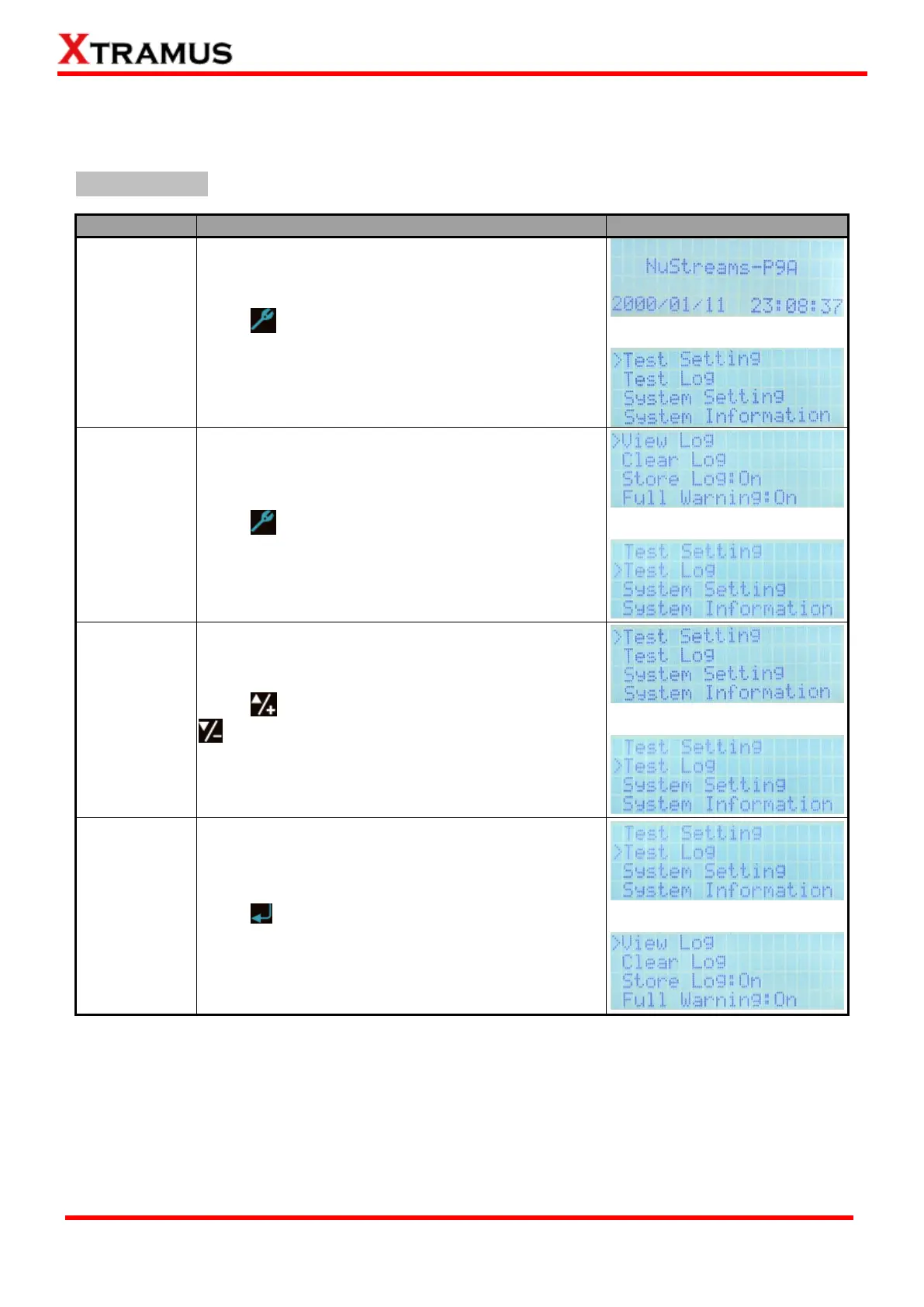
The table down below shows NuStreams-P9As basic controls.
Basic Functions
Function
Control Button Action
LCD Display
Entering Main
Menu
Press button to enter NuStreams-P9As main
menu.
Back to
Previous
Menu
Press button to go back to the previous menu.
Moving
Selection
Cursor
Press to move the selection cursor up, or press
to move the selection cursor down.
Entering
Selected
Option
Press button to enter the menu option you chose.

Table of Contents

Related product manuals