E-mail: sales@xtramus.com
Website: www.Xtramus.com
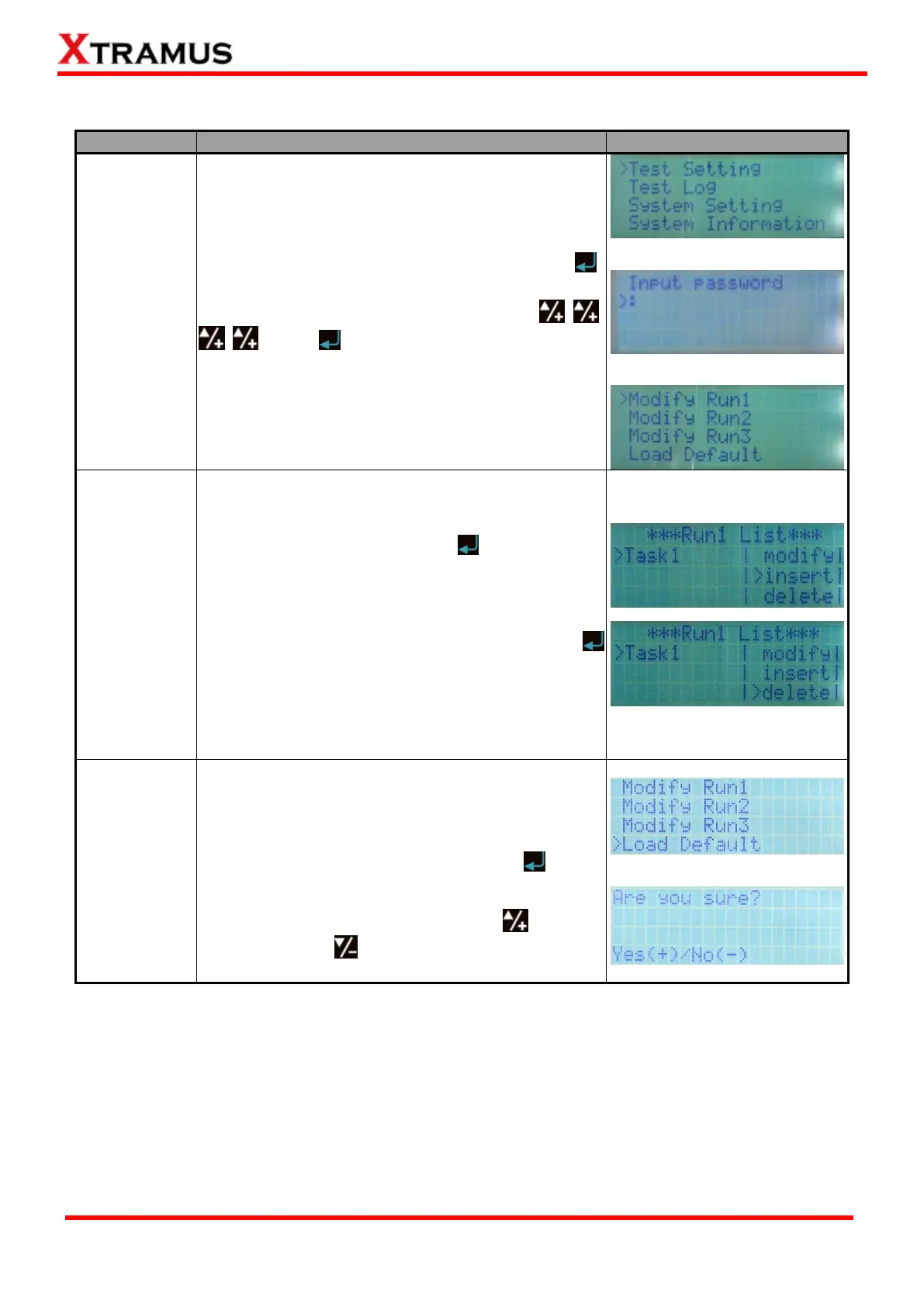
4.2.4. NuStreams-P9A Front Panel Functions – Test Setting
Entering Test
Setting Menu
Move the cursor > to “Test Setting”, and press
button. NuStreeams-P9A will prompt you to input the
system password. The default password is
. Press button after inputting the
password to enter the test setting menu.
You can also insert or delete Tasks.
To add a new task to the current Run, choose “insert”
from “Run List” menu, and press button. A new
task with default parameters will be added to that
Run.
To remove an existing task of the current Run,
choose “delete” from “Run List” menu, and press
button. The existing task you chose will be deleted.
Each “Run” can contain up to 4 Tasks, while each
Task is an independent test that can contain different
test parameters.
You can reset all settings stored in all 3 Runs and
load the default test configurations here.
To load default test configurations, choose “Load
Default” from “Run List” menu, and press button.
NuStreams-P9A will confirm if you really want to reset
all test settings to default values. Press button to
confirm, or press button to cancel.



 To Next Page