E-mail: sales@xtramus.com
Website: www.Xtramus.com
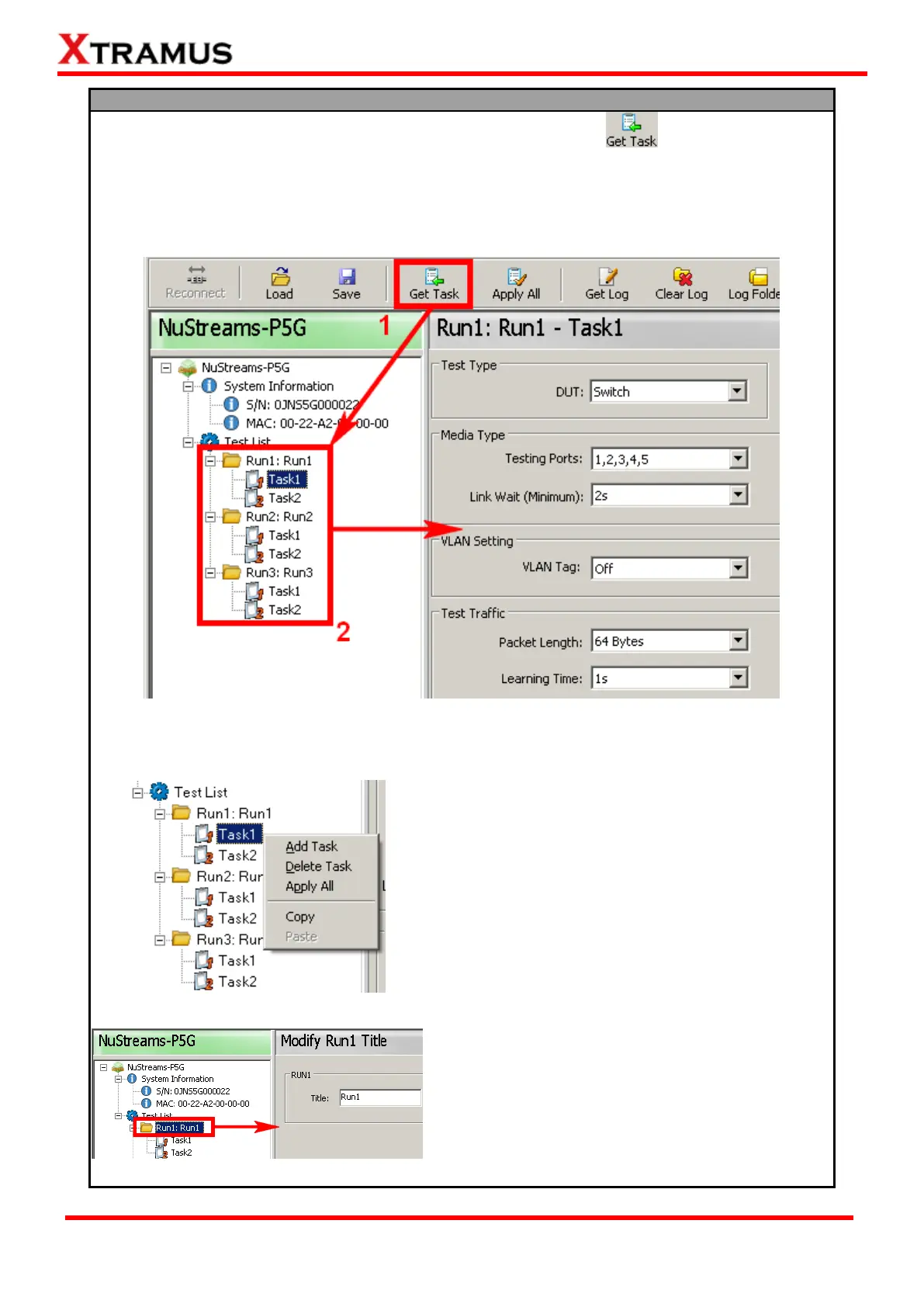
To access test settings stored in NuStreams-P5G/P9A, please click button located on the
Quick Launch Buttons section so NuSet-MiniPG-Config can access and display all Runs stored
in NuStreams-P5G/P9A.
Please note that the USB connection between PC and NuStreams- P5G/P9A must be connected
at all time while getting/setting tasks.
All test settings stored in NuStreams-P5G/P9A will be displayed under Test List. All parameters in
each Task can be viewed or changed by the detailed configuration window displayed on the Main
Display Window.
By right clicking a Task on Test List, you can Add
Task, Delete Task, Apply All, Copy, or Paste Tasks.
Add Task: Add a Task with default test setting
values to the current Run. Up to 4 Tasks can be
added in one Run.
Delete Task: Delete the current Task.
Apply All: Apply all test settings and save these
settings to NuStreams-P5G/P9A.
Copy: Copy current Task.
Paste: Paste the Task you copied to the current
Run.
Also, by clicking Run 1~3 listed on Test List, you can
change the title of each Run on the Main Display
Window.



 To Next Page