105
Resetting the Microprocessor
Memory channels, setting menus, and various settings can be initialized and returned to their factory
defaults.
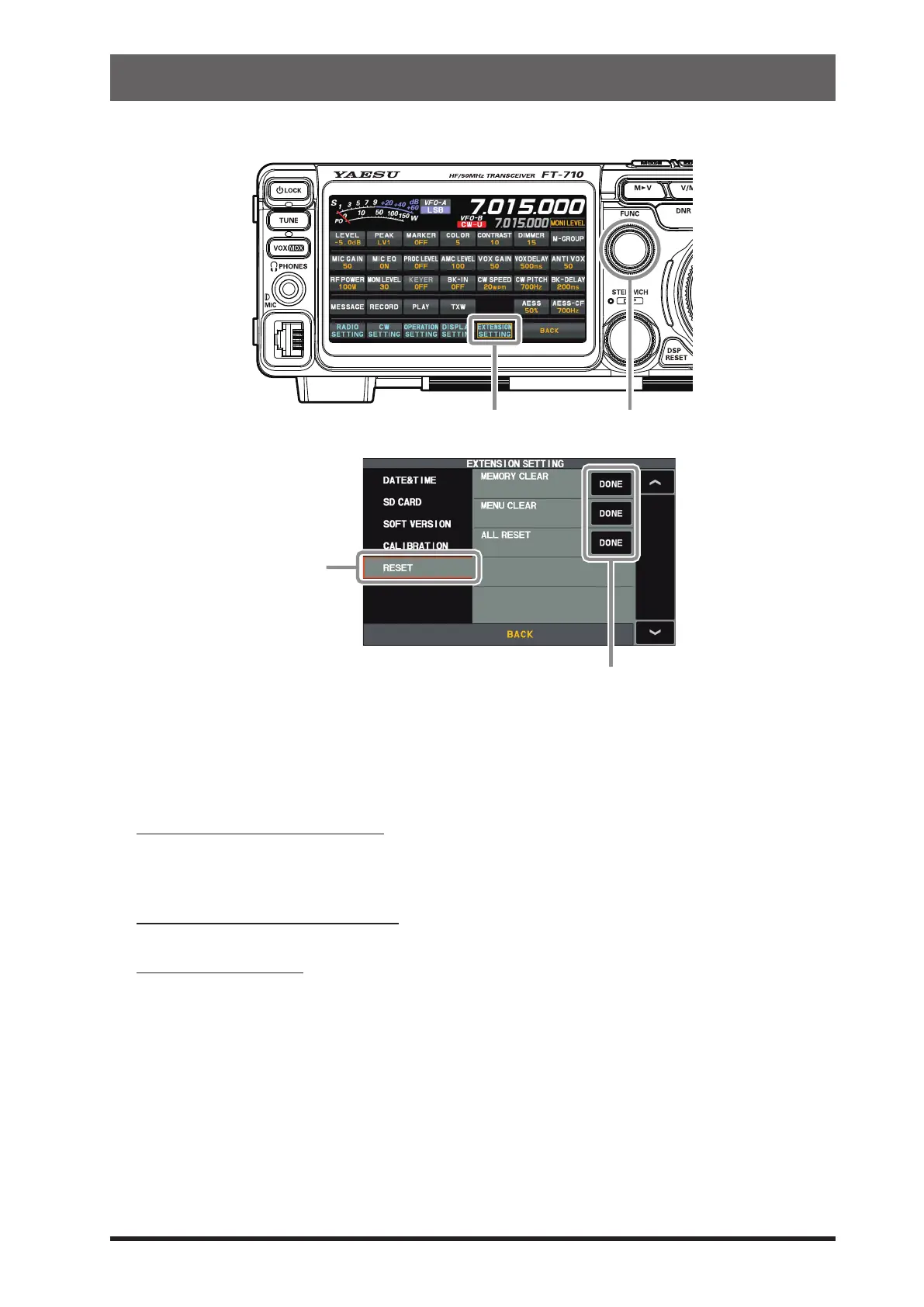
EXTENSION SETTING FUNC knob
1. Display the reset item selection screen.
Press the [FUNC] knob → touch [EXTENSION SETTING] → touch [RESET]
2. Touch “DONE” of the item you want to reset (see below).
Or Select an item with the [FUNC] knob and press the [FUNC] knob.
A conrmation screen for reset execution is displayed.
MEMORY CLEAR (Memory Reset)
Only the contents of the memory channel are initialized (factory default).
All stored information will be erased, but channel M-01 will return to the initial setting of 7.000.000
MHz, LSB.
MENU CLEAR (Setting Menu Reset)
Only the contents of the setting menu are returned to their default values (factory default).
ALL RESET (All Reset)
Initializes all settings of this unit, including various settings, memories, and setting menus, and re-
stores the factory settings.
3. Touch [OK] or select [OK] with the [FUNC] knob and press the [FUNC] knob to execute the reset.
To cancel the reset, touch [CANCEL] or select [CANCEL] with the [FUNC] knob and press the [FUNC]
knob.
4. The power is turned OFF once and then turned ON automatically.
The reset is complete.



 To Next Page