18
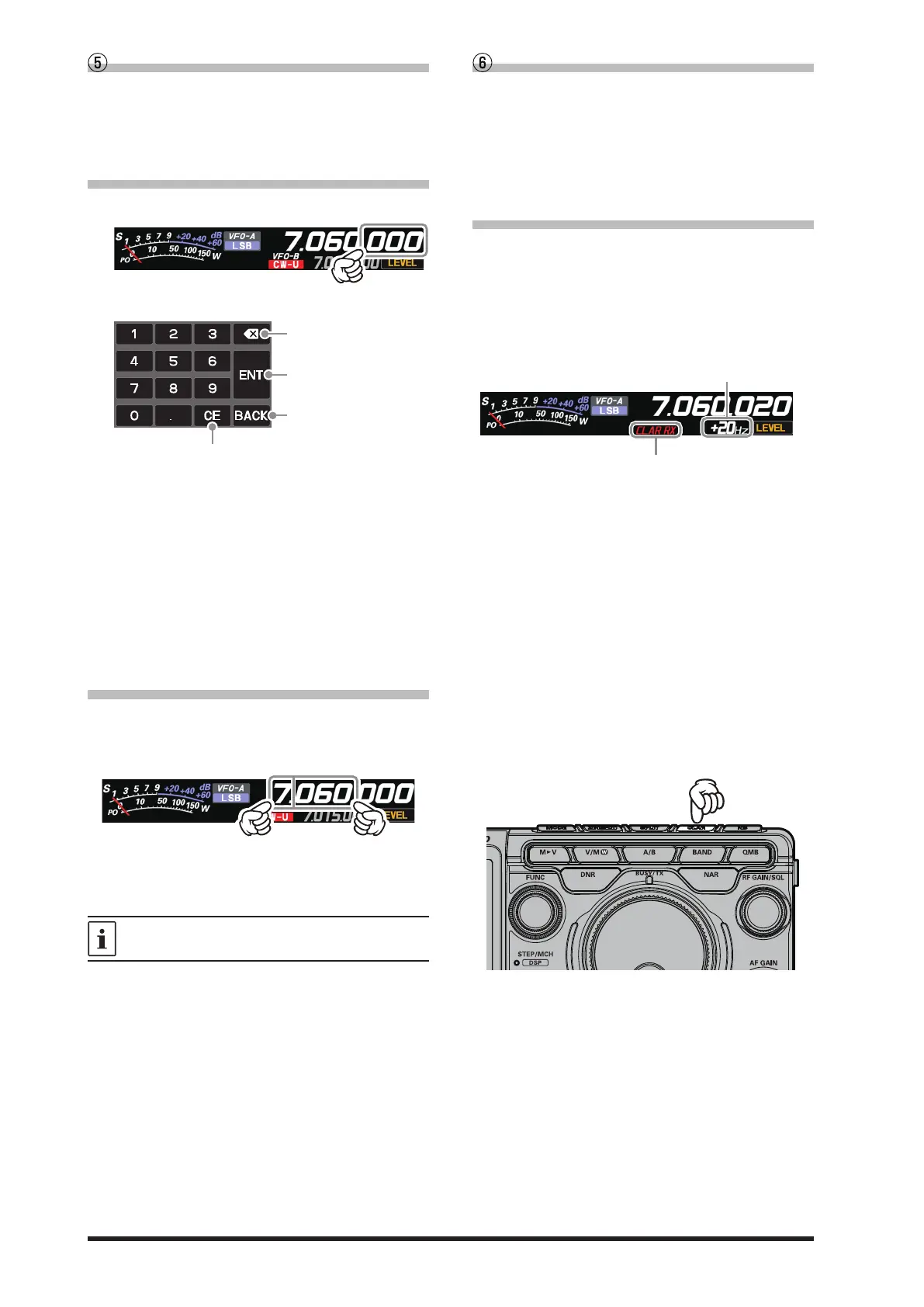
Frequency Display (VFO-A)
Displays the transmit and receive frequencies of
VFO-A. Press the [A/B] key to switch between
VFO-A and VFO-B, the frequency of VFO-B is
displayed.
• Keyboard Frequency Entry
1. Touch the “Hz” area of the frequency display.
2. Enter the frequency using the numeric keys.
Clear all entered numbers.
The entered frequency is
confirmed.
The display returns to the
previous screen when
back is touched.
Erases the rightmost digit.
● If there is no operation within 10 seconds,
the input will be canceled.
3. Touch [ENT] to conrm.
● A short-cut for frequencies ending in zero -
touch [ENT] after the last non-zero digit.
Example:
To enter 7.00.000MHz
[0] →[7] → [ENT] or [7] → [.] → [ENT]
To enter 7.03.000MHz
[7] → [.] → [0] → [3] → [ENT]
• Tuning in 1 MHz or 1 kHz Steps
To temporarily set the dial knob to 1MHz or 1kHz
steps, touch the “MHz” or “kHz” area of the fre-
quency display.
Touch “MHz” or “kHz” area of the frequency dis-
play to confirm. If there is no operation within 3
seconds, the frequency will be xed.
Touch the Scope Screen, to easily move to the
touched frequency.
Frequency Display (VFO-B)
Displays the transmit and receive frequencies of
VFO-B. Press the [A/B] key to switch between
VFO-B and VFO-A, the frequency of VFO-A is
displayed.
When the clarier function is active, the oset fre-
quency is displayed.
• When the clarier function is active
The clarier is used to adjust the transceiver re-
ceive frequency to match the other station trans-
mit frequency and improve the audio; or to shift
the transmit frequency of this station when the
transmit frequency of the contact station is shift-
ed.
:
:
: •
Changes only the receive frequency while
leaving the transmit frequency as it is.
Changes only the transmit frequency while
leaving the receive frequency as it is.
After changing the receive frequency with
the clarifier, pressing the [CLAR] key twice
will set the transmit frequency to match the
receive frequency.
After changing the transmit frequency with
the clarifier, pressing the [CLAR] key will
set the receive frequency to match the
transmit frequency.
When the receive frequency is offset by +20 Hz.
Press the [CLAR] key, the display will show “CLAR
RX” in red and the clarier will be active.
Rotate the DIAL knob to change the offset fre-
quency of the clarier.
To cancel Clarifier operation, press the [CLAR]
key several times.



 To Next Page