20
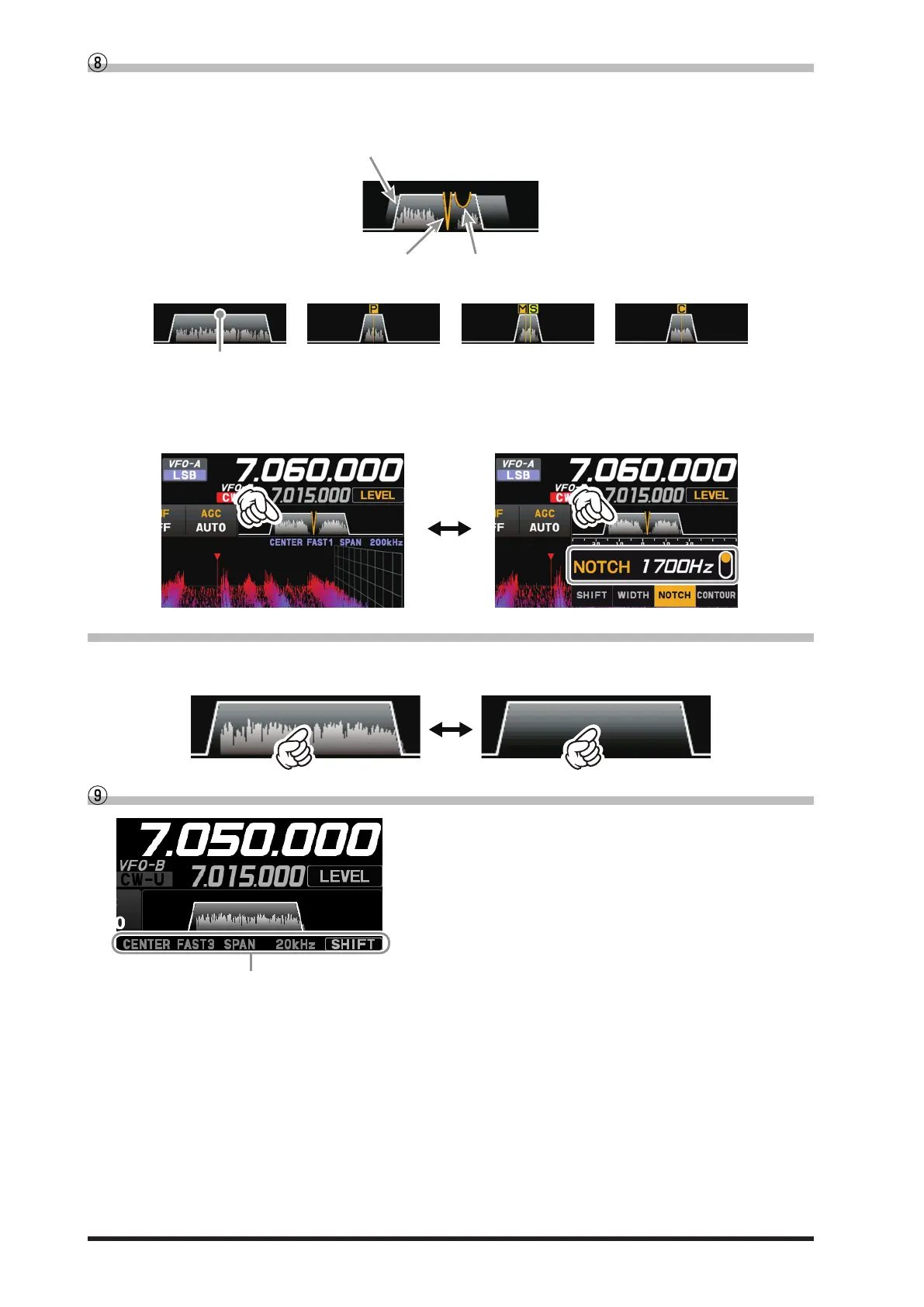
Filter Function Display
Displays the passband status of the Digital lter. The operation of WIDTH, SHIFT, NOTCH, CONTOUR
etc. can be observed.
State of CONTOURState of NOTCH
Passband status of DSP filter
(SHIFT, WIDTH)
SSB Mode CW Mode
DSP filter bandwidth
RTTY Mode PSK/DATA Mode
Touch the lter display to reveal and check the setting value of the last used function from SHIFT, WIDTH, NOTCH,
CONTOUR, and APF. The setting may be changed by turning the [FUNC] knob of the active function.
Example: When the last function used is the NOTCH function
Touch the lter display to display the NOTCH function setting value.
• Turn the spectrum display OFF
To display only the Digital lter bandwidth information, press and hold the spectrum area of the lter func-
tion display to clear the spectrum view. To display it, press and hold again.
Information displayed on the scope screen
CENTER : The receive frequency is always shown at the
center of the screen and spectrum display.
The band spectrum is shown within the range
set by “SPAN”. The CENTER mode is conve-
nient for monitoring the signal activity around
the operating frequency.
CURSOR : Monitors the spectrum within the range set
with “SPAN”. When the frequency (marker)
exceeds the upper limit or the lower limit of
the range, the screen is automatically scrolled
and the status beyond the setting range can
be observed.
FIX : Enter the start frequency of the scope.
SLOW1 : sweep speed Slow
SLOW2 : sweep speed ↑
FAST1 : sweep speed Normal
FAST2 : sweep speed ↓
FAST3 : sweep speed Fast
STOP : Temporarily hold the operation of DSS dis-
play and waterfall display.
SPAN nnnkHz : Scope Screen frequency span (display
range).



 To Next Page