15
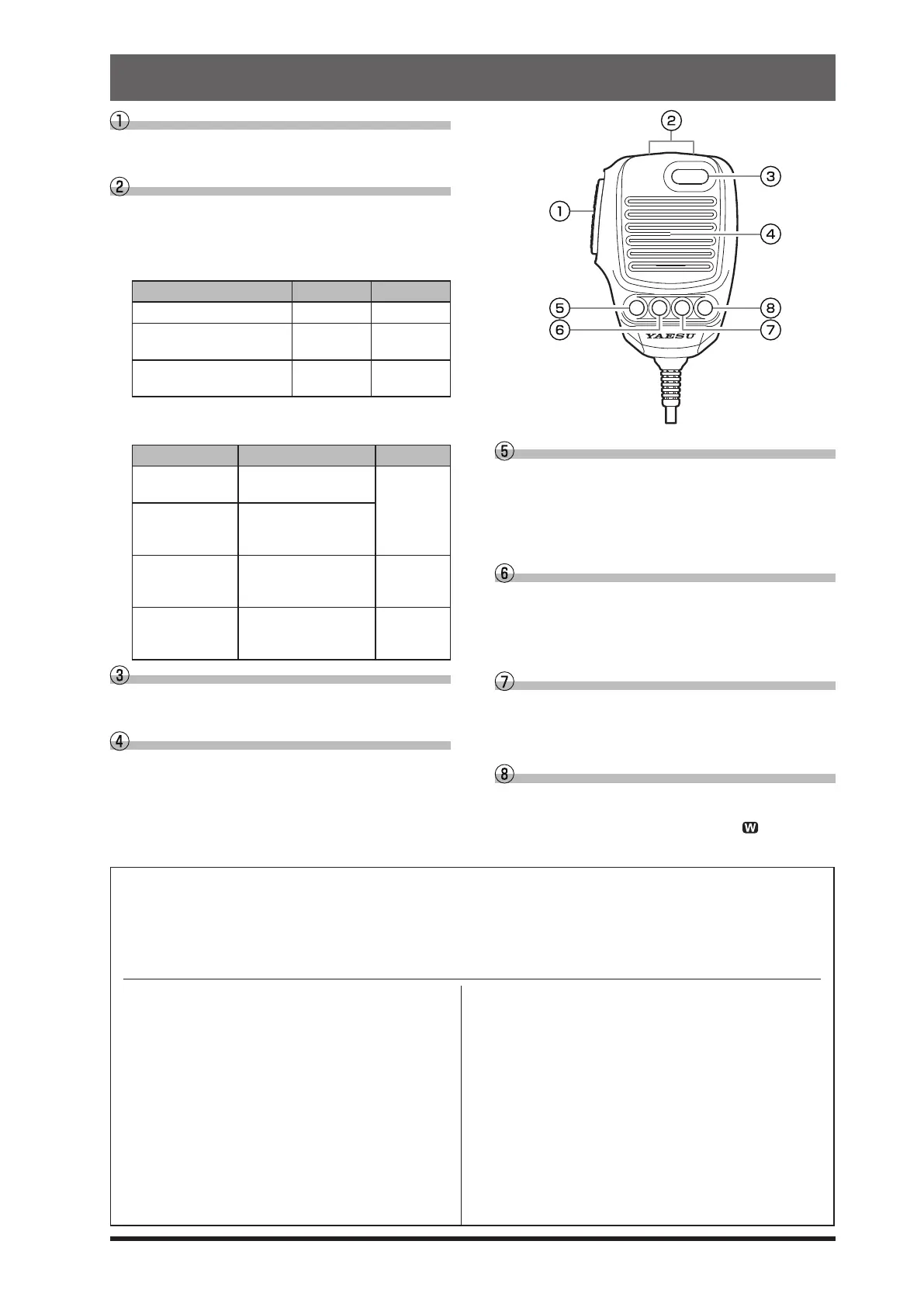
SSM-75E Microphone Switches
PTT Switch
Switches Transmit/Receive.
Press to transmit and release to receive.
DWN / UP Key
The [UP]/[DWN] keys may also be used to manual-
ly scan the frequency upward or downward.
● The amount of frequency change depends on the
operation mode (default setting: see table below).
Operating Mode UP DWN
LSB / USB / CW-L / CW-U +20
Hz
-20Hz
DATA-L / DATA-U
RTTY-L / RTTY-U / PSK
+10Hz
-10Hz
AM / AM-N / FM / FM-N
DATA-FM / D-FM-N
+5kHz -5kHz
● The frequency change can be changed in the
setting menu.
Operating Mode Menu Item Step
LSB / USB
CW-L / CW-U
SSB/CW DIAL STEP
5/10/20 (Hz)
DATA-L / DATA-U
RTTY-L / RTTY-U
PSK
RTTY/PSK DIAL STEP
AM / AM-N AM CH STEP
2.5/5/9/10/
12.5/25
(kHz)
FM / FM-N
DATA-FM
D-FM-N
FM CH STEP
5/6.25/10/
12.5/20/25
(kHz)
MUTE Key
While pressing the MUTE key, the receiver audio
from the speaker will be muted.
Microphone
Speak into the microphone in a normal tone of
voice with the microphone 5cm away from the
mouth.
MUTE
P1 P2 P3 P4
P1 key
This key toggles the ON/OFF lock for the MAIN Dial
knob. When “Lock” is ON, the MAIN Dial knob can
still be turned, but the frequency will not change,
and “LOCK” appears in the display.
It is the same function as the [LOCK] key on the
front panel of the transceiver.
P2 key
The current operation status can be stored in a
dedicated memory channel (QMB: Quick Memory
Bank) with one touch.
It is the same function as the [QMB] key on the
front panel of the transceiver.
P3 key
Pressing this key momentarily, exchanges the
VFO-A and VFO-B frequency data.
It is the same function as the [A/B] key on the front
panel of the transceiver.
P4 key
This key toggles frequency control between VFO
and the memory system.
It is the same function as the [V/M
] key on the
front panel of the transceiver.
The functions of the [P1] / [P2] / [P3] / [P4] / [UP] / [DWN] keys can be assigned by the following operations:
1. Press the [FUNC] knob.
2. Select [OPERATION SETTING] → [GENERAL].
3. Select a key to assign a function [MIC P1]/ [MIC P2]/ [MIC P3] /[MIC P4] / [MIC UP]/ [MIC DOWN].
4. Rotate the [FUNC] knob, or touch “<” or “>” on either side of the value to select a function (see the table below)
.
5. Touch [BACK] several times to return to normal operation.
LOCK
QMB
A/B
V/M
TUNER
VOX/MOX
MODE
ZIN SPOT
SPLIT
: Toggles the ON/OFF lock for the MAIN
Dial knob.
: QMB (Quick Memory Bank) function.
: Swaps the VFO-A and VFO-B frequency
data.
: Toggles frequency control between VFO
and the memory system.
:
Turns the built-in antenna tuner ON/OFF
.
: Press to turn the VOX function ON/OFF.
Press and hold to activate the MOX
function.
: Change the operation mode.
: Press to activate the auto-zero function.
Press and hold to activate the sidetone.
: SPLIT function.
FINE
NAR
NB
DNR
FREQ UP
FREQ DOWN
BAND UP
BAND DOWN
ATT
IPO
DNF
AGC
: Sets the ne tuning ON/OFF.
: Sets the Narrow ON/OFF.
: Activates the NB (Noise blanker) func-
tion.
: Activates the DNR (Digital Noise Reduc-
tion) function.
: Change to a higher frequency.
: Change to a Lower frequency.
: Change to a higher Operation Band.
: Change to a Lower Operation Band.
: Turns the ATT (Attenuator) ON/OFF.
: Activates the IPO.
: Turns the DNF (Digital Notch Filter) ON/
OFF.
: Adjust the AGC receiver-recovery time.



 To Next Page