69
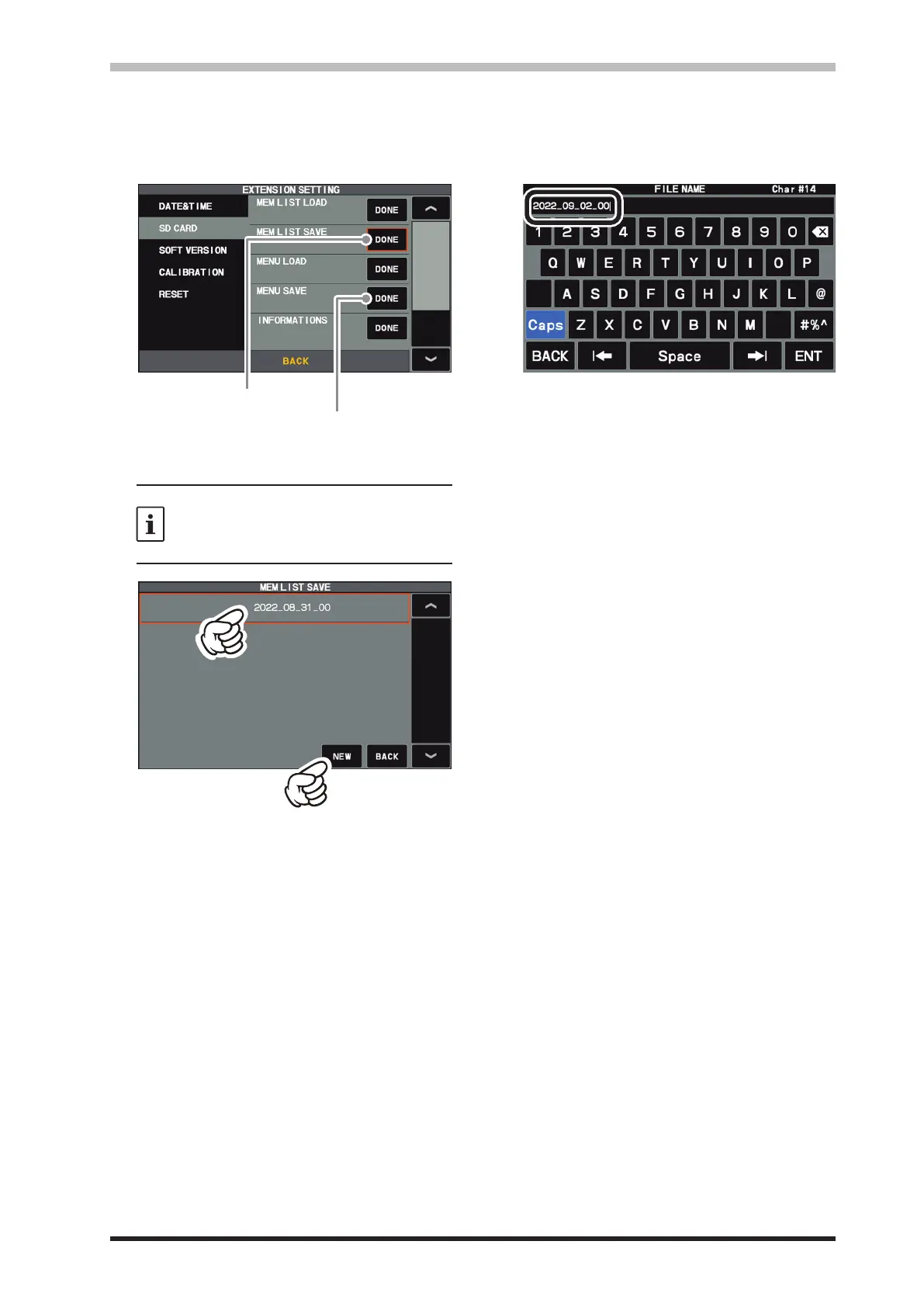
1. Press the [FUNC] knob.
2. Select [EXTENSION SETTING] → [SD
CARD].
3. Touch “DONE” for the data item to be saved.
Saving memory data
4. To save the file with a new name, touch
“NEW”.
To overwrite previously saved data, touch
the file name, and touch “OK” when the
overwrite conrmation screen appears.
Touch “CANCEL” to cancel overwrite save.
When overwriting
When saving with a new file name
5. Enter the le name (maximum 15 characters)
on the le name input screen.
If the le name is not to be changed, proceed
to step 6 as it is.
6. Touch “ENT” to start saving data, or touch
“BACK” to cancel the name input.
7. “FILE SAVED” is displayed when data saving
is completed.
8. Touch the screen to end saving data.
9. Touch [BACK] several times to return to nor-
mal operation.
• Saving Memory data and Setting Menu data
The Memory Channel data, and the Setting Menu data can be saved to the SD Card:



 To Next Page