68 | 3DGence INDUSTRY F340
6.2 Setting edition window
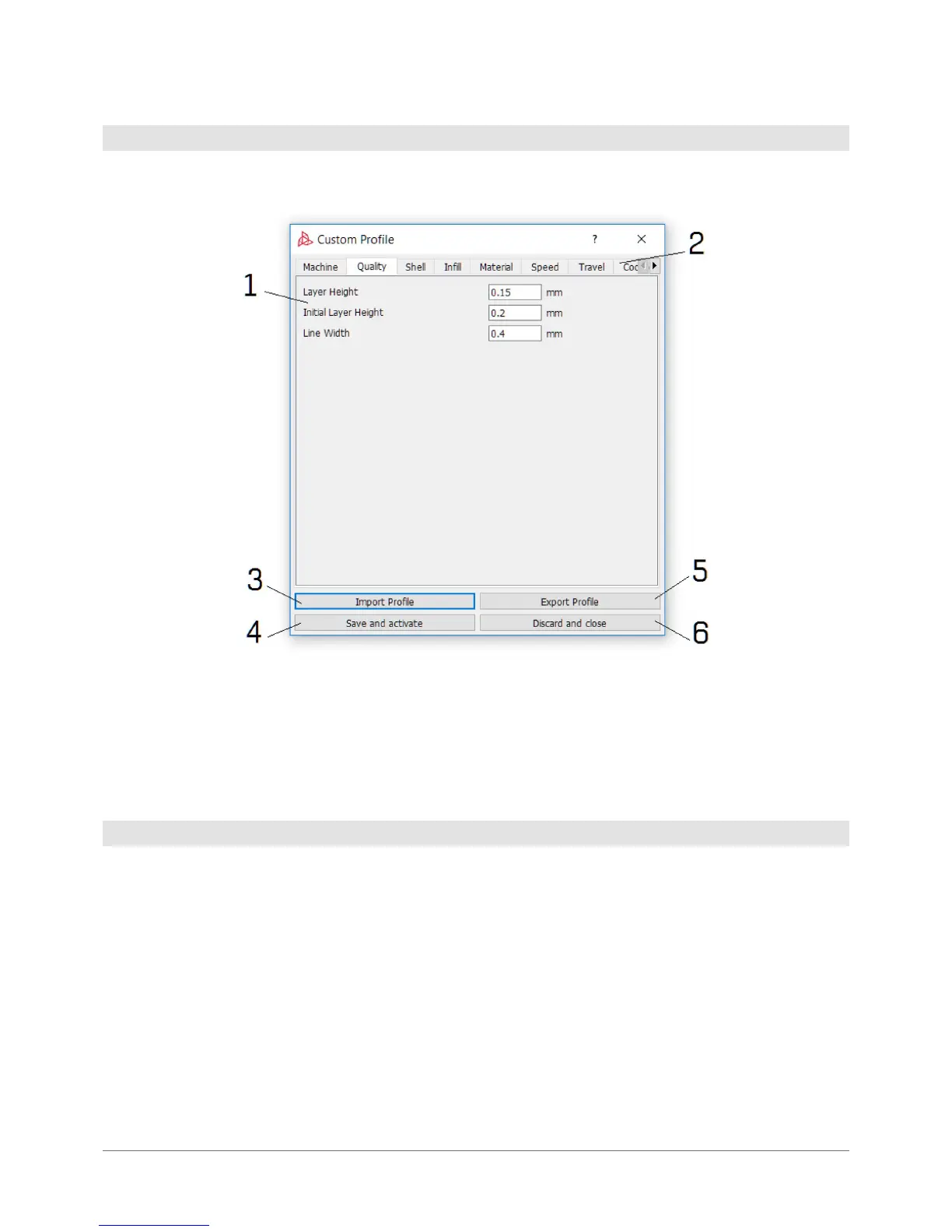
After you have selected the Custom Prole, a window displays where you can modify the settings.
1. Setting edition window.
2. Pages where you can change the settings.
3. Prole import, the window opens up automatically during start-up.
4. Prole saving and activation, window closure.
5. Prole export.
6. Change cancellation, no prole activation, window closure.
The Print Proles obtained by modifying advanced settings may be shared freely. Please note that the proles created by
means of different software versions may not be compatible. In such circumstances, please verify the print settings as
this may entail the risk of machine damage or print quality deterioration.
The proles may be shared also with the producer via the service request form. If the user has created a prole for any
non-certied material, the activities aimed at certifying such a material will be initiated to incorporate it with ofcial
proles. If the user has improved the quality of printing on the material, the producer will also initiate activities to update
the ofcial proles to include such changes.
6.3 Prole sharing



 To Next Page