2.2. XY values calibration, dual printhead module offset
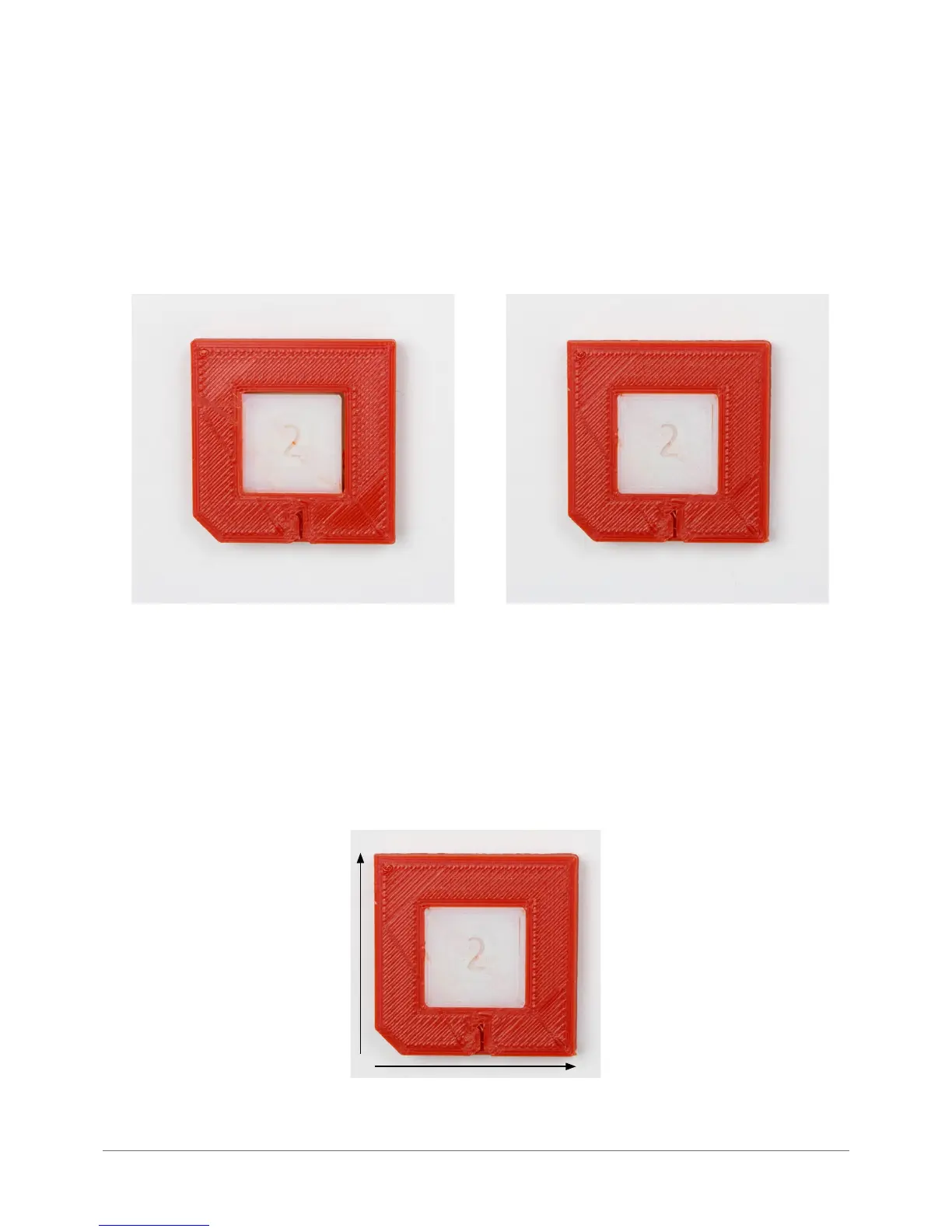
In order to check the proper value of XY offsets the printer’s user should print the calibration model of XY offsets – DUAL-OF-
FSET-TEST.gcode.
After nishing the printing process, the user should visually inspect the printout. In case of presence of a rift between the
material 1 and 2 within the X/Y axes, the offsets have to be calibrated. Even minimal rift requires adjustments due to the fact
that the Industry F340 printer has a possibility to calibrate the offsets to 0.01 mm.
XY offsets calibration:
a) after nishing the printing process, the user should measure the rifts in both axes. Alternatively, one could use a sheet of
paper (~0.1 mm), business card (~0.4 mm), credit card (~0.8 mm),
b) the next step is to introduce variables to the printer by adding a measured value (in mm) to the currently introduced one.
MENU -> CALIBRATION -> PRINTING MODULE -> X OFFSET/Y OFFSET
The user should move the material 1 (red on the photo) towards the material 2 (white on the photo) in accordance with the
turnaround of XY axes with the value measured with use of feeler gauge.
Fig. 39. Calibration models – XY Offsets.
BAD GOOD
Fig. 40. XY axes on a calibration model.
Y
X



 To Next Page