EasyManua.ls Logo

3M Attest 390 - User Manual

3M Attest 390
284 pages
Print Icon
To Next Page IconTo Next Page
Loading...
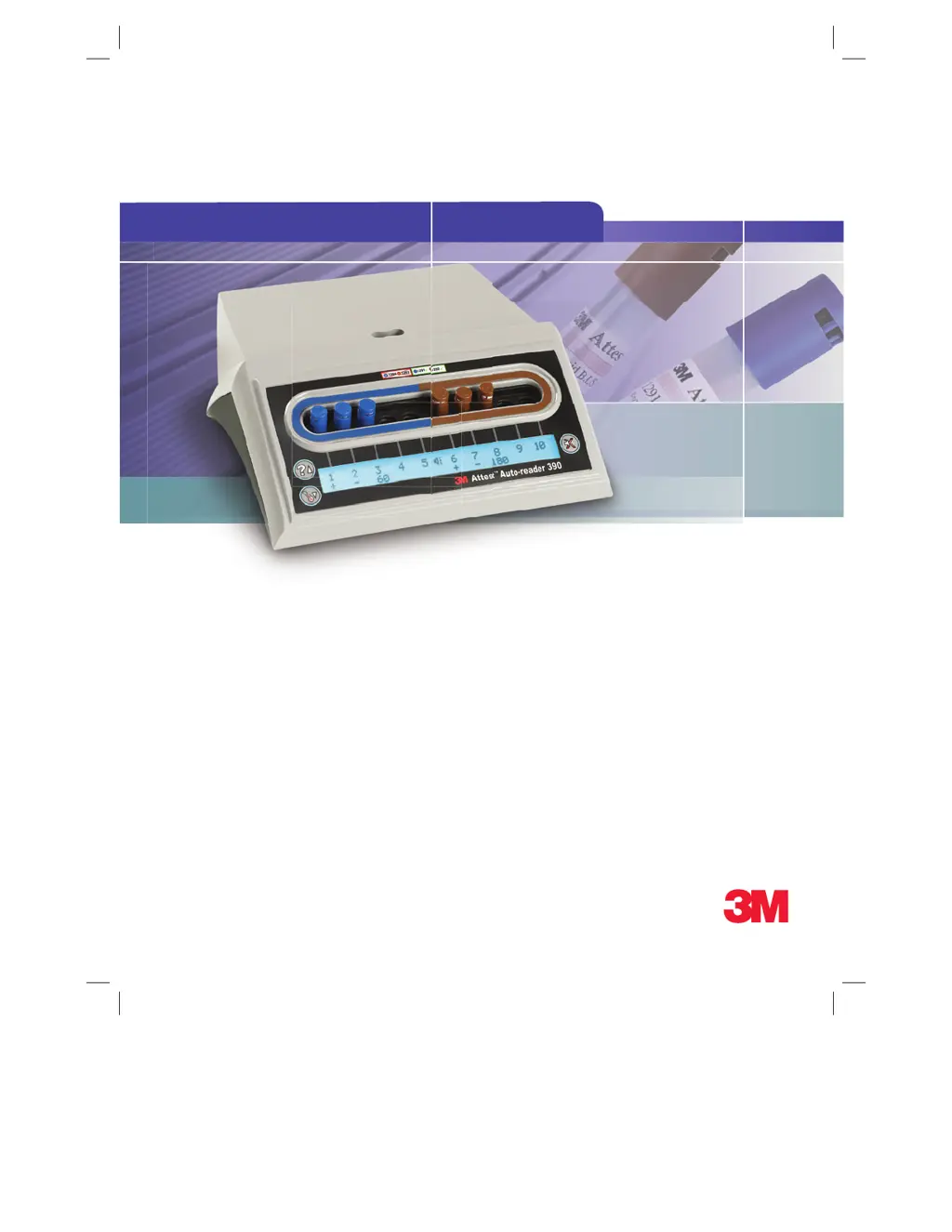
3M
Attest
Auto-reader 390
1
Operator’s Manual
2
Manuel de l’utilisateur
3
Benutzerhandbuch
4
Manuale dell’operatore
5
Manual del usuario
5
Manual del operador
6
Bedieningshandleiding
7
Användarhandbok
8
Brugsvejledning
9
Brukerhåndbok
0
Käyttöopas
-
Manual do Utilizador
-
Manual do Operador
=
Εγχειρίδιο Χειριστή
H
Instrukcja obsługi
F
Příručka pro obsluhu
S
Priročnik za uporabo
M
Инструкция по эксплуатации
A
Upute za korištenje
:
Operatör Kılavuzu
I
操作指南
คู่มอปฏิบัติงาน
T
작업자 매뉴얼
Rendered on 5/8/2013 10:56:35 AM
Page 1
34871202858.pdf

Table of Contents

Other manuals for 3M Attest 390

Questions and Answers

  • S
    Samantha ChenAug 18, 2025
    What to do if a Temperature Control Error occurs on 3M Industrial Equipment?
    • R
      Robert MontoyaAug 18, 2025
      If a Temperature Control Error occurs with your 3M Industrial Equipment, unplug the unit, then plug it back in to clear the error. If the error persists, it may require repair or replacement.
  • M
    Mary WilkinsAug 20, 2025
    What to do if a Memory Error occurs on 3M Industrial Equipment?
    • C
      campbellangelaAug 20, 2025
      If you encounter a memory error on your 3M Industrial Equipment, try unplugging the unit and plugging it back in to clear the error. If the error continues, it may need repair or replacement.
  • J
    Jonathan RamirezAug 23, 2025
    What to do if an LED Error occurs on 3M Industrial Equipment?
    • M
      Michelle ClarkAug 23, 2025
      If you get an LED Error on your 3M Industrial Equipment, unplug the unit and plug it back in to clear the error. If the error doesn’t clear, call for repair or replacement. Also, do not use the affected incubation well.
  • D
    Don MathisAug 25, 2025
    What to do if a Power Failure Error occurs on 3M Industrial Equipment?
    • T
      Theresa JarvisAug 26, 2025
      If you get a Power Failure Error on your 3M Industrial Equipment, ensure the power supply connection to the auto-reader is secure.
  • B
    brianclarkAug 28, 2025
    What to do if a Communications Error occurs on 3M Industrial Equipment?
    • T
      Timothy RichAug 28, 2025
      If a Communications Error occurs with your 3M Industrial Equipment, call for repair or replacement.
  • T
    Tonya JacksonAug 30, 2025
    What to do if a 'BI Inserted Incorrectly Error' occurs on 3M Industrial Equipment?
    • T
      Tiffany WatsonAug 30, 2025
      If you receive a 'BI Inserted Incorrectly Error' on your 3M Industrial Equipment, ensure the BI is designed to be incubated and read in the device. Also, make sure the BI is fully inserted into the incubation well.
  • B
    Brittany StoneSep 2, 2025
    What to do if the LCD panel on my 3M Industrial Equipment does not display properly?
    • P
      Paul GallegosSep 2, 2025
      If the LCD panel on your 3M Industrial Equipment isn't displaying correctly, first, unplug the unit and then plug it back in. If the problem continues, it may need repair or replacement.
  • G
    gary52Sep 4, 2025
    What to do if an Ambient Light Error occurs on 3M Industrial Equipment?
    • M
      Maurice ThomasSep 4, 2025
      If an Ambient Light Error occurs on your 3M Industrial Equipment (occupied well), rely on the optional visual pH color change result for the BI in the affected well. To prevent this in the future, move the equipment to a location with reduced ambient light.
  • J
    Janet MeyersSep 6, 2025
    What to do if the 3M™ Attest™ Rapid Readout BI has been removed before incubation is complete in 3M Industrial Equipment?
    • S
      smithjohnSep 6, 2025
      If the 3M™ Attest™ Rapid Readout BI has been removed before incubation is complete, replace it in the proper well within 10 seconds to prevent loss of collected data.
  • S
    Stephen FletcherSep 9, 2025
    How to disable unwanted alarm sounds on 3M Industrial Equipment?
    • L
      Leonard AdamsSep 9, 2025
      If you are experiencing unwanted alarm sounds when a positive BI is detected on your 3M Industrial Equipment, you can disable the alarm. Refer to the 3M™ Attest™ Auto-reader 390 Configuration section for instructions.

3M Attest 390 Specifications

General IconGeneral
Brand3M
ModelAttest 390
CategoryLaboratory Equipment
LanguageEnglish

Related product manuals