66 PCS100 UPS-I User Manual
—
8 OPERATING PCS100 UPS-I
8.1 Starting and Stopping PCS100 UPS-I
The primary method of starting and stopping the PCS100 UPS-I is via the Graphical Display Module (GDM) which
is mounted in the door of the master inverter enclosure. This is deemed Local Control. Start/Stop control of the
PCS100 UPS-I via the digital I/O terminals (Section 13.2) is deemed Remote Control.
8.1.1 GDM Control
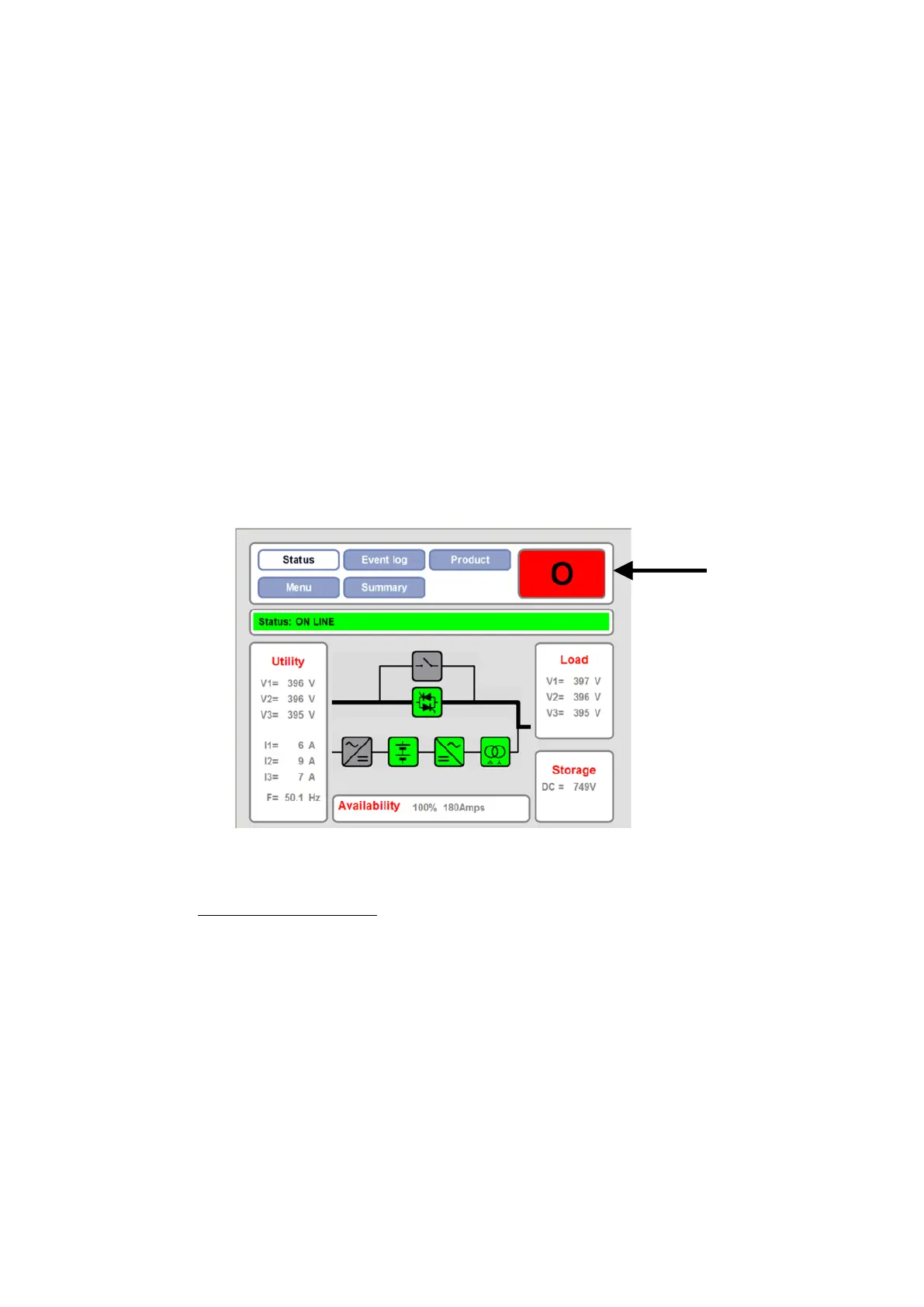
The Start (I) / Stop (O) /Reset button in the Navigation & Control Panel allows GDM control of the PCS100 UPS-I.
When the PCS100 UPS-I is stopped (Bypass) a green Start (I) button will show, and when running (RUN) a red Stop
(O) button will show. Pressing the Start (I)/ Stop (O)/ Reset button followed by YES in the following confirmation
screen will cause that action to be taken. Figure 8-1: GDM Status Page shows the status page when the PCS100
UPS-I is running.
Figure 8-1: GDM Status Page
Note: If parameter A31 GDM Control Enable is set to False the Start/Stop/Reset button will not be displayed.


 To Next Page