26 Using the Printer
Afinia
PrintTestPage
TheBarcodestestpageisformattedfor4"x4"labels(inter‐labelgap,
black‐mark,orcontinuous).Largerlabelsmaybeused.
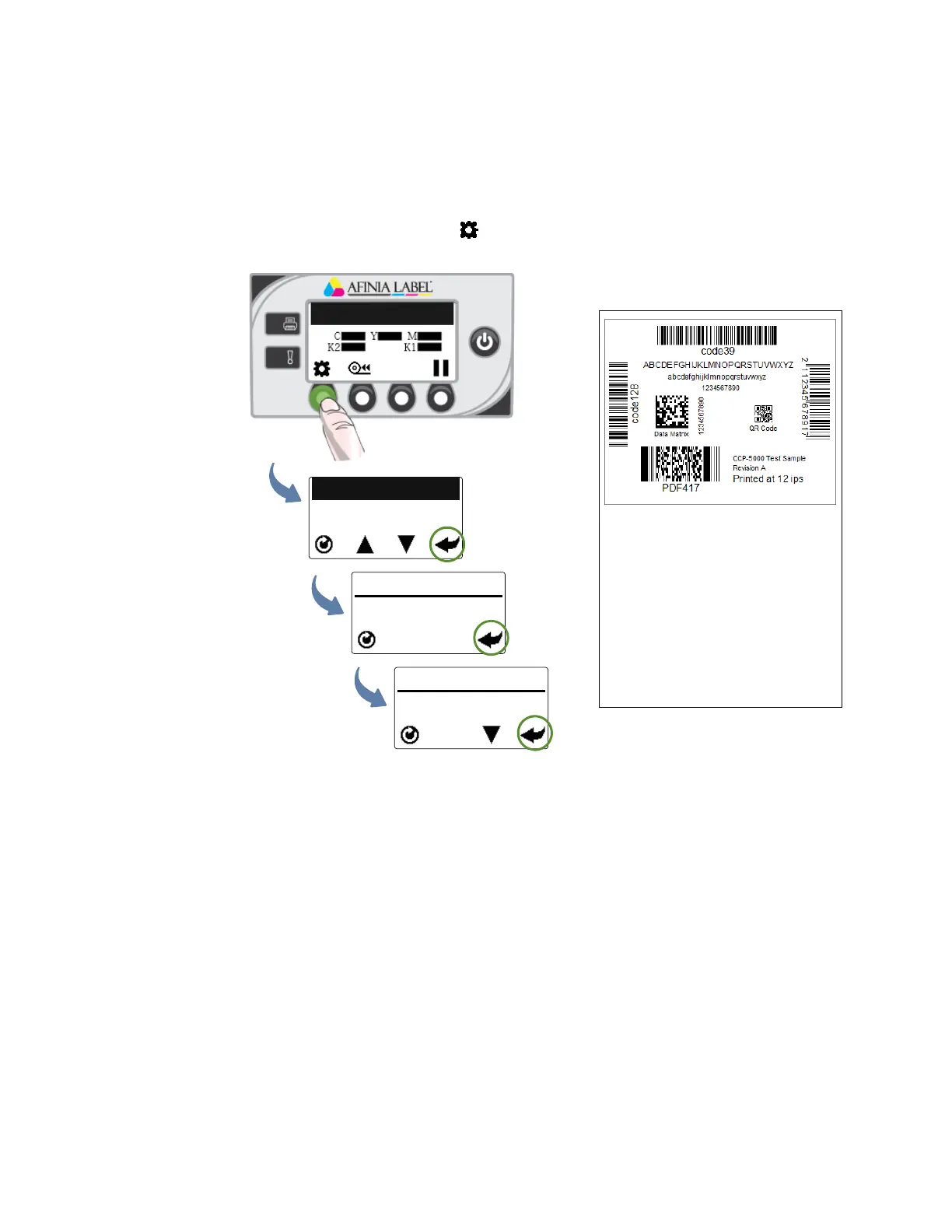
Onthecontrolpanel,select (
Config
)>
MAINTENANCE
>
PRINTTESTPAGE
>
Barcodes
.
Printer Online
CONFIGURATION
2. MAINTENANCE
MAINTENANCE
1. PRINT TEST PAGE
PRINT TEST PAGE
1. Barcodes
(Config)
(Select)
(Select)
(Select)
Sample Barcodes Test Page
Asuccessfultestprintincludes:
•Barcodesarereadable
•Lettersandnumbersarereadable
•Noinksmearing,colormixing,orstreaks
•Labelisprintedinblackwithnoothercolorvisible



 To Next Page