57
8. Service
8.7 RO Inline™
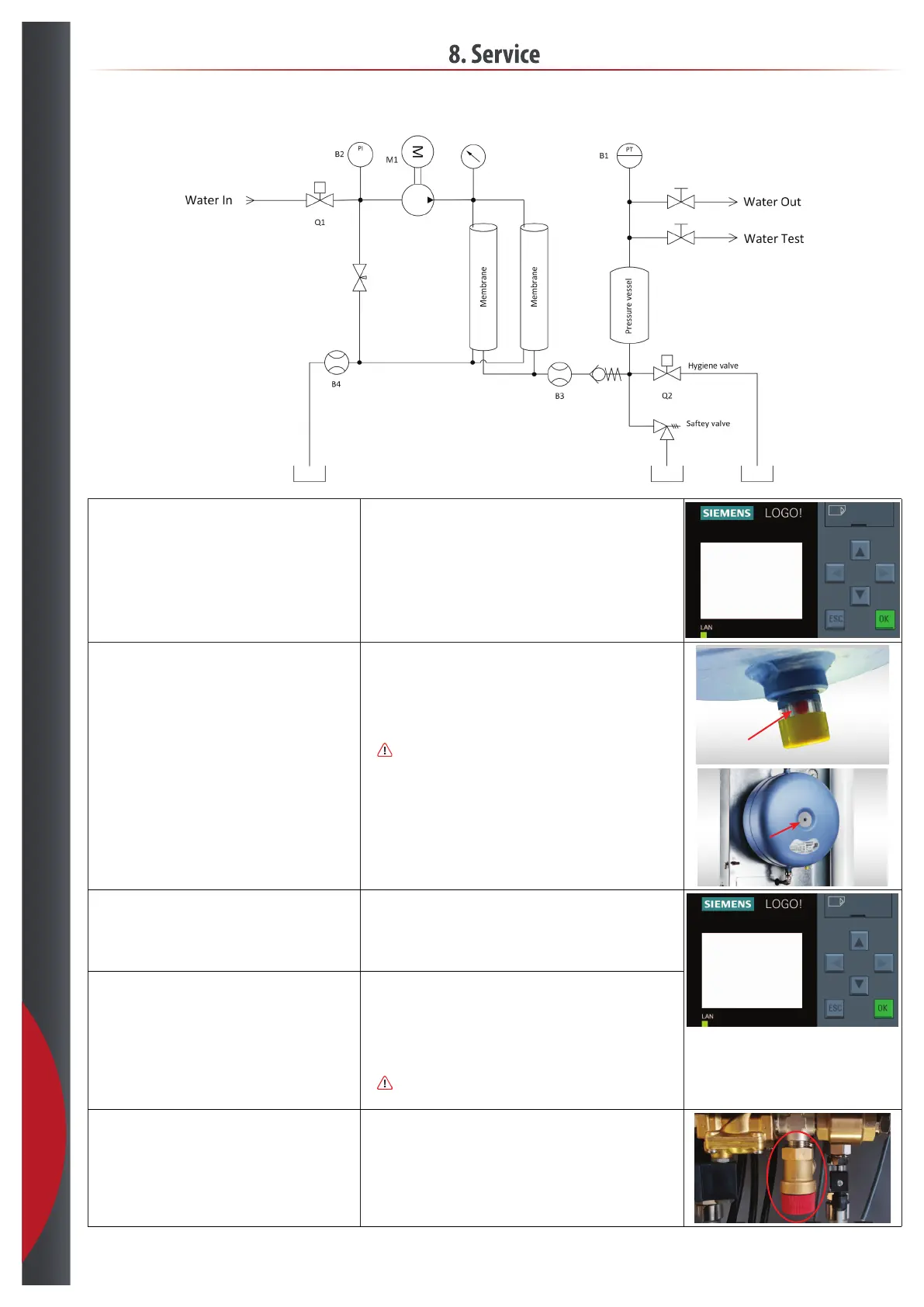
Check conductivity in pressure vessel.
• Start hygiene flush, go to Cursor screen, press [ESC] + ~.
• Wait until the pump stops again.
• Open the test valve.
• Let the water run for 30 sec.
• Take a sample.
ESC+C.. 9/9
~
| }
Check pre pressure in the vessel and check the membrane indicator. • Check that the membrane indicator is green.
- if the indicator is red, replace the pressure vessel.
• Stop the the humidification system.
• Close the outlet ball valve on the RO Inline™.
• Disconnect the hose from water outlet.
• Turn off fuse F1 and F2.
•
Slowly open the outlet ball valve, and empty the pressure vessel for
water, use a service hose.
• Measure the pre pressure in the pressure vessel 1,5 bar.
- adjust the if needed.
Check production. • Turn on fuse F2, wait 30 sec. and turn on fuse F1.
• Wait 60 sec. then messure production flow capacity.
• Check if the value in the display is within the same range - adjust if needed:
- Go to the flow calibration menu, password 3112.
- Follow the instructions in section 9, Screen: ”Flow Calibration”.
Vessel Pressure
B a r 4.92
Prod. l/h 300
Drain l/h 96
Drain % 32
Check drain. • Messure drain flow.
• Check if the value in the display is within the same range - adjust if needed.
- Go to the flow calibration menu, password 3112.
- Follow the instructions in section 9, Screen: ”Flow Calibration”.
• Close the outlet ball valve again.
• Reconnect the humidification system again.
•
Slowly open the outlet ball valve.
• Reset both systems if they are in alarm.
Check the safety valve. • Manually activate the safety valve, until production starts.
• Check if the valve is leaking after test.
- Replace if needed. Recommended 1 per year.
Green = OK
Red = replace pressure vessel
201218



 To Next Page