72
■ RUN
08:22FRI
►Mode Switch
Variables
I/O Status ▼
[Mode Switch] RUN
PROG Mode
►RUN Mode
Are you sure you want to
change the mode?
[ESC] [OK]
■ RUN
08:22FRI
►Advanced Settings ▲
Security
[Advanced Settings]
►System Info
Fault Code
LCD Setup ▼
[Advanced Settings]
►Clock Setup ▲
Language
Analog Calibration ▼
[Clock Setup]
►Clock
YEAR : 2016
MM.DD: 12.09
HH:MM: 10:27
[Advanced Settings]
►PwrUp Behavior ▲
Memory Card
ENET Cfg
[ENET Cfg]
►ENET Status
IP Address Settings
[IP Address Settings]
►Set ENET Mode
Set IP Address
Set Subnet Mask ▼
[Set ENET Mode]
Static √
DHCP
Enter IP Address
192.168.011.185
[ESC] [OK]
Enter Subnet Mask:
255.255.255.000
[ESC] [OK]
[IP Address Settings]
►Set Gateway Address ▲
Save IP Settings
Enter Default Gateway:
192.168.011.001
[ESC] [OK]
Save below IP Settings?
Mode: Static
IP: 192.168.011.185
Subnet: 255.255.255.000
Gateway:192.168.011.001
[ESC] [OK]
[Security]
►Activate PWD
Deactivate PWD
Change PWD
Password Protection is
activated!
[OK]
Enter Password:
31120000
[ESC] [OK]
Password Protection is
deactivated!
[OK]
9. Display Menu
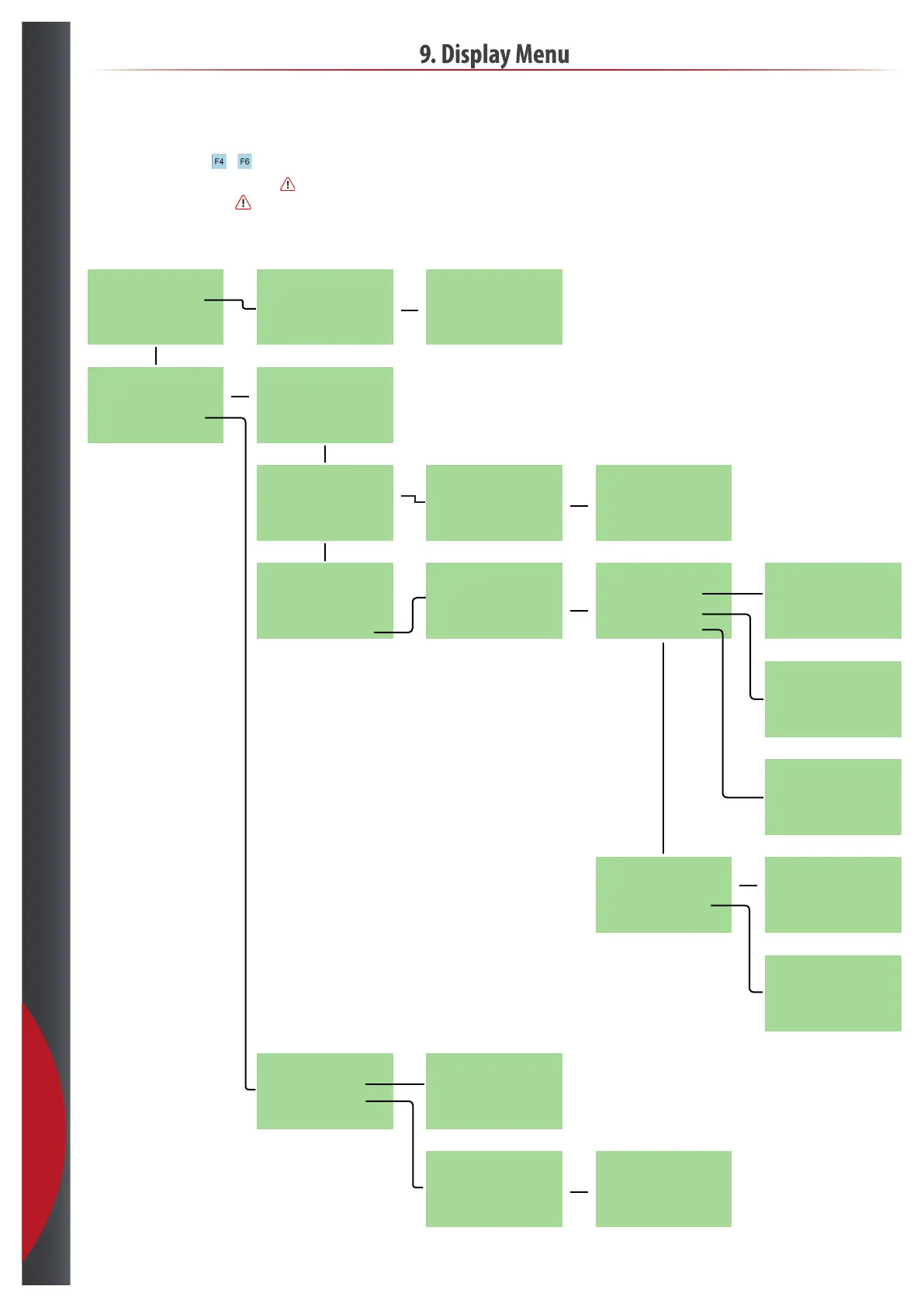
9.3 HydroSens™ - ethernet and time setup
To edit ethernet setup and time +
To edit settings, deactivate PWD under Security -
remember to activate again.
Edit ethernet settings in PROG mode-
remember to switch back to RUN mode.
201218



 To Next Page