
 Need help?
Do you have a question about the Allied Telesis CentreCOM GS970M Series and is the answer not in the manual?
Explains document symbols for notes, cautions, and warnings.
Provides contact information and support resources for Allied Telesis.
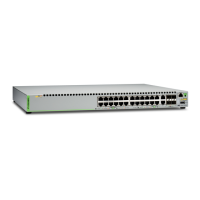
Describes hardware features including twisted pair ports, SFP slots, and PoE.
Lists package contents for GS970M/10 and GS970M/10PS switches.
Explains PoE standards (802.3af, 802.3at) and powered device classes.
Details the functional descriptions of Power, Fault, Link/Activity/Speed, and SFP LEDs.
Reviews safety precautions before installing the chassis or its components.
Provides requirements for choosing a suitable site for switch installation (desktop, rack, wall).
Steps for rack mounting GS970M series switches in a 19-inch equipment rack.
Steps for wall mounting GS970M series switches.
Guidelines for connecting cables and powering on the switch.
Addresses common issues like POWER LED status, port LEDs, and link problems.
Troubleshooting problems with PoE ports not providing power to devices.
Details the physical dimensions and weight for all GS970M series models.
Provides pin layouts and signal descriptions for RJ45 connectors.
 General
| Height | 1U |
|---|---|
| Model | CentreCOM GS970M Series |
| Type | Managed |
| Management | Web, CLI, SNMP |
| Jumbo Frames | 9KB |
| Power Supply | Internal AC power supply |
| Operating Temperature | 0°C to 50°C |
| Standards Compliance | IEEE 802.3, IEEE 802.3u, IEEE 802.3ab, IEEE 802.3z, IEEE 802.3x, IEEE 802.1D, IEEE 802.1w, IEEE 802.1Q, IEEE 802.1p |
| Power over Ethernet (PoE) | Optional (PoE+ models available) |










 To Next Page
