Altai Technologies Ltd. All rights reserved
C1n Series WIFI AP/CPE Web-admin Configuration Manual
TPS15-003_rev1.3
Syslog severity: Specify which severity level of log that C1n sends to remote syslog
server. The severity options are listed in Table 6-1.
6.3. SNMP Setting
Simple Network Management Protocol (SNMP) is a Network management protocol
used almost exclusively in TCP/IP networks. SNMP provides a means to monitor and
control network devices, and to manage configurations, statistics collection,
performance, and security. C1n supports SNMP protocol that user may use ALTAI
Wireless Management System (AWMS) or a third party NMS to manage C1n Series
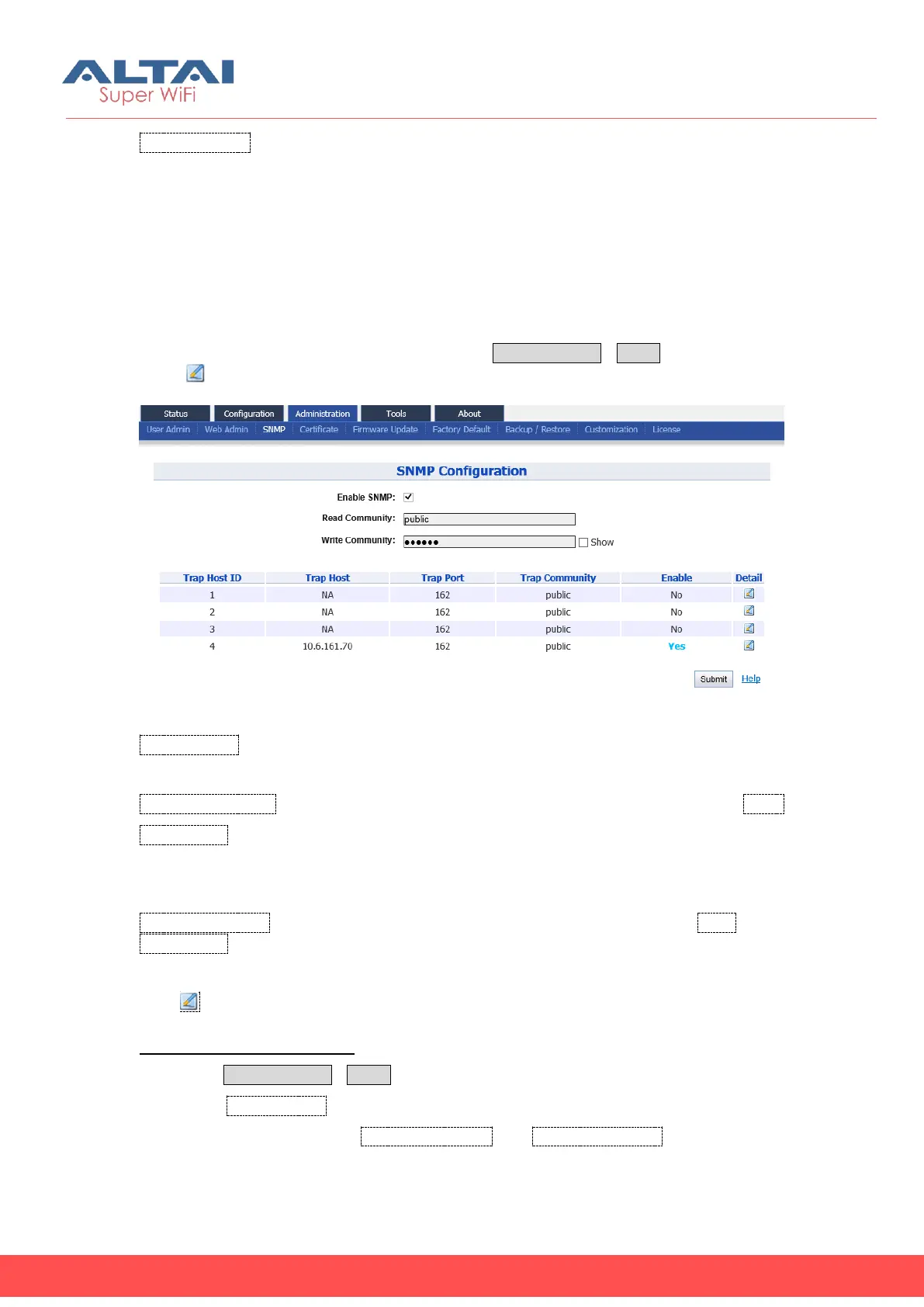
AP/CPE. User may specify the SNMP setting via AdministrationSNMP. Also user may
click “ ” to specify the SNMP manager if necessary.
Figure 6-3 SNMP Configuration
Enable SNMP: Enable or Disable SNMP in C1n; if enabled, C1n communicates with
AWMS or others NMS. By default, it is “Enabled”.
Read Community: Specify read community of SNMP protocol; the string of Read
Community between NMS and C1n must be identical. If the community string is
correct, C1n responds with the requested information from NMS; otherwise, C1n
simply discards the request and does not respond. The default setting is “public”
Write Community: Specify write community of SNMP protocol; the string of Write
Community between NMS and C1n must be identical. If the community string is
correct, NMS can modify C1n configuration; C1n simply discards the request and
does not respond. The default setting is “netman”.
Press :To edit Trap Host
Enable SNMP function in C1n:
1. Select AdministrationSNMP
2. Check Enable SNMP to enable SNMP protocol
3. Specify the string in both Read Community and Write Community that are
identical in the NMS’s setting.


 To Next Page