Altai Technologies Ltd. All rights reserved
C1n Series WIFI AP/CPE Web-admin Configuration Manual
TPS15-003_rev1.3
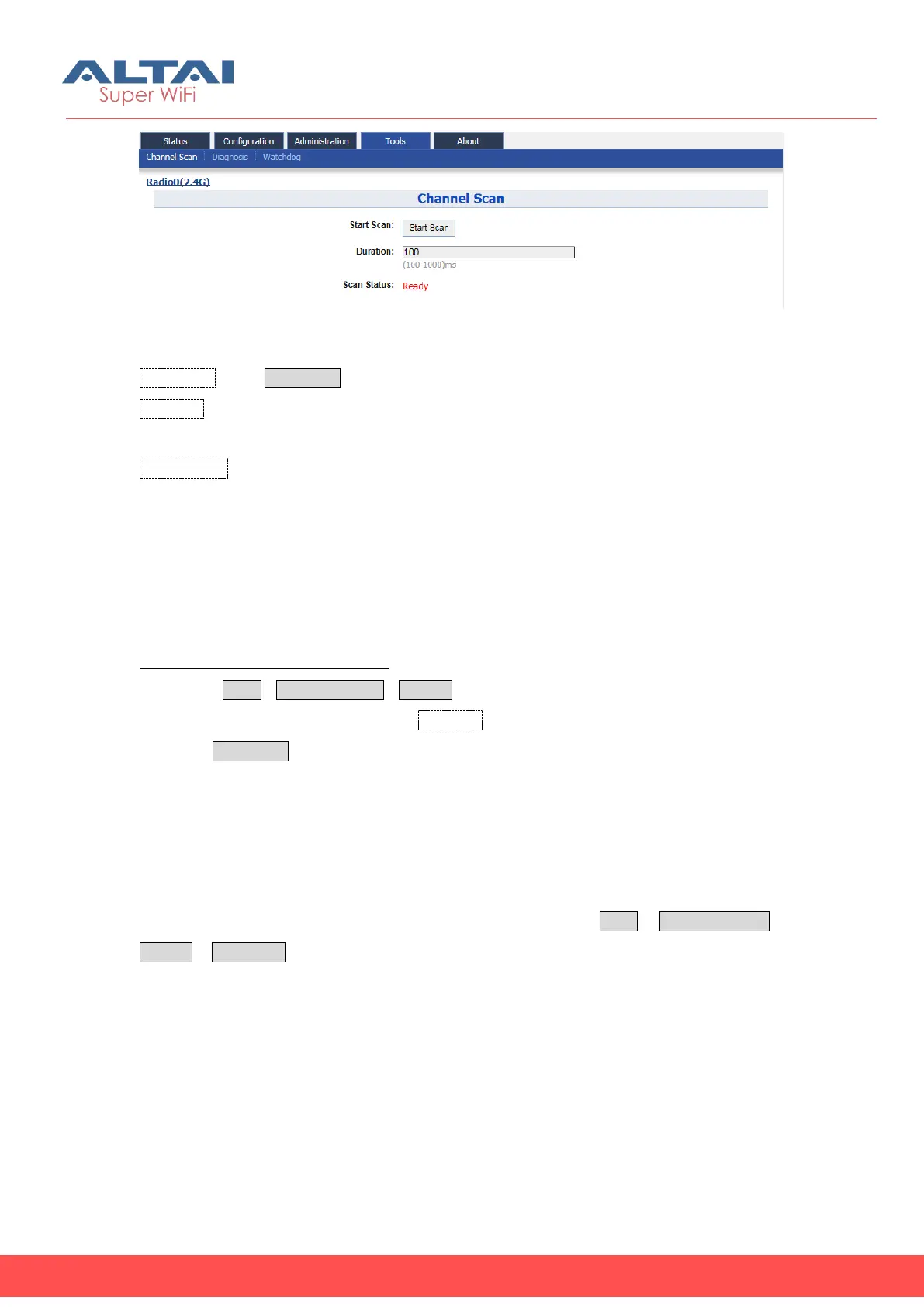
Figure 7-7-1 Channel Scan
Start Scan: Press Start Scan to start Radio0 channel scan.
Duration: Specify the channel scanning interval; the range is from 100ms to 1000ms.
The default setting is 100ms.
Scan Status: Indicate the current status of 2.4GHz radio for channel scanning. It can
be “Ready”, “In Progress”, and “Success”.
“Ready” means that the radio can perform scanning.
“In Progress” means that the radio is scanning.
“Success” means the scanning is finished. User may review the result or scan the
channel again.
Scan the channel status of radio0:
1. Select ToolsChannel ScanRadio0
2. Specify the scanning duration in Duration
3. Press Start Scan
4. Wait until the scan status change to “Success”. The scanning will take
approximately 20 seconds
7.1.1. Overview Info
User may review the information about channel usage via Tools Channel Scan
Radio0 Overview. The information includes “Noise Floor”, “Busy %”, and “no. of AP”.


 To Next Page