Altai Technologies Ltd. All rights reserved
C1n Series WIFI AP/CPE Web-admin Configuration Manual
TPS15-003_rev1.3
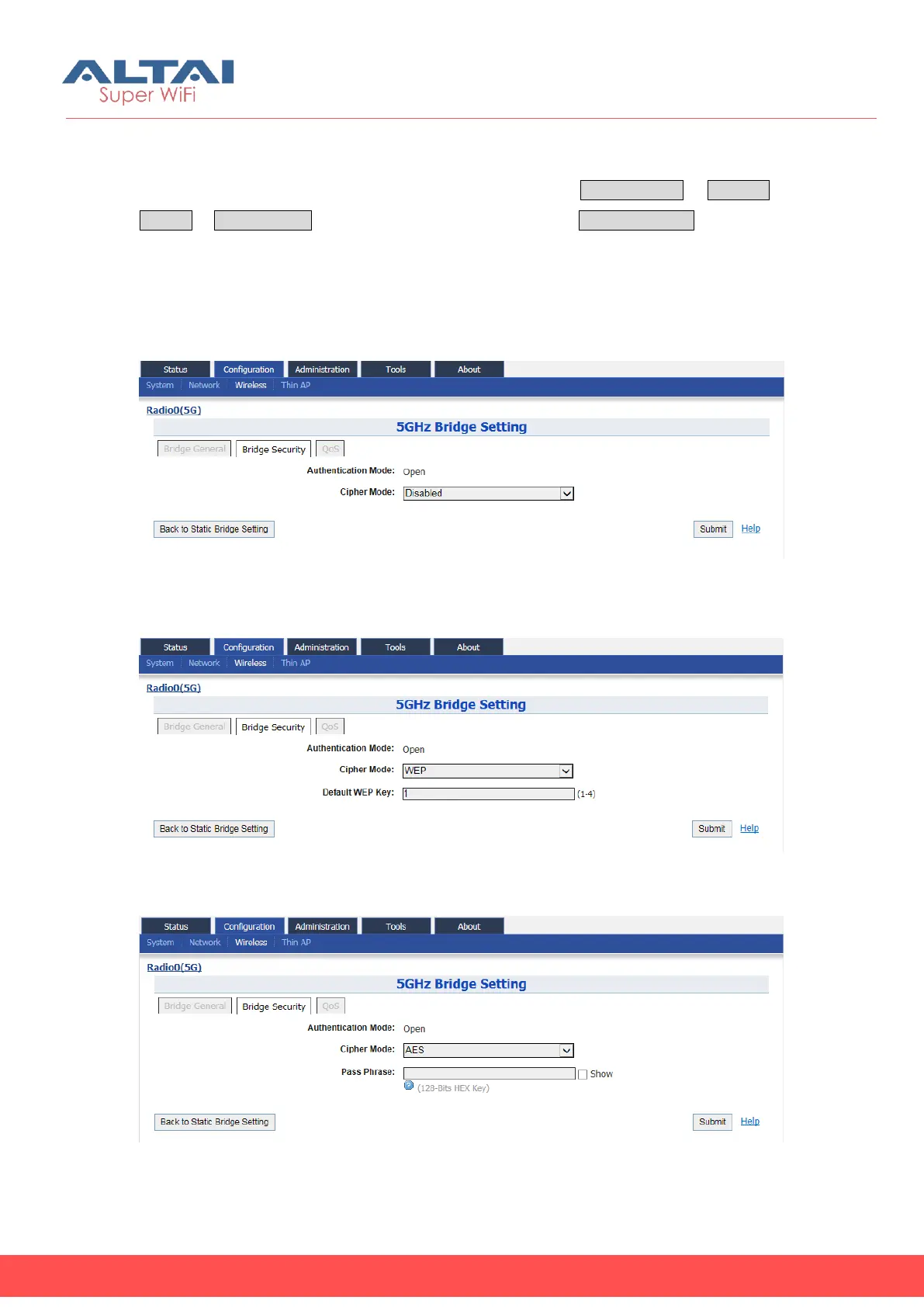
5.4.1.4.2.2. Bridge Security Setting
User may specify the cipher mode in bridge link via Configuration Wireless
Radio0 Static Bridge, to click the “More…”then select Bridge Security. It provides
“Disable”, “WEP”, and “AES” as cipher mode. “WEP” means all data is transmitted
with WEP encryption. The type of WEP encryption and key settings are determined by
the entries in the WEP Key Table. AES provide stronger data protection than WEP. User
is required to provide a 128-bit HEX pass phrase for data encryption.
Figure 5-53 5G bridge security setting-Open & No security
Figure 5-54 5G bridge security setting-Open & WEP
Figure 5-55 5G bridge security setting-Open & AES



 To Next Page