Altai Technologies Ltd. All rights reserved
C1n Series WIFI AP/CPE Web-admin Configuration Manual
TPS15-003_rev1.3
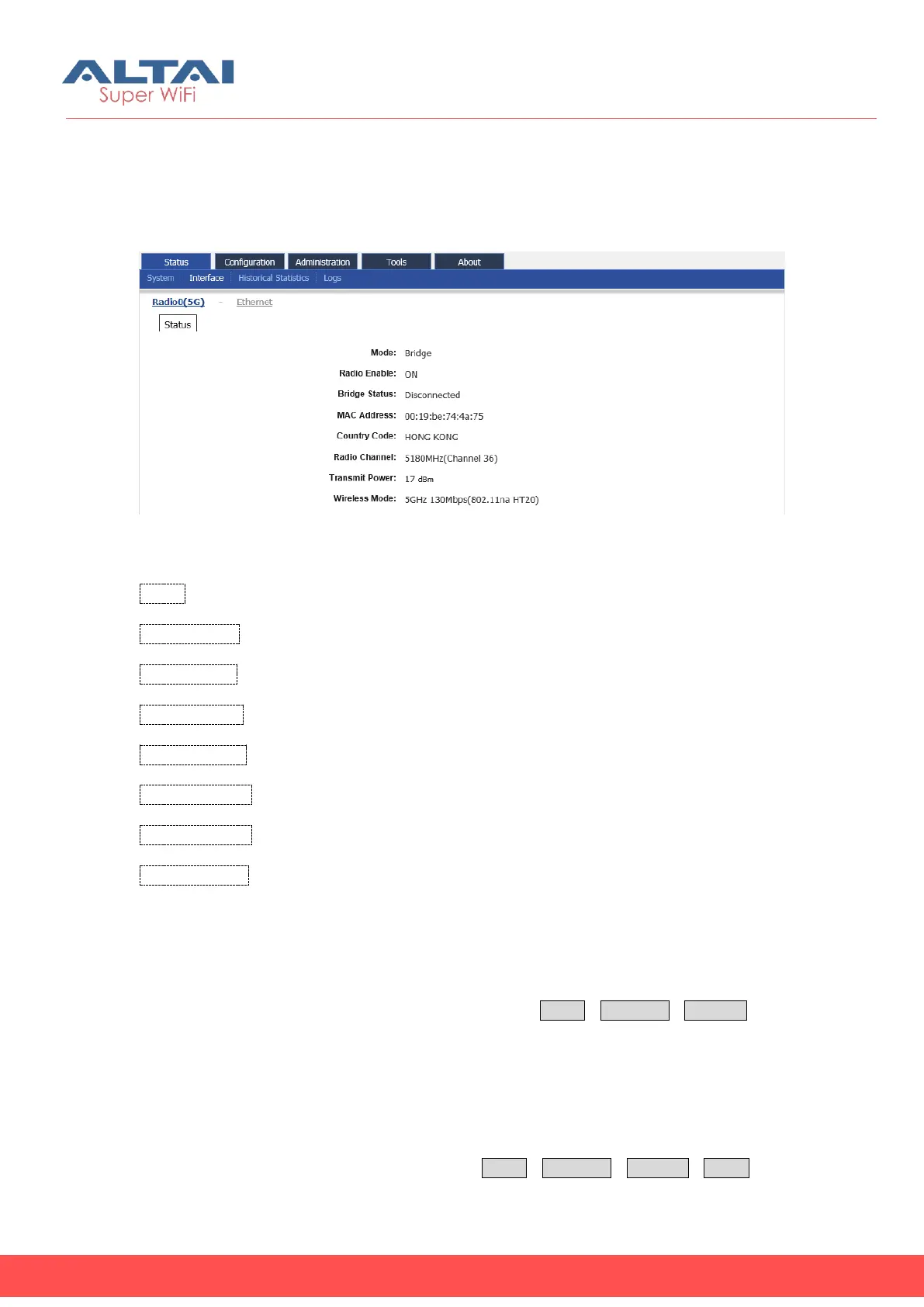
4.2.1.4. Radio0 Interface Status-Bridge Mode (for C1an and C1xan)
When Radio0(5G) work mode is configured to Bridge, C1an/C1xan will be operated
as a wireless Bridge. 5G interface information shows the Status:
Figure 4-23 5G Radio bridge mode status
Mode: Operation mode, here is Bridge
Radio Enable: Radio0 (5G) status (ON/OFF)
Bridge Status: The status of bridging link to remote bridge
MAC Address: Radio0(5G) MAC address.
Country Code: Country Code information of Radio0(5G).
Radio Channel: Radio0(5G)operating channel
Transmit Power: Radio0(5G)current transmit power
Wireless Mode: Radio0(5G) wireless mode
4.2.2. Ethernet Interface
User may obtain Ethernet interface information via StatusInterfaceEthernet. The
information includes Status and Statistic.
4.2.2.1. Status
User may obtain Ethernet interface status via StatusInterfaceEthernetStatus. The



 To Next Page