Altai Technologies Ltd. All rights reserved
C1n Series WIFI AP/CPE Web-admin Configuration Manual
TPS15-003_rev1.3
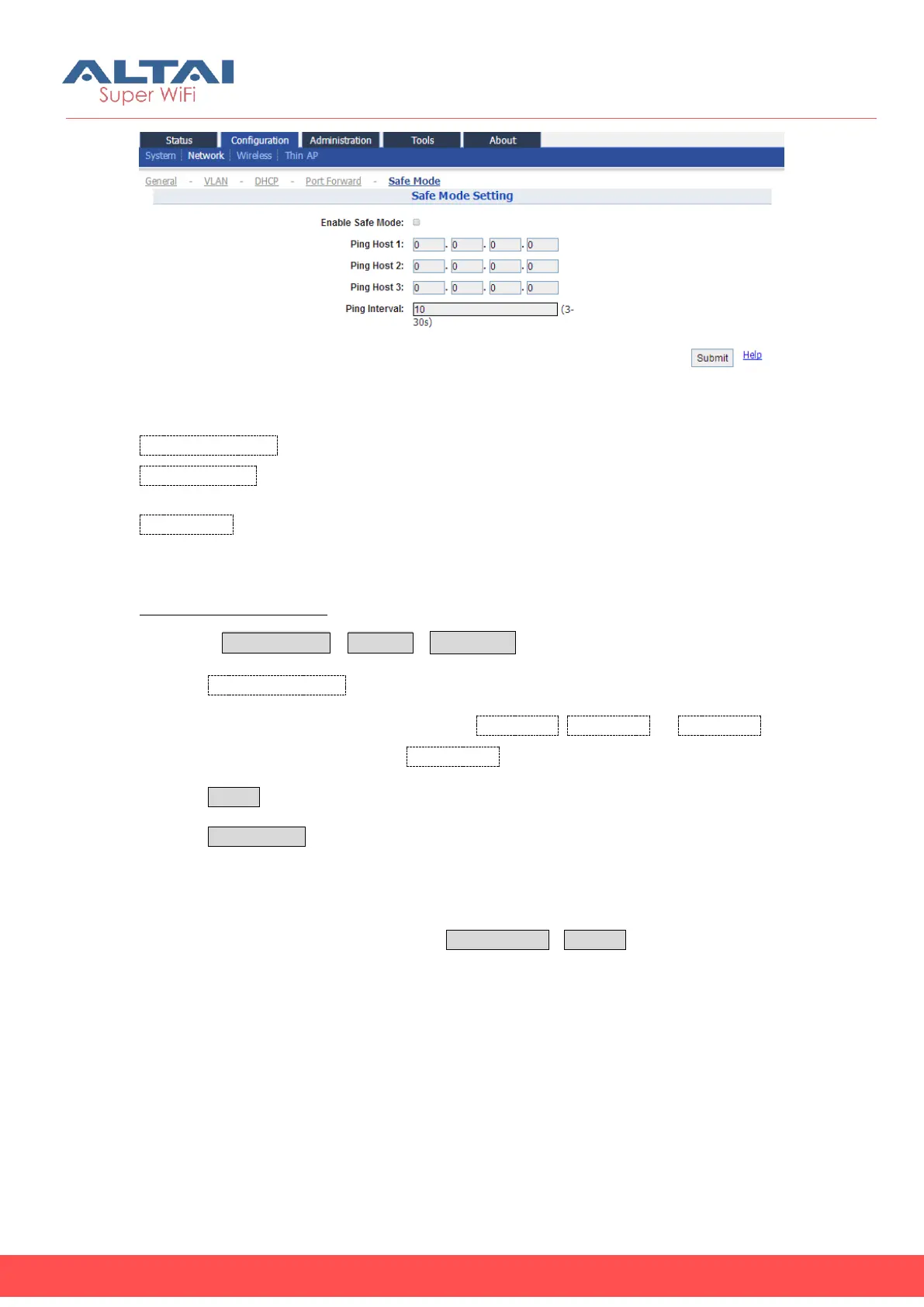
Figure 5-13 Safe Mode Setting
Enable Safe Mode: Enable or disable safe mode. By default, it is disabled.
Ping Host 1, 2, 3: Three ping hosts can be specified. AP will ping these hosts
periodically at the ping interval configured through its current backhaul link.
Ping Interval: Specify the ping interval of safe mode from 3s to 30s. Default setting is
10 seconds.
Enable safe mode in C1n:
1 Select Configuration->Network->Sate Mode
2 Click Enable Safe Mode.
3 Specify at least one server’s IP address in Ping Host 1, Ping Host 2, or Ping Host 3
4 Specify the ping interval time in Ping Interval.
5 Click Submit
6 Click Save&Apply to apply
5.4. Wireless
User may configure wireless network via ConfigurationWireless. C1n and C1an only
have 2.4GHz Radio, C1an and C1xan only have 5GHz Radio.



 To Next Page