Altai Technologies Ltd. All rights reserved
C1n Series WIFI AP/CPE Web-admin Configuration Manual
TPS15-003_rev1.3
10. Click Submit
11. Click Save&Apply to apply
5.4.1.1.2.2. WLAN X (0-15) Security
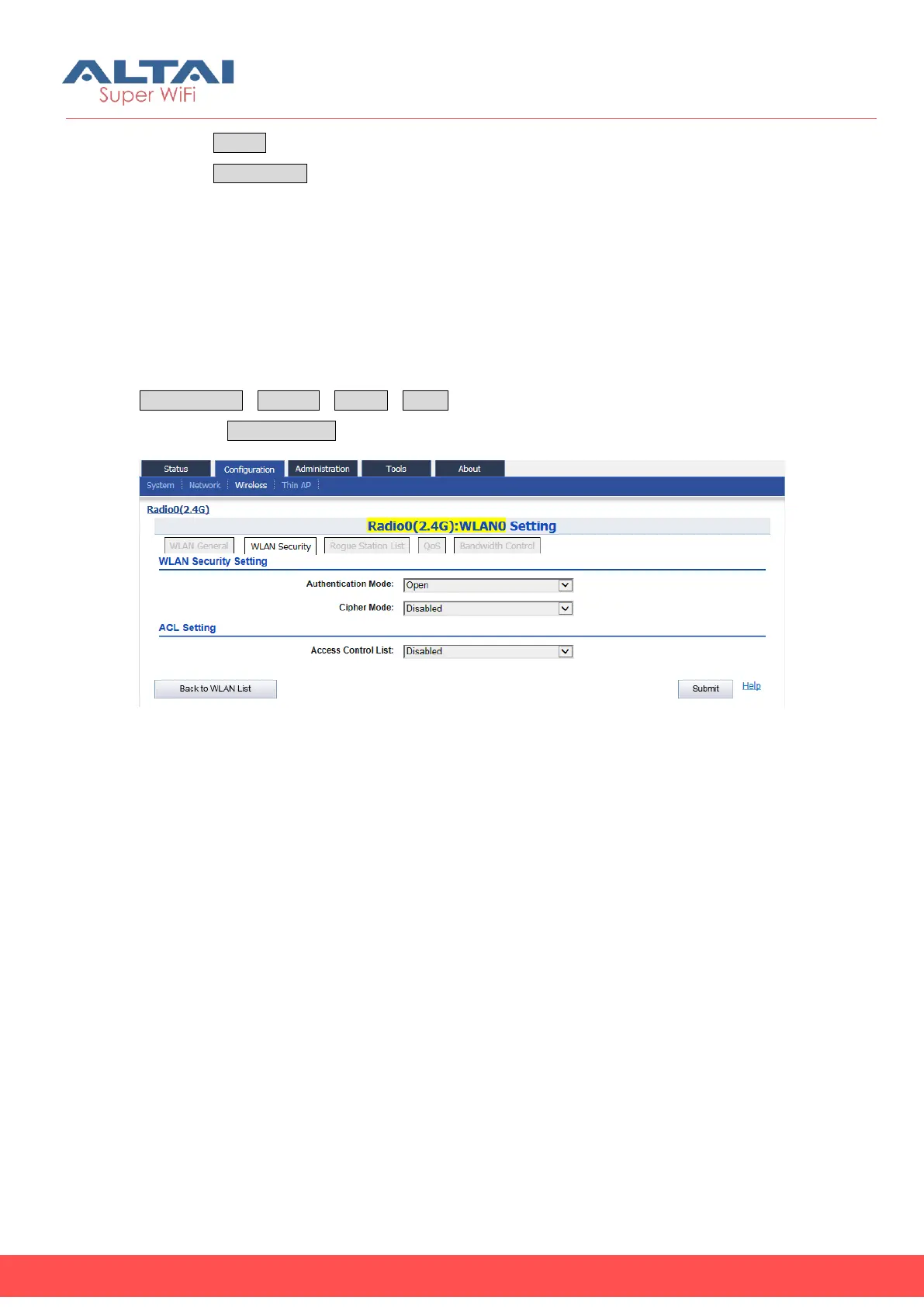
C1n supports different wireless security scheme to prevent unauthorized access. User
may enable the wireless security with different combination of authentication scheme
and cipher scheme. The default security setting is Open without cipher scheme, i.e.
no security and data encryption. User may specify the wireless security via
ConfigurationWirelessRadio0WLAN to select “More…”behind the WLAN, and
then select WLAN Security to access to security configuration page.
Figure 5-26 WLAN Security Setting
1) Open
If a WLAN opens to the public without any authentication, user may configure
authentication mode of that WLAN as “Open”. User may enable the cipher mode
when authentication mode is set as “Open”. The option of cipher mode is “WEP” only.



 To Next Page