Altai Technologies Ltd. All rights reserved
C1n Series WIFI AP/CPE Web-admin Configuration Manual
TPS15-003_rev1.3
4. Click Submit
5. Click Save&Apply to apply
6.3.1. Trap Host Setting
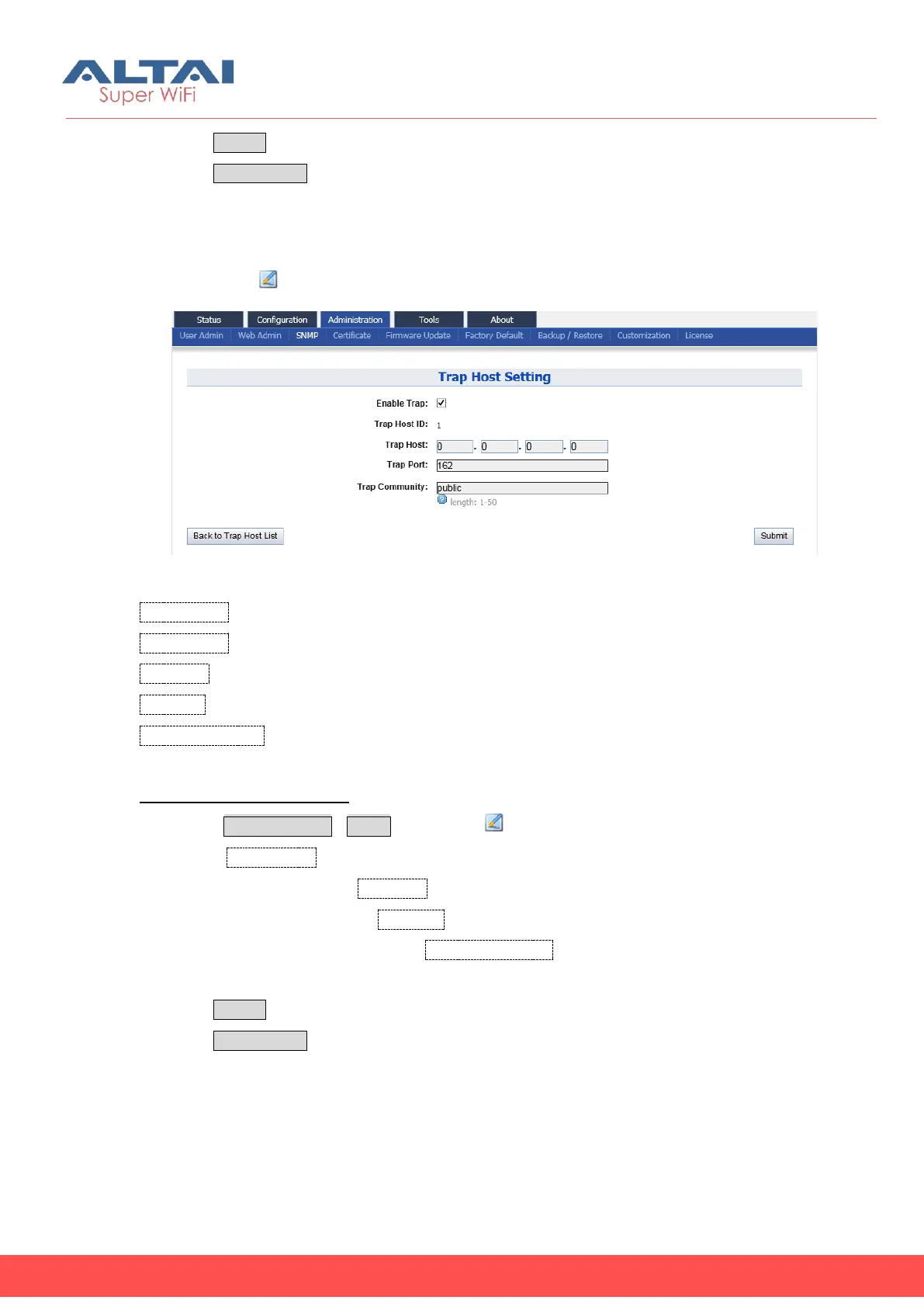
User may click “ ” to specify the SNMP manager if necessary.
Figure 6-4 SNMP Trap Host
Enable Trap: Enable or Disable a particular trap host.
Trap Host ID: SNMP Trap host ID; C1n supports maximum 4 Trap Host.
Trap Host: Specify IP address of SNMP manager.
Trap Port: Specify the service port of SMNP Trap service, by default it is 162
Trap Community: Specify the string of trap community information.
Configure a trap host in C1n:
1. Select AdministrationSNMP, then click “ ”
2. Check Enable Trap
3. Specify the IP address in Trap Host
4. Specify the port number of Trap Port
5. Specify the community string in Trap Community that is identical in the NMS’s
setting.
6. Click Submit
7. Click Save&Apply to apply
6.4. Certificate Management


 To Next Page