Altai Technologies Ltd. All rights reserved
C1n Series WIFI AP/CPE Web-admin Configuration Manual
TPS15-003_rev1.3
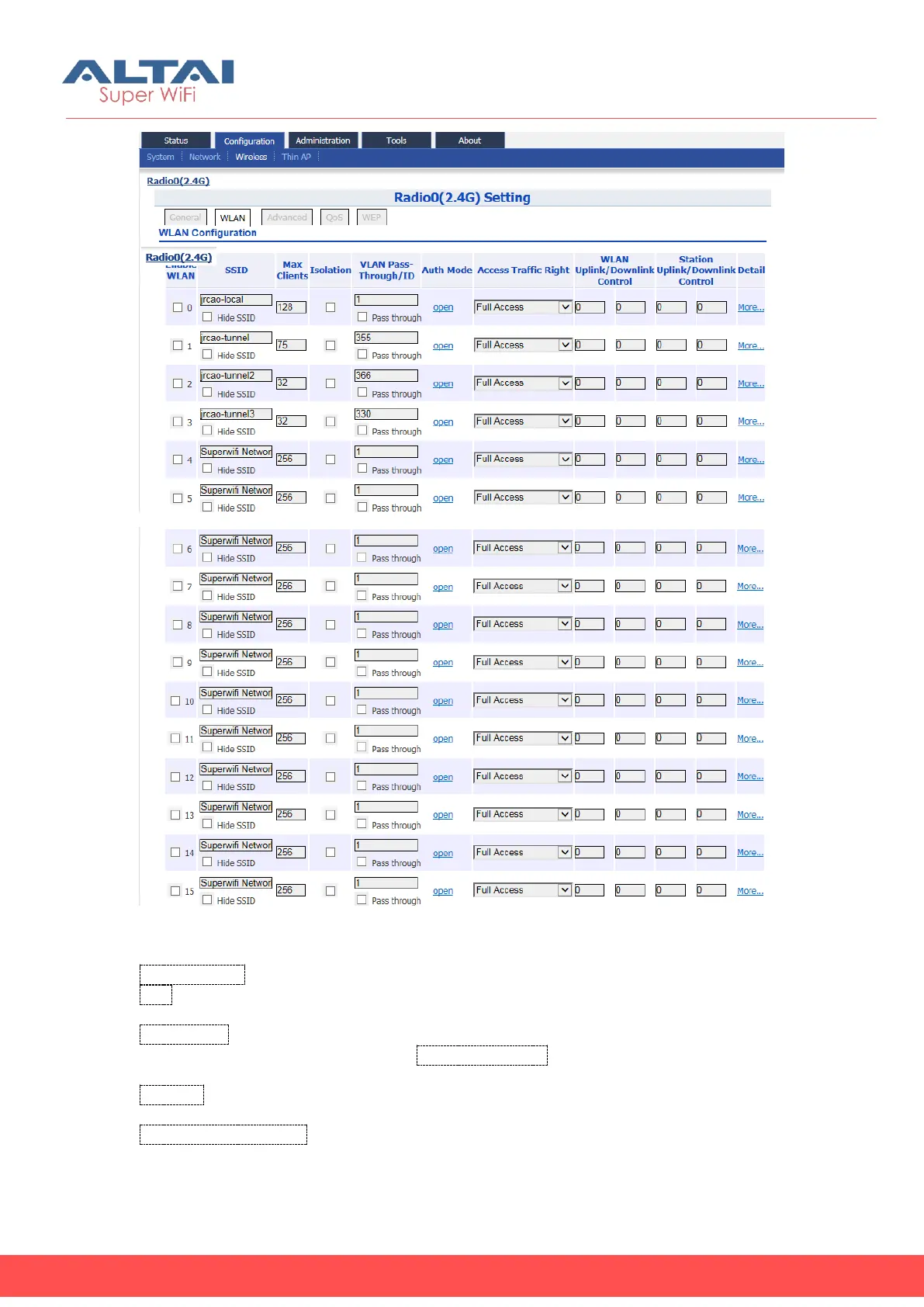
Figure 5-24 Radio0 WLAN Setting
Enable WLAN : Enable or Disable WLAN from 0-15.
SSID: Specify SSID of each WLAN; it supports up to 32 characters. The default SSID is
Superwifi Network X, where X is WLAN number.
Max Clients: Specify maximum associated clients of each WLAN. This value must be
smaller than or equal to the value of Maximum Clients in General setting. The default
value is 256.
Isolation: Allow or block intra-WLAN user communication. If enabled, clients cannot
communicate to each other directly in the same WLAN. By default, it is enabled.
VLAN Pass-Through/ID: Specify the VLAN ID of WLAN or configure the WLAN that acts
as VLAN truck port. This option is available if user enables VLAN. If user specifies a
VLAN ID, A2 tags all incoming packets from the radio with VLAN ID, and then forwards



 To Next Page