Altai Technologies Ltd. All rights reserved
C1n Series WIFI AP/CPE Web-admin Configuration Manual
TPS15-003_rev1.3
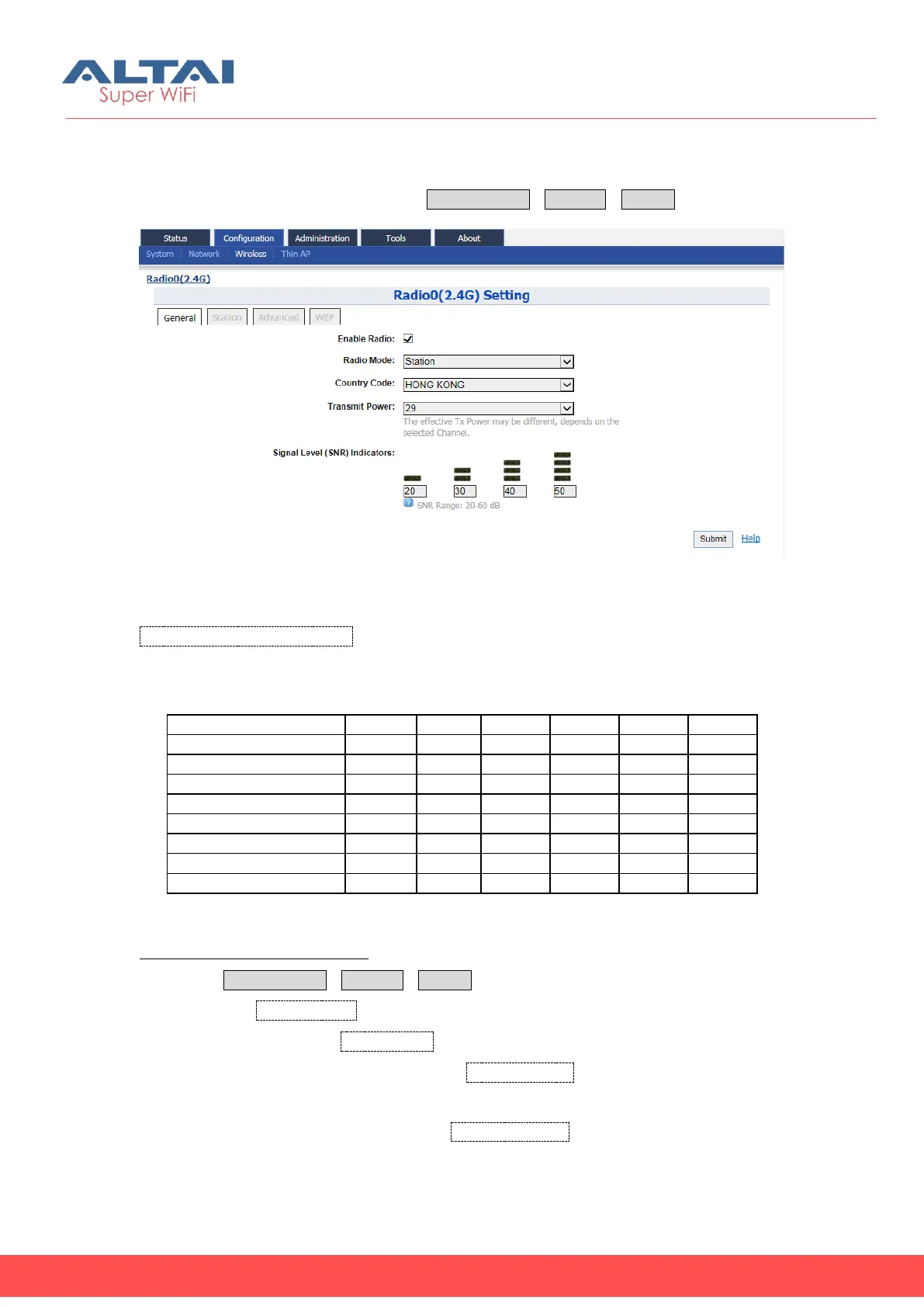
C1n can works as CPE/Station. When C1n is set to “station” mode, the backhaul link
must be established through associating with the remote APs. User may configure C1n
as station in Radio’s general page via ConfigurationWirelessRadio0.
Figure 5-15 Radio0 Station Setting
Signal Level (SNR) Indicators: There are 6 LEDs at the back of the C1n, 4 LEDs are used
for signal strength indication in Station mode for association with another AP. The 4
LEDs altogether shall display 8 levels of signal strength, in the following manner.
Configure C1n as CPE / Station:
1. Select ConfigurationWirelessRadio0
2. Check the Enable Radio option
3. Select the “Station” in Radio Mode
4. Set the corresponding country code in Country Code; HONG KONG is default
setting.
5. Set desired transmission power in Transmit Power; the effective transmission
power is depended on the remote AP.



 To Next Page