Altai Technologies Ltd. All rights reserved
C1n Series WIFI AP/CPE Web-admin Configuration Manual
TPS15-003_rev1.3
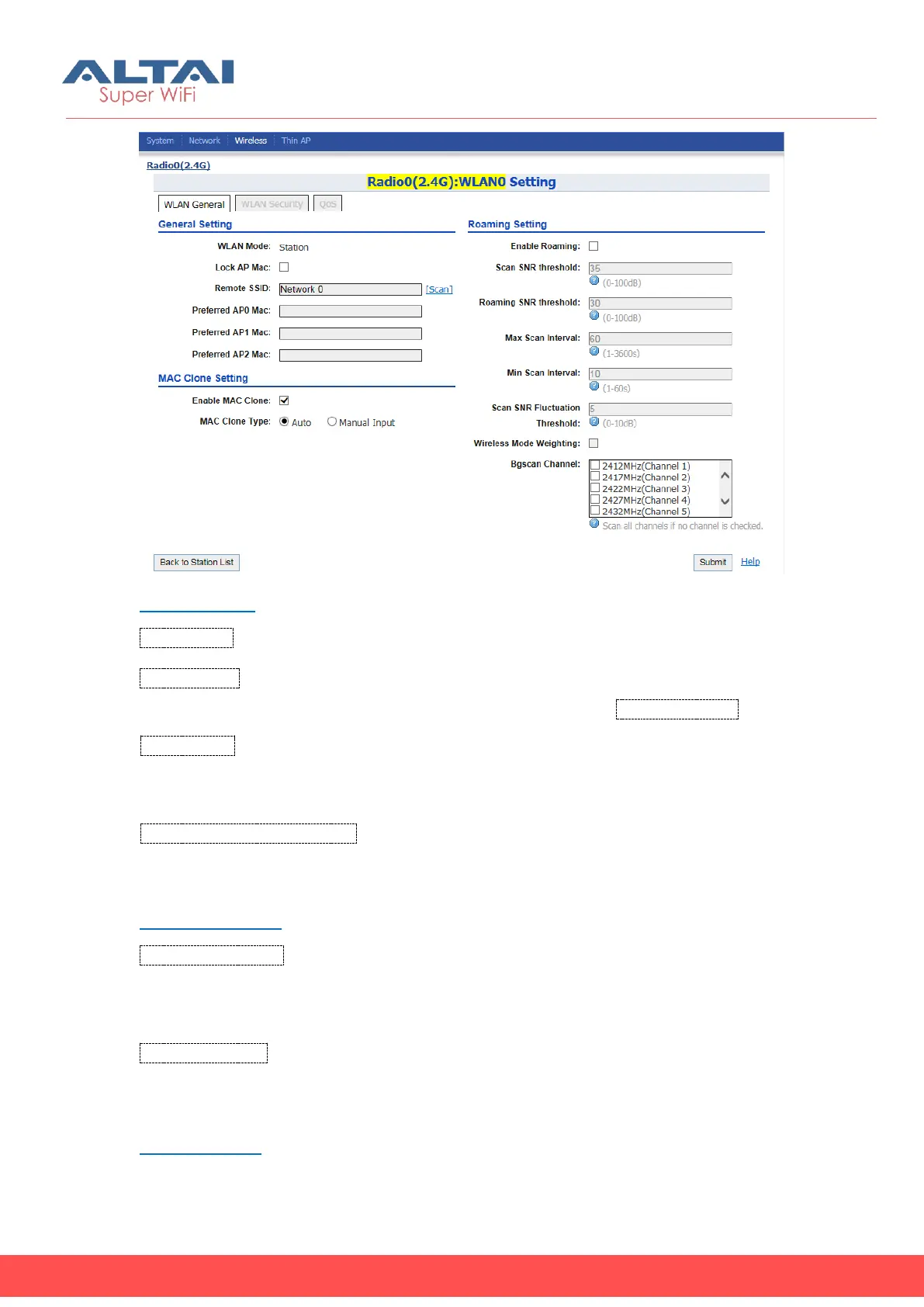
Figure 5-17 Radio0 WLAN0 Setting
General Setting
WLAN Mode: The operating mode of C1n; Here is "Station".
Lock AP Mac: When C1n Radio0 lock to a remote AP Mac, Radio0 will not roaming
among remote APs. User should input the MAC of remote AP in Remote AP Mac.
Remote SSID: Specify the SSID of access point that C1n is going to associate; the SSID
should be up to 32 characters. User may select “[Scan]” to look for the surrounding
SSID.
Preferred AP0, AP1, AP2 Mac: Specify the AP that C1n should associate them
preferentially. User may specify up to 3 AP’s MAC addresses in the order of priority.
MAC Clone Setting
Enable MAC Clone: Enable or Disable MAC Clone function, when it’s enabled,
Radio0 will use the cloned MAC associate remote AP. This feature supports one
laptop/PC only.
MAC Clone Type: either input manually or cloned from connection laptop/PC
directly.
Roaming Setting



 To Next Page