Appendix A – PCM Operations (18-0037) AM8a Instruction Manual
February 10, 2000 0037-S0A.L_
A-6
LOOP TIMSTRUNK INPUTS
PCM2
PCM1
!
CAUTION: 10 VOLTS MAX
TXRX
TX/2W RX
TX RX A/B
ON or OFF connection
and straight thru or
reversed TX and RX
connections to TIMS
TX/2W and RX jacks by
the TIMS ([SHIFT] [#,
ST]) key (three positions)
Internal Channel Selection
for monitoring.
channel
RX or TX Channel selected
for monitoring at AM8a
n
n
Do not Remove
Cross Connects
The AM8a IMITATE parameter
will usually be set to the end of
equipment being monitored.
MON
MON
IN IN
100 Ω
100 Ω
860 Ω
860 Ω
Use 48-0131AY cable
(to RX jack only) if
860 Ω resistance (two
430 Ω resistors) is not
in Monitor jack circuit.
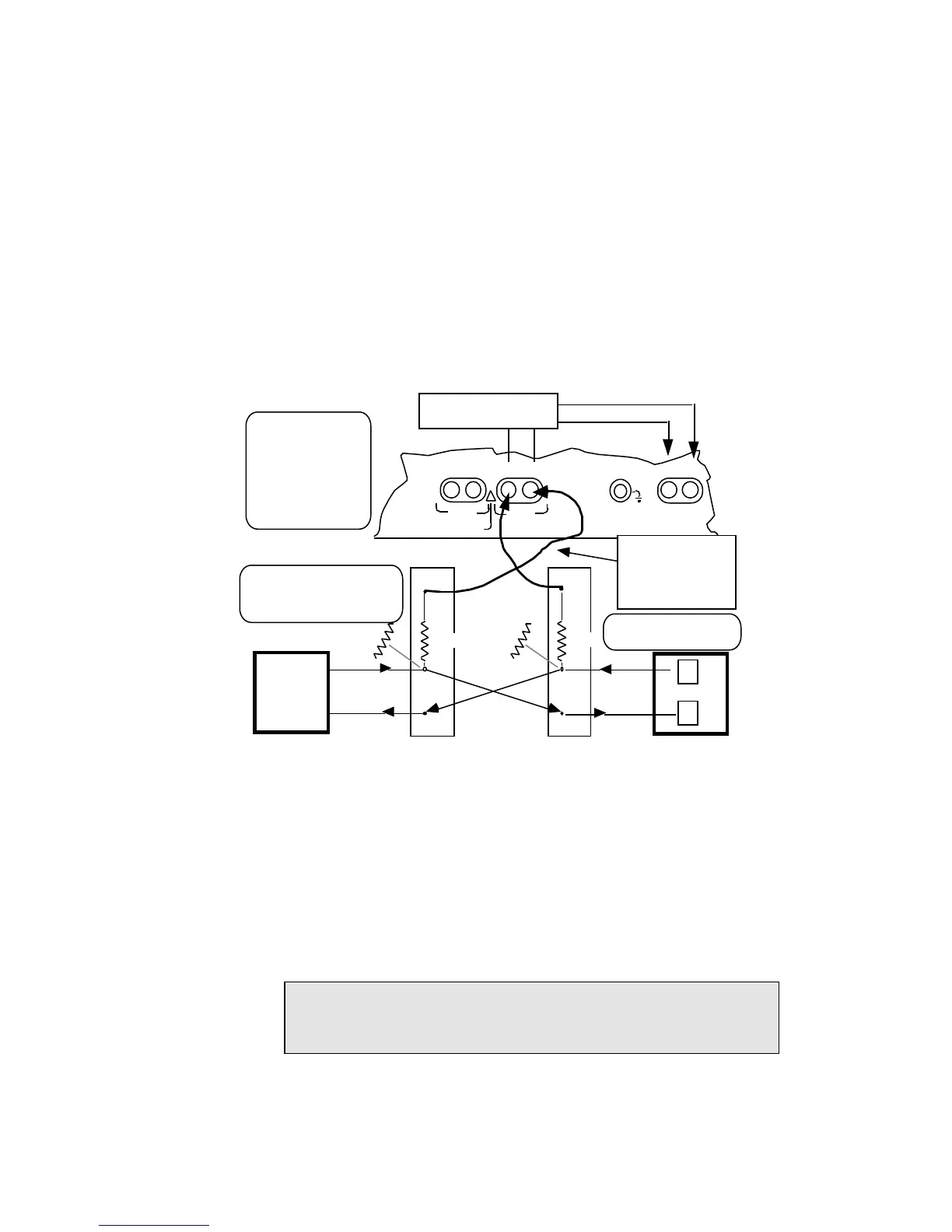
Monitor Connections –
PCM1 shown. PCM2 monitoring would make connections to PCM2 jacks
Network Equipment
Network Equipment
Figure A-5. Monitor PCM Connection Points
A.1.2 CIRCUIT CONFIG Menu Settings
The ANALOG/PCM parameter will be set to:
• 1 –pcm int. clk: 1.544 Mbps clocking will originate with the AM8a from the TX
jack to the equipment under test (Figure A–5).
• 2 –<pcm loop clk>: clocking from the equipment under test will control the
AM8a clocking via the RX jack.
NOTE: With either "rpt 1 to 2" or "rpt2 to 1" drop and insert tests, the signal
with the clocking data must come into the PCM1 RX jack. Also refer
to CAUTION concerning order of jack connections.


 To Next Page