Front Panel Operation (18-0037) AM8a Instruction Manual
February 10, 2000 0037-S01.L_
1-4
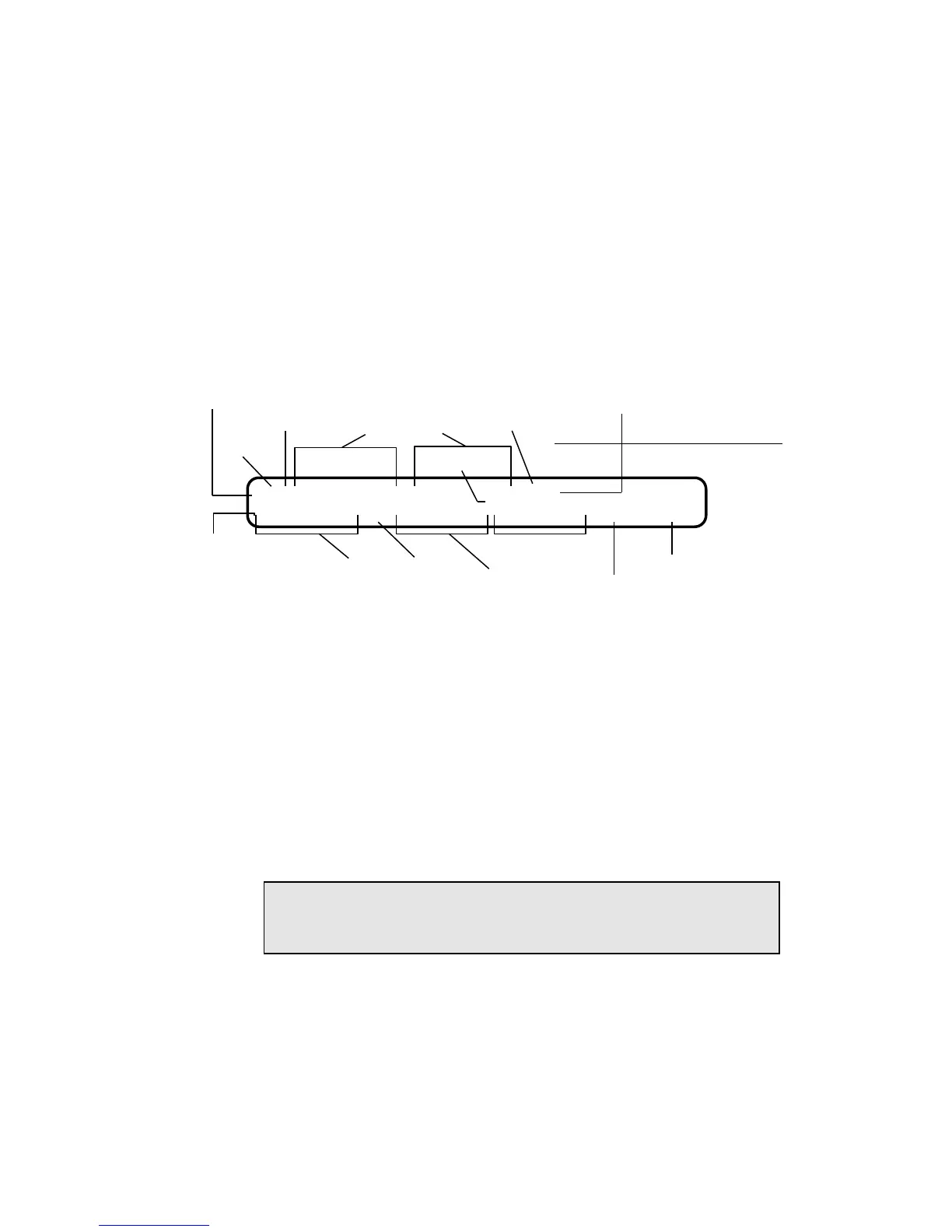
This character signifies a new call:
Wink
Off Hook
Dialed Digits
On Hook
Decoded signaling
Steady
Character
Analog Switch
(PCM far end) signaling
Tone Duration
Off-Time
Low-Band
Level/Frequency
Elapsed
Time from
Off Hook
Digit Analysis
(Digit selected from
1st line by using
underline bar cursor)
>HW2125551212W8189155441Hhh
00:02.163 T5 -06/0770 -06/1336 0059/0060
Flashing
Character
Analog Terminal/Line
(PCM near end) signaling
Cursor
DTMF
Digit
5
High-Band
Level/Frequency
NOTE: A flashing field in the 2nd line indicates a value that is outside of the
range specified by the ANALYZE parameter
Figure 1-2. AM8a Events Display
1.2.2 Events Display Character Set: A list of the possible characters which may be displayed
on the Events Display follows. Following each description is a sample of what the
second line of the display would show if the character were selected for analysis.
• Upper-case characters represent the beginning of an event.
• Lower-case characters represent the end of an event.
• Flashing characters indicate the event originated from the switching (far end)
equipment.
• Non-flashing characters indicate the event originated from the Te/Line (near end)
equipment.
NOTE: Some non-flashing events such as Tones on a 2-wire circuit may have
originated from either the switch or the Term/line equipment. The
direction of these events cannot be determined.
> indicates the beginning of a new call sequence. ">" will appear only at the first
position if the CONFIG DISPLAY:MODE parameter is set for "new call reset". More
than one new call sequence (with its beginning ">" in some other position) is only
possible if the DISPLAY:MODE parameter is set for "manual reset" or "scroll". The
time and date of the event and setting from MODE:MODE parameter is shown on
the second line when this character is selected.
15:00:15 02-28-92 Emulate (or Monitor) Switch (or Term/Line)


 To Next Page