- 19 -
3378702_ATE_ut_GB ENGLISH
GB
– set the delayed start.
MULTISTEP COOKING
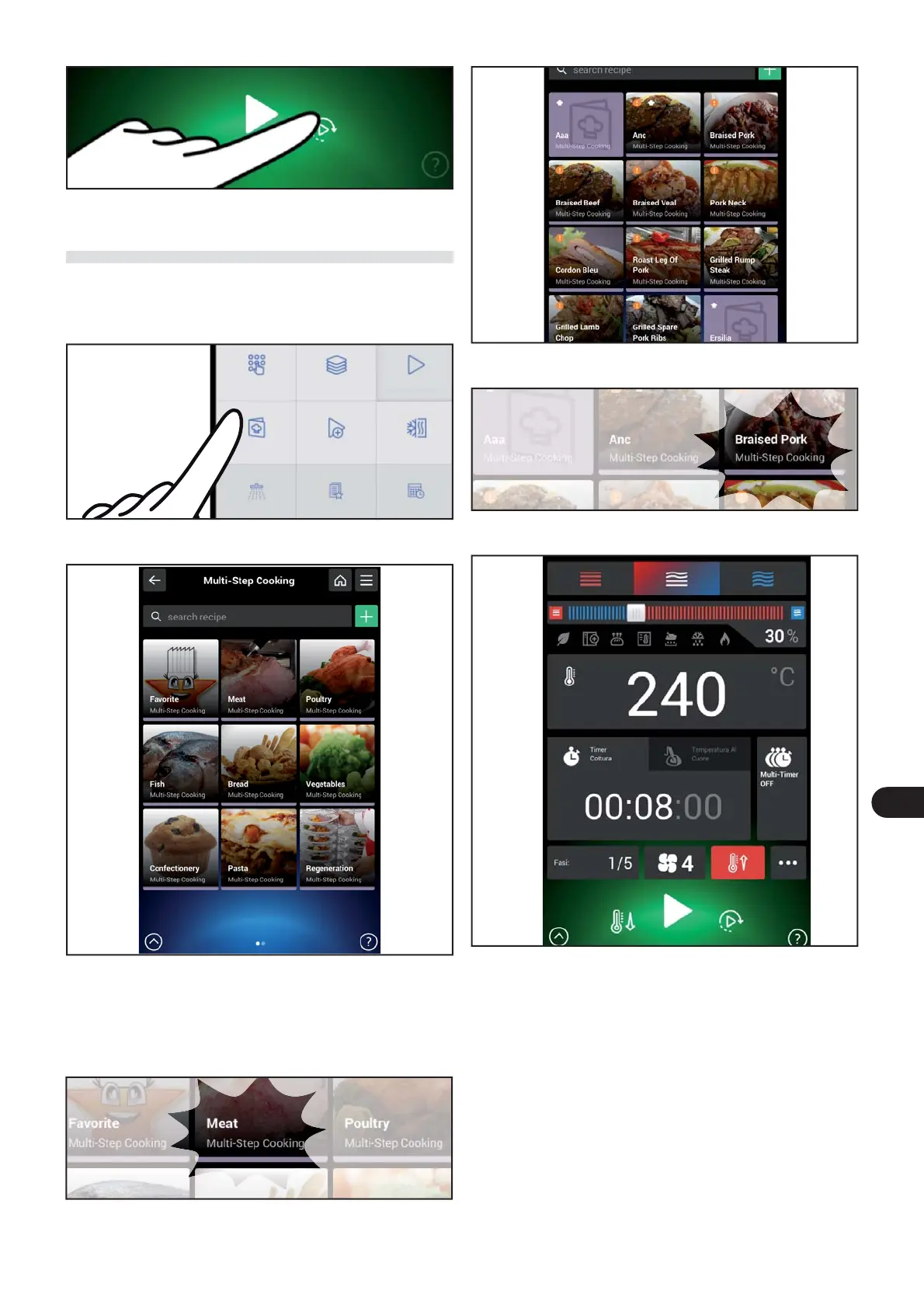
Proceed as follows.
) On the main menu screen, press the icon to access the
“multi-step cooking“ function.
The following screen appears on the display.
Food cooking can be selected, modi ed or programmed
on this screen.
) Select the type of food by pressing the relative zone.
The following screen appears on the display.
) Select the type of food.
The following screen appears on the display.
This screen allows you to:
– Select the type of cooking (convection, mixed or steam).
– Edit the percentage of humidity or the opening of the vent.
– Edit the cooking time.
– Activate or deactivate the Multi-timer.
– Add and/or eliminate a phase.
– Edit the fan speed.
– Activate or deactivate the cooldown.
– Set the delayed start.
Manual cooking
Multi-ActO Automatic cooking
Multi-step
cooking
Special cooking Cook & Chill
Cleaning
Favourite Scheduler



 To Next Page