- 23 -
3378702_ATE_ut_GB ENGLISH
GB
CLEANING
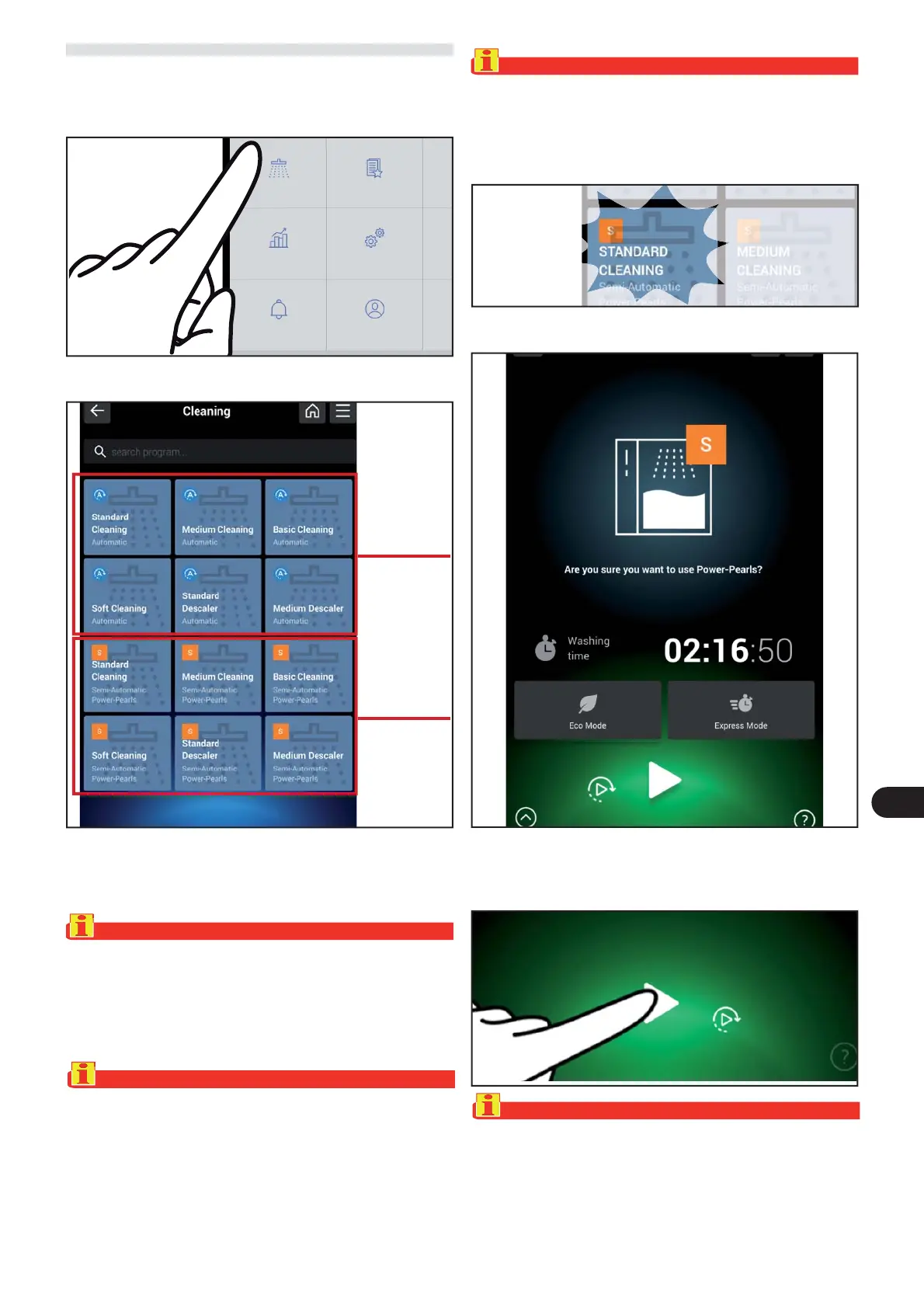
) On the main menu screen, press the icon to access the
“Cleaning“ .
Proceed as follows.
The following screen appears on the display.
The type of program for washing the appliance – auto-
matic or semi-automatic washing – can be selected on
this screen.
Important
The automatic wash programs, marked with “A” (top left)
can only be displayed and used if the appliance has the
“GPAT” accessory on request installed, otherwise, the
display only shows the semi-automatic wash programs
marked with “S” (top left).
Important
Before launching the wash cycle, remove trays, grills or
other containers from the cooking chamber. Washing with
a tray inside the cooking chamber can damage the oven.
Before launching the wash cycle check that there is no sol-
id food residue larger than 8-10 mm inside the cooking
chamber.
The following screen appears on the display.
) S
elect the washing cycle required.
) Press the icon to start the washing cycle.
Important
The operator must be present for all the wash programs
marked with the letter “S” at the top left.
Important
Never remove the lter from the bottom of the cooking
chamber. Any solid food residue could clog the drain or
damage the oven’s washing system.
Cleaning
Favourite
HACCP date
Settings
Users Mod
Automatic
cleaning
semi
automatic
cleaning



 To Next Page