- 29 -
3378702_ATE_ut_GB ENGLISH
GB
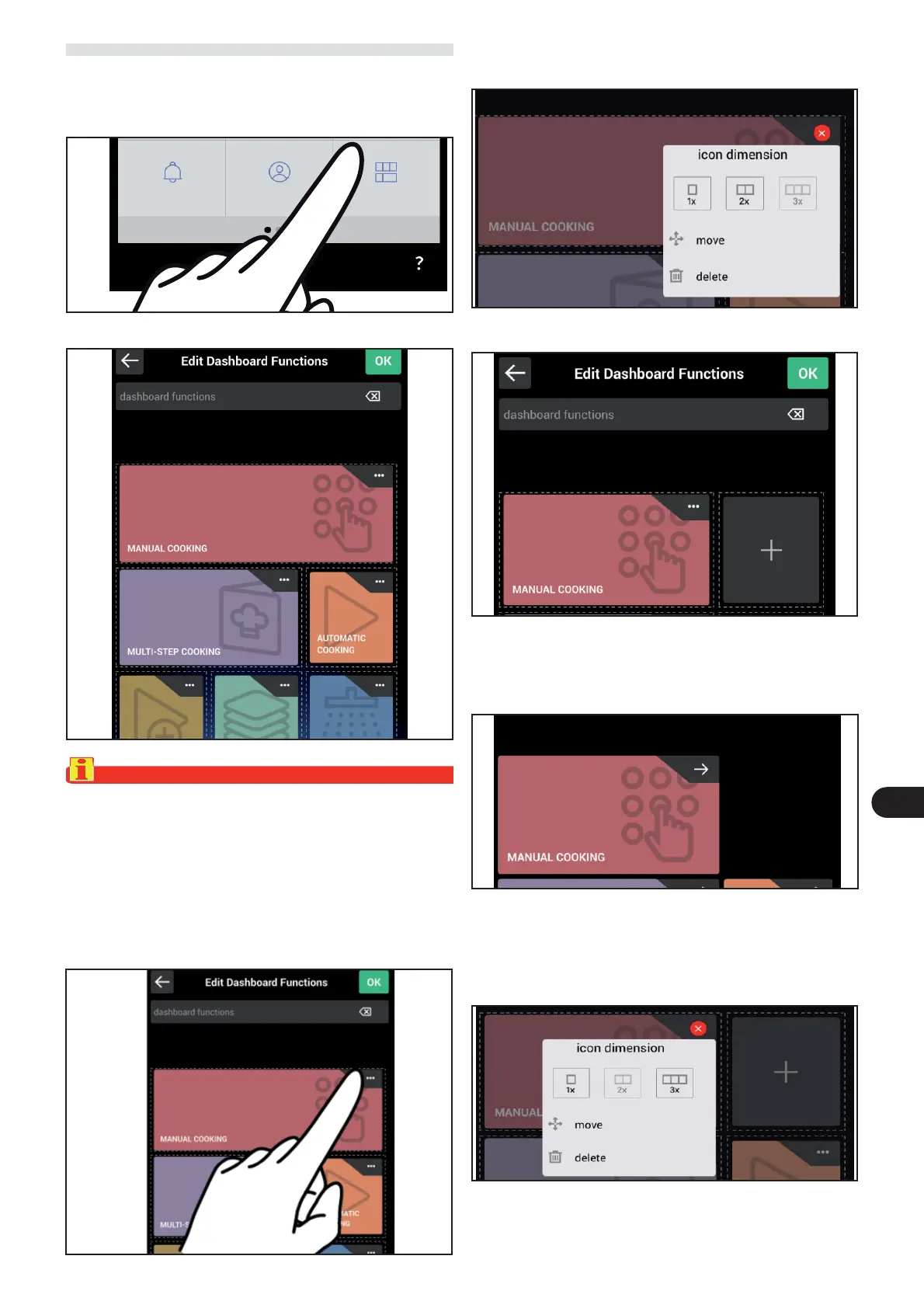
The following screen appears on the display.
EDIT DASHBOARD FUNCTIONS HOME PAGE
) On the main menu screen, press the icon to access the
“ Edit dashboard functions “ function.
Proceed as follows.
Important
The homepage is associated with the user that is active at
that time.
This screen is used to customise the content of the Home-
page b
y reducing, moving or deleting the function icons
as shown in the examples below:
) Press the three dots in the top right corner to select the
function to be modi ed.
Resizing the functions icon
The following screen appears on the display.
) Select icon size “2x”.
Users
Edit
dashboard functions
Notices
The following screen appears on the display.
) Press OK to save the new setting and go back to the previ-
ous screen.
The following screen appears on the display.
) Select “move” and immediately select the empty space
where the function is to be moved.
) Press the three dots in the top right corner to select the
function to be moved.
Move the functions icon



 To Next Page