- 20 -
3378702_ATE_ut_GB ENGLISH
GB
MULTYACTO
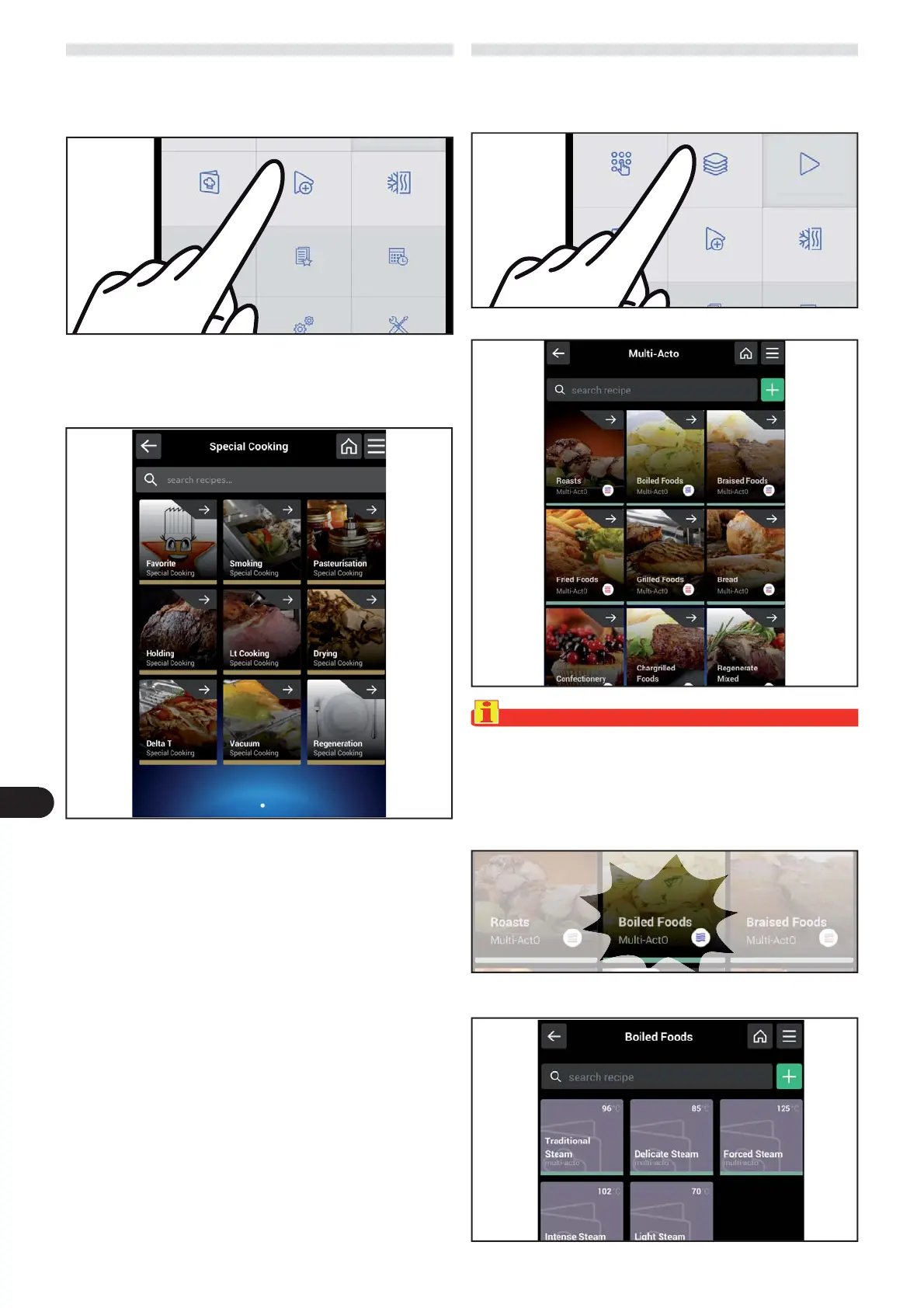
) On the main menu screen, press the icon to access the
“Multi-actO“ function.
Proceed as follows.
The following screen appears on the display.
Important
The desired type of cooking can be selected on this screen:
boiling, braising, roasting, frying, grilling, bread, pastry,
plate, mixed regeneration, dry regeneration, steam re-
generation.
SPECIAL COOKING
) On the main menu screen, press the icon to access the
“Special cooking“ function.
Proceed as follows.
The following screen appears on the display where it is pos-
sible to carry out all functions described in the “Automatic
cooking” paragraph (see page 18).
In every setting of the “special cooking” you can set some
parameters shown below:
– Cooking chamber temperature setting.
– Time setting.
– Core probe temperature setting.
– Tray loading setting.
– Delta T setting.
– % humidity/vent opening setting.
) Select the cooking type.
The following screen appears on the display.
multi-phase
cooking
Special
cooking
Cook & Chill
Favourite Scheduler
Manual
cooking
Multi-ActO Automatic cooking
Special
cooking
Cook & Chill



 To Next Page