- 12 -
3378702_ATE_ut_GB ENGLISH
GB
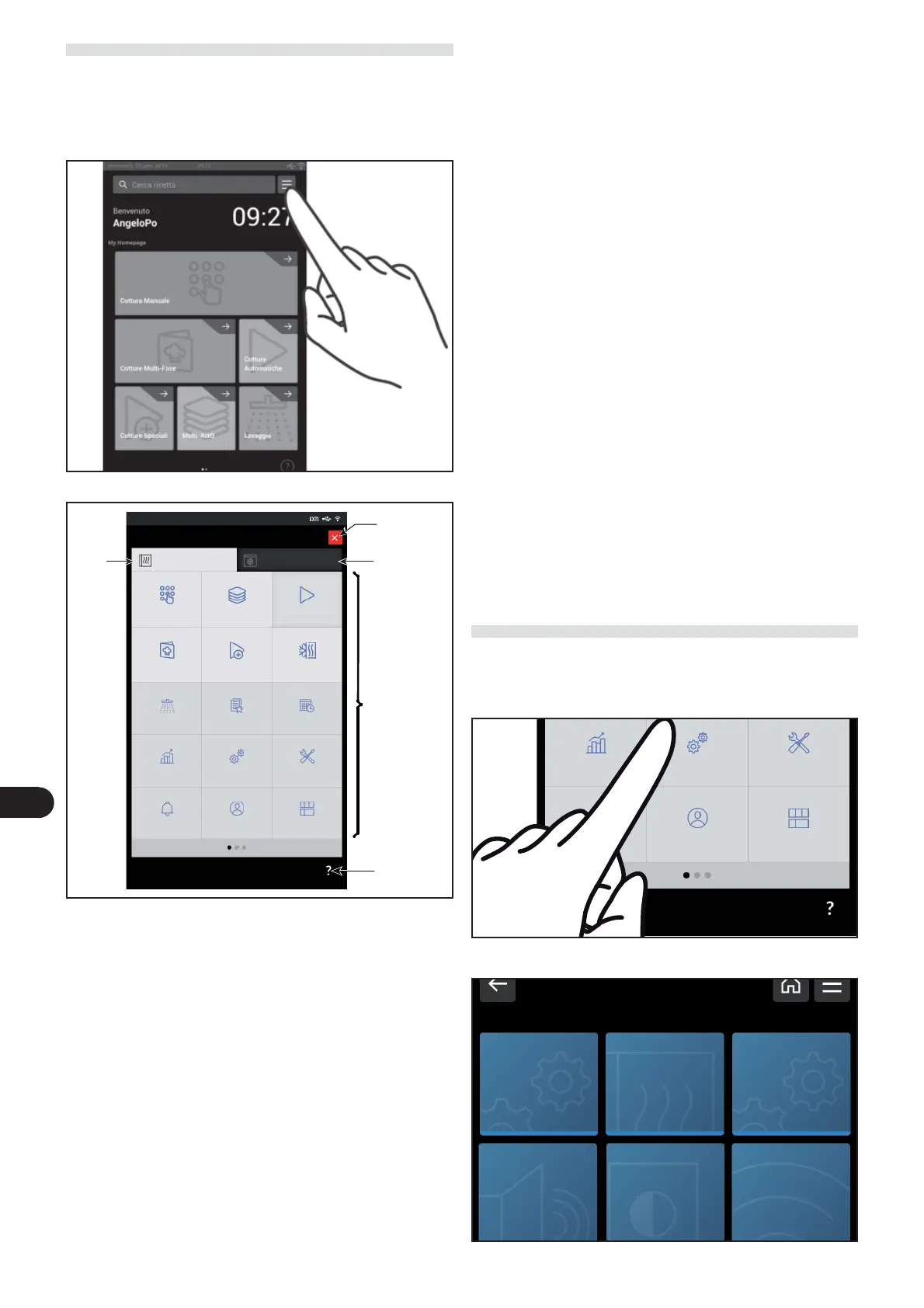
MAIN MENU
– “Manual cooking“ function: used to enter the data (tem-
perature, cooking time, etc.) to allow cooking to be carried
out in “manual mode” (see page 14).
– “Multi-ActO” function: it is used to activate the function
to manage simultaneously stored cooking processes. (see
page. 20) .
– “Automatic cooking” function: used to recall the cooking
modality pre-set for the di erent foods (see page 18).
– “Multi-step cooking” function: used to select, amend or
create cooking programs that involve multiple stages (see
page 19).
– “Special cooking” function: used to recall the particular
cooking modality (e.g. Smoking, pasteurisation, holding,
BT cooking, dry, delta T, vacuum, regeneration, favourites)
(see page. 20).
– “Cook&Chill” function: used to execute cooking in com-
bination with the blast chiller (only for BE-1 models).
Press the icon to access the Main menu.
The following screen appears on the display.
Used to access the program and display pages of the opera-
ting parameters of the equipment.
– “Washing” function: used to select the type of program
for cleaning of the appliance (see page 23).
– “Favorite” function: used to access the preferred cooking
programs (see page 26).
– “Scheduler function: used to program warnings or activi-
ties (e.g. cooking programs) on certain days and at certain
times (see page 26).
– “Notices” function: used to access the list of activities pro-
grammed through the “scheduler” function (see page 28).
– “HACCP Data” function: used to display the HACCP data
acquired during di erent cooking (see page 27).
– “Settings ” function: used to set the appliance’s operat-
ing parameters (see 12).
– “Service” function: function for the exclusive use of the
After-Sales technical assistance service (to be used with
Password) (see page 27).
– “Users” function: used to select the active user or to man-
age the list of users. Each user is associated with a person-
alised homepage (see page 28).
– “Edit dashboard functions (home page): used to per-
sonalise the content of the Homepage. The homepage is
associated with the user who is active at that time (see
page 29).
SETTINGS
) On the main menu screen, press the icon to access the
“ Setting “ function.
Proceed as follows.
The following screen appears on the display.
Manual cooking
Multy-ActO Automatic cooking
multi-phase cooking
Special cooking Cook & Chill
Washing
Favourite Scheduler
HACCP date
Settings Service
Alerts
Users Modify dashboard
Help key
Close and go
back to the
previous screen
Blast chiller
selection
Oven
selection
Functions of
the Oven
HACCP date
Settings Service
Users Modify dashboard
Settings
Cooking Setting General Settings
Connectivity
Parameters
Audio settings
User Parameters
LCD Settings


 To Next Page
 Loading...