- 14 -
3378702_ATE_ut_GB ENGLISH
GB
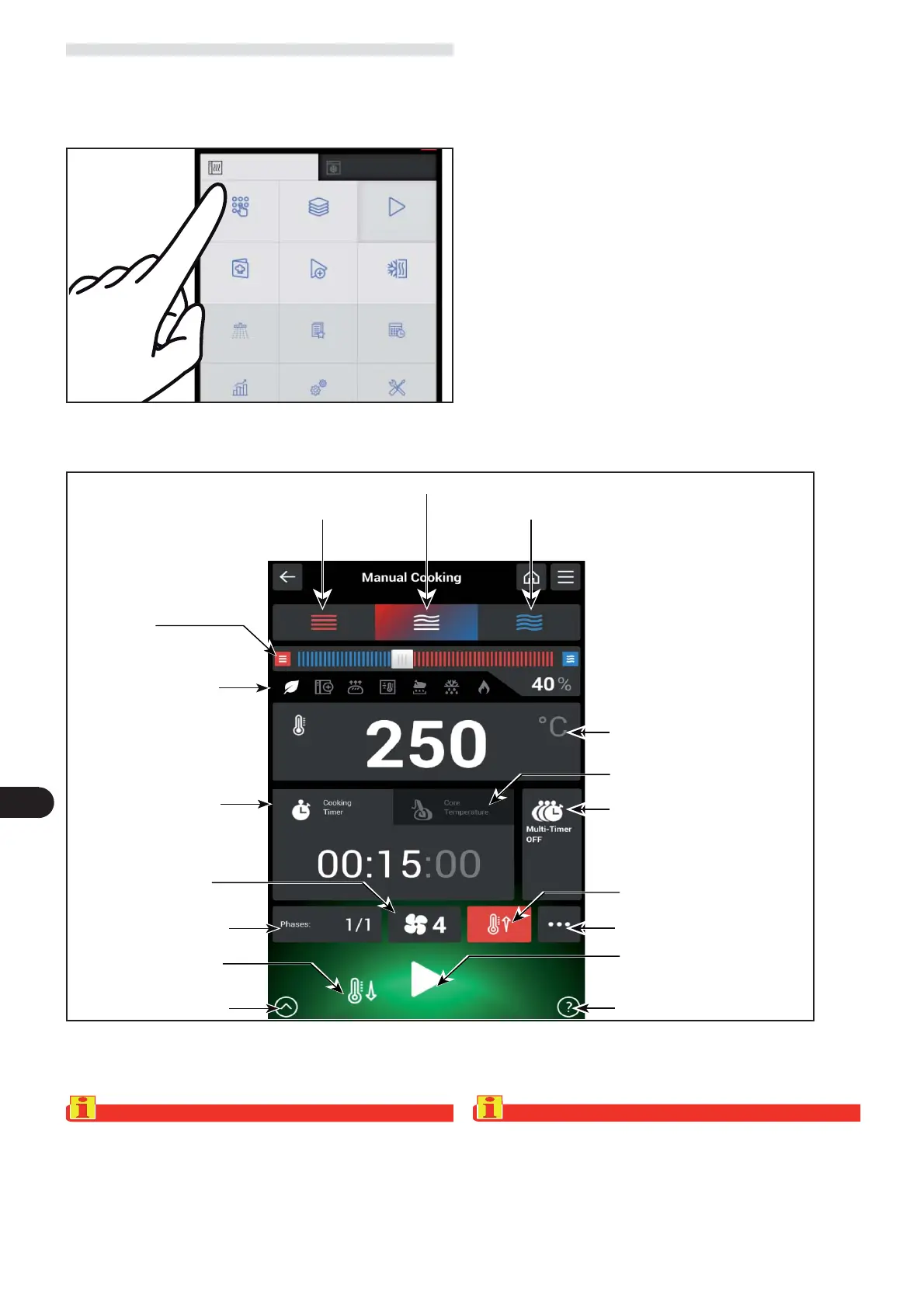
MANUAL COOKING
) On the main menu screen, press the icon to access the “
Manual Cooking “ function.
Proceed as follows.
The following screen appears on the display.
Data can be entered on this screen (type of cooking, tem-
perature, cooking time, etc.) so as to execute the cooking in
“manual mode”.
Important
The “cooking time” and “core temperature” functions are
mutually exclusive. For example, if a user selects “cooking
time” and then selects “core temperature”, the rst func-
tion is cancelled.
Important
Cooking with several phases and the Multi-timer function
are two mutually exclusive functions. If, for example, the
multi-timer function is active, phases cannot be added,
and vice versa.
Manual cooking
Multi-ActO Automatic cooking
multi-step cooking
Special cooking Cook & Chill
Cleaning
Favourite Scheduler
Help key
Steam
Combined cooking
Percentage humidity or
steam vent percentage
Convection
Cooking chamber temperature
Multi-timer on/off
Auxiliary cooking functions
Cooking time
Cooking phases
Other functions
Core temperature
Fan speed
Fast cooling
START
Preheating on/off
Indications of active
auxiliary functions



 To Next Page