103
(13) SHORT CUT keys
There are various short cut key combinations available for use with the ‘
FLASHING FUNCTION
’.
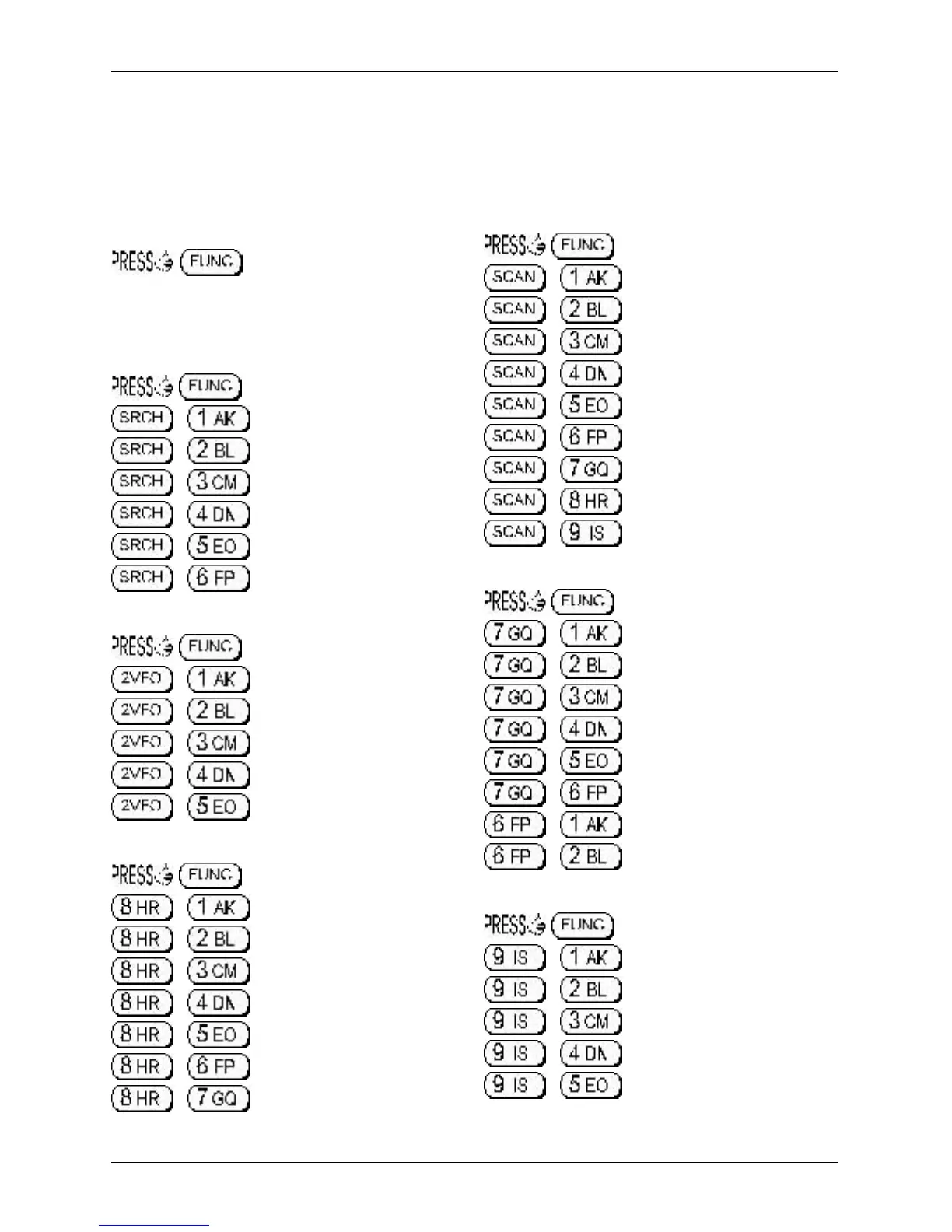
When the “FUNC” legend is flashing, two keys are held simultaneously to provide a short cut to
specific functions which would otherwise require greater key presses or use of a menu.
13-1 Short cut menu access
to activate the
flashing
function
legend “FUNC” then refer to the table
which is valid only WHILE THE “FUNC” LEGEND
IS FLASHING:-
Search short cuts
for flashing “FUNC” cursor then:
+ SRCH-GROUP menu
+ SRCH-GROUP DELAY
+ SRCH-GROUP LEVEL
+ SRCH-GROUP VOICE
+ SRCH-GROUP FREE
+ SEARCH AUTO STORE
VFO short cuts
for flashing “FUNC” cursor then:
+ VFO-MODE DELAY
+ VFO-MODE LEVEL
+ VFO-MODE VOICE
+ VFO-MODE FREE
+ VFO-MODE QUICK MEMORY
Scan, search, edit, delete short cuts
for flashing “FUNC” cursor then:
+ COPY MEM-BNK
+ COPY SEARCH
+ MOVE MEM-CH
+ SWAP MEM-CH
+ EDIT MEM-CH
+ MEM PROTECT
+ SRCH PROT
SCAN short cuts
for flashing “FUNC” cursor then:
+ SCAN-GROUP menu
+ SCAN-GROUP DELAY
+ SCAN -GROUP LEVEL
+ SCAN -GROUP VOICE
+ SCAN -GROUP FREE
+ SCAN-GROUP MODE SCAN
+ MEMORY BANK TEXT
+ M-BANK resizing menu
+ BANK PROTECT
Configuration menu short cuts
for flashing “FUNC” cursor then:
+ LAMP
+ LCD CONTRAST
+ POWER-SAVE
+ AUTO PWR-OFF
+ REMOTE BPS
+ FREQ DISP
+ WRITE PROTECT (global)
+ OPENING MESSAGE
Delete short cuts
for flashing “FUNC” cursor then:
+ DELETE VFO-PASS
+ DELETE MEM-BANK
+ DELETE SEL-CH
+ CH PROTECT
+ DEL MEM PASS
Section 13, 13-1



 To Next Page