104
13-2 Short cut text entry
Entering text into memory channels, memory banks and search banks can be quite long winded.
To speed up the process,
while the “FUNC” legend is flashing
two keys may be pushed
in sequence
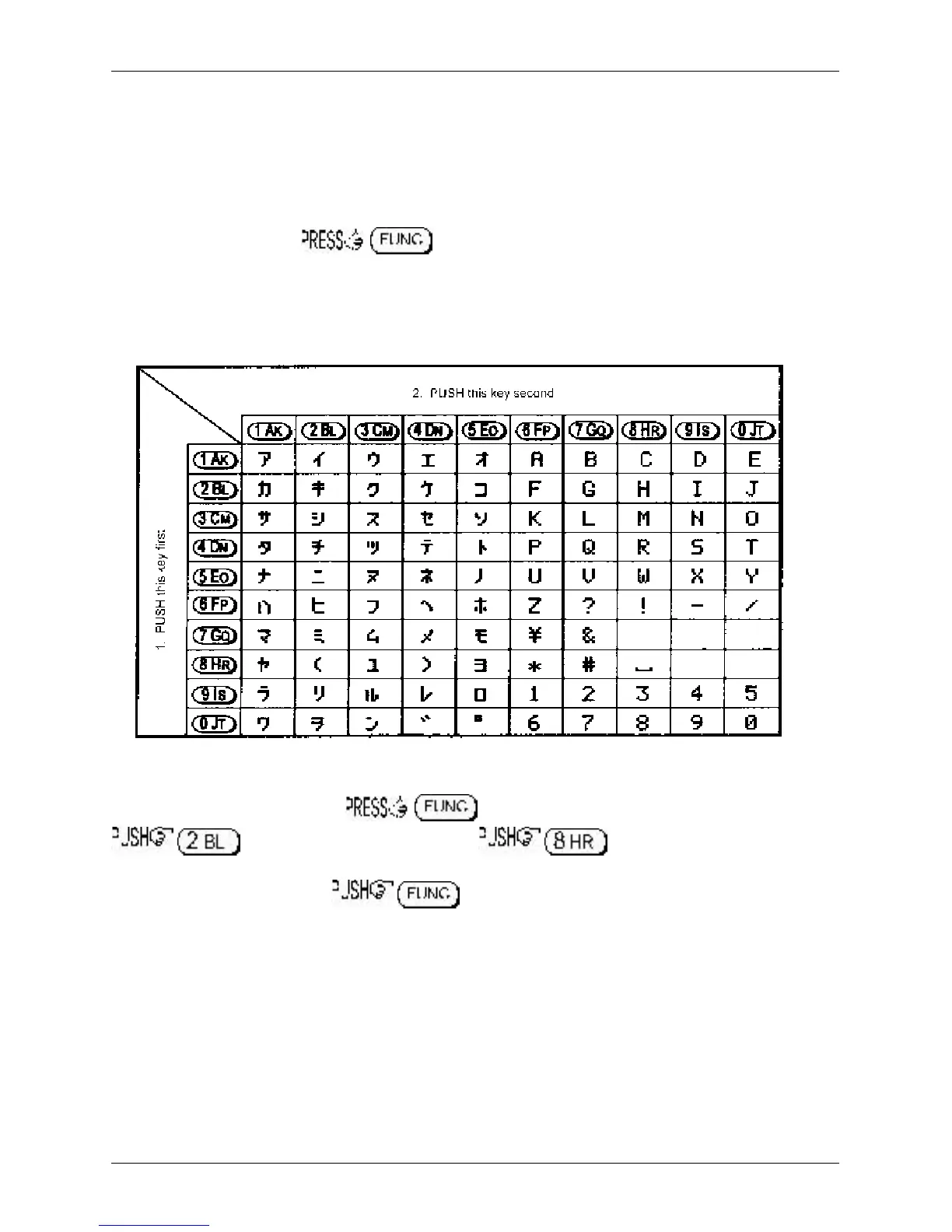
to provide a short cut a variety of alphabet letters (upper case), numbers and symbols. This method of
text entry is consistent with that used by PERSONAL PAGERS.
While in a text input menu, to display the for
flashing
“FUNC” then refer to the
following table. Look for the required character in the table then PUSH the key shown to the
horizontal-left followed by the vertical key shown above the required character (do not push both
keys together). The first key push will produce a character on the screen which will be replaced with the
required character when the second key is pushed, the cursor with then move one place to the right.
Example:
To select the letter “H” until the
flashing
“FUNC” is displayed.
, the number “2” will be displayed, , the desired “H” character will be
displayed and the cursor will move one position to the right. The
flashing
“FUNC” legend will continue to
flash, if it is not required further for it to be removed from the LCD.
Section 13-2



 To Next Page