3.5.12. User Settings > Current Loop
Enter this part of the menu
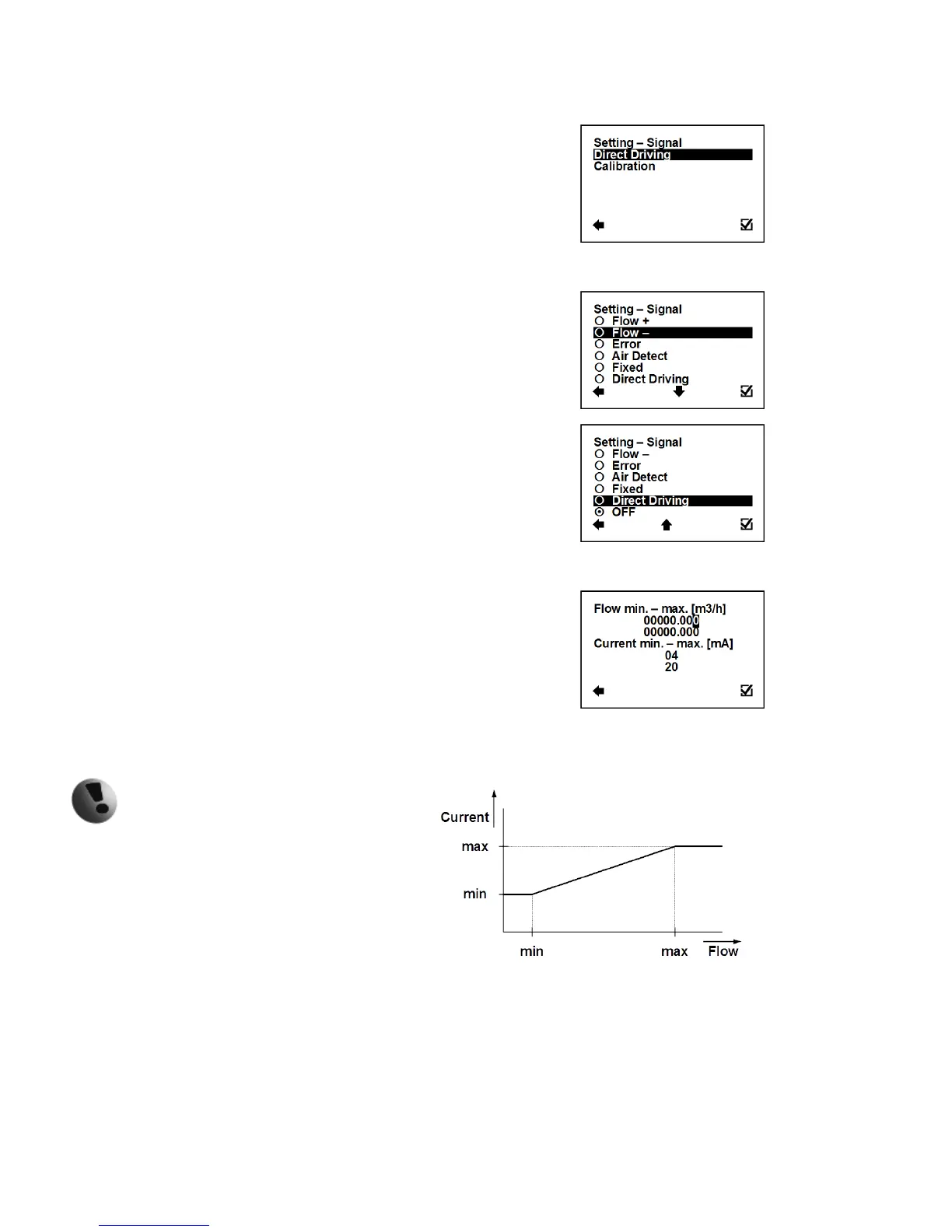
User Settings > Current Loop > Settings Signal
This function serves to select which signal the output should be
giving.
Confirmation of setup and saving to memory
Output: 10 mA, for any positive flow
Output: 10 mA, for any negative flow
Output: 10 mA, for any error identified by the device
The signal can be cancelled by pressing any
push button on the flowmeter.
Output: 10 mA, during air detection (empty pipe)
Output: fixed output of 10 mA
Output: Direct Driving – setup is below
Output: fixed output of 4 mA
User Settings > Current Loop > Direct Driving
This function serves to set flow values in relation to current output.
Possible range: 0 – 36000 m3/h; 4 – 20 mA
Selection of digit position
Confirmation of setup and saving to memory
Setup of measurement flow-range (only positive
values)
Setup of the current output range, corresponding to
the actual flow-rate within the given range
When changing an item for the current
loop output, all settings for the voltage
output are to be changed, to make sure
there will be no signal conflict at the
output port. The output that is not used has to be
switched off (Settings – Signal – OFF).



 To Next Page