BASIC CIRCUIT CONNECTIONS:
Size:
11mm x 15mm x 1.0mm
Durability:
10,000 insertion/removal cycles
Weight:
0.4g
Minimal Capacity:
32 MB
The data are stored in *.csv format.
To read the datalogger simply plug the SD card to your computer and open the file using any table
processor.
The logging interval is possible to set from 1 minute to 1 day
Each record consist of:
Date and time, FW number, Measurement(Run/Stop), Total, Total+, Total-, Aux, Error Min, OK min, Error
Code, Temperature, External Temperature (if present), External Pressure (if present)
While there is an error “SD card not inserted” or “SD Open file” active and the user plugs-in the SD card,
error will disappear after next write to the datalogger. It is recommended to setup the datalogger interval
again or restart the flowmeter after every SD card plug-in.
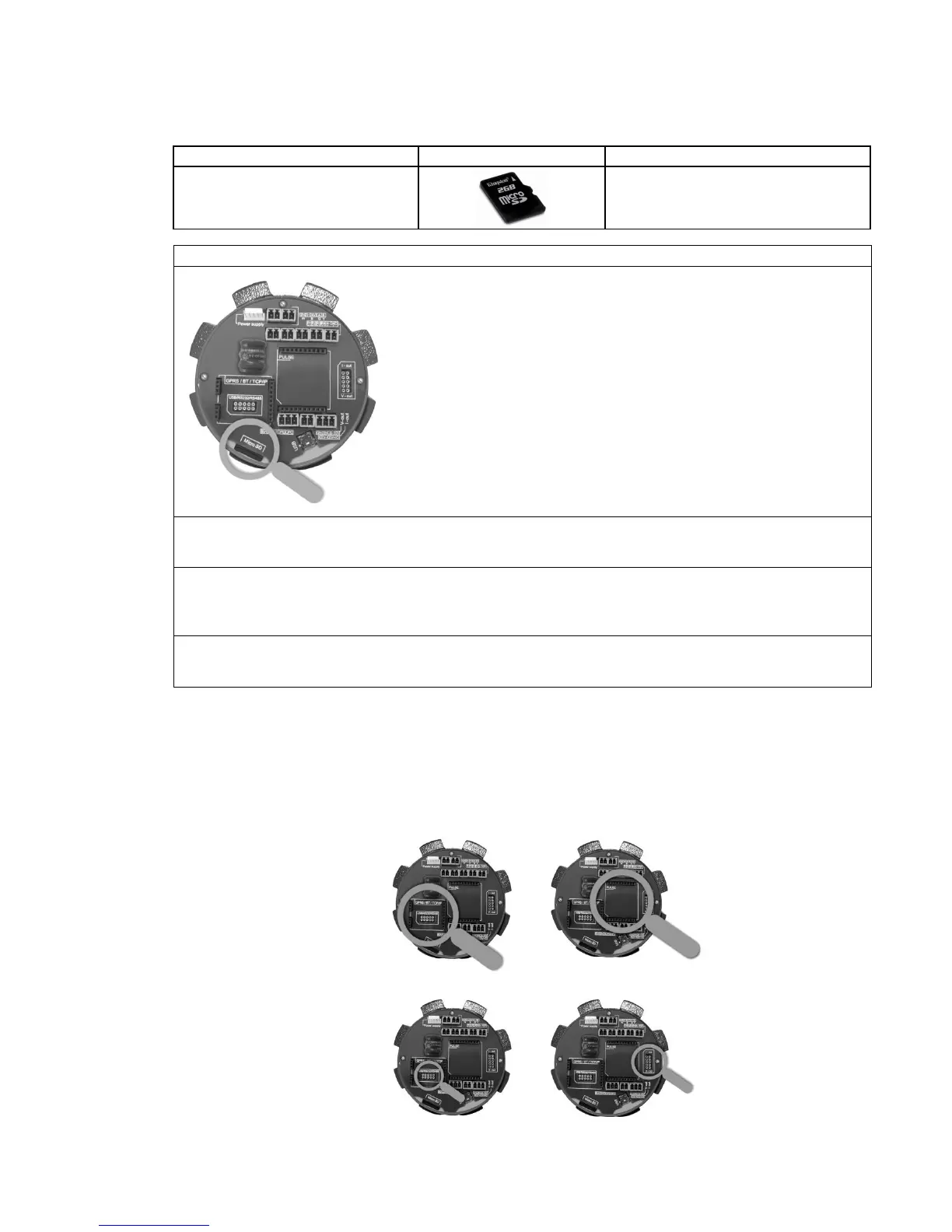
4.3. Module positioning
Individual module installation is straightforward thanks to a plug-and-play system. Yet, some caution is
required when selecting the correct installation slot according to the picture below.
GPRS
BLUETOOTH
TCP/IP
GSM-SMS
CURRENT-LOOP
EXT. PRESSURE



 To Next Page