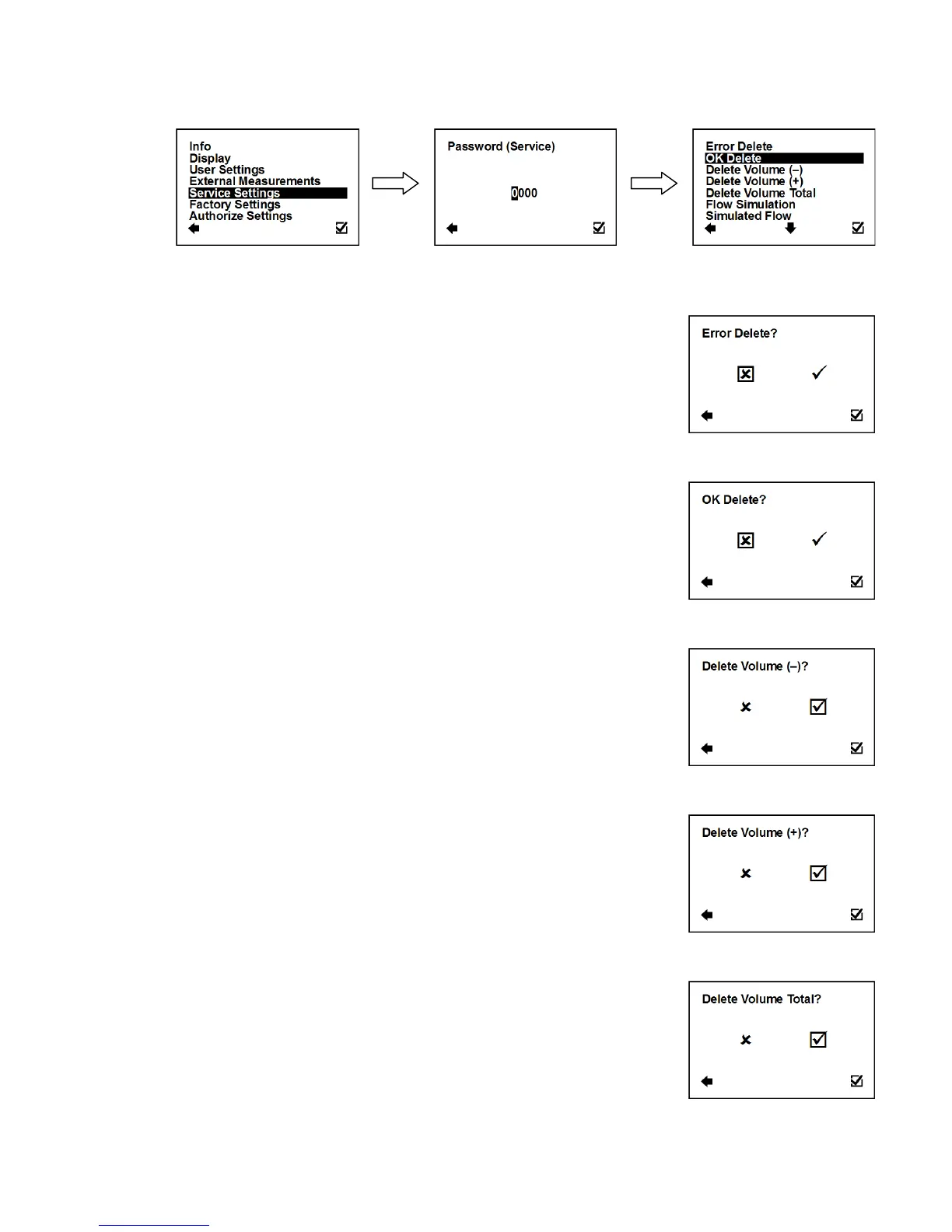
3.7. Service Settings Menu
To enter this part of the menu, it is necessary to enter the Service Password.
3.7.1. Service Settings > Error Delete
This option serves to zero the totalizer for number of minutes
the flowmeter signalised an error.
Resets error minute totalizer
3.7.2. Service Settings > OK Delete
This option serves to zero the totalizer for number of minutes
of operation.
Resets operation minute totalizer
3.7.3. Service Settings > Delete Volume –
Option to zero the totalizer for negative flow.
Resets negative volume totalizer
3.7.4. Service Settings > Delete Volume +
Option to zero the totalizer for positive flow.
Resets positive volume totalizer
3.7.5. Service Settings > Delete Volume Total
Option to zero the totalizer for total flow.
Resets total volume totalizer



 To Next Page