3.5.14. User Settings > Frequency output
Enter this part of the menu
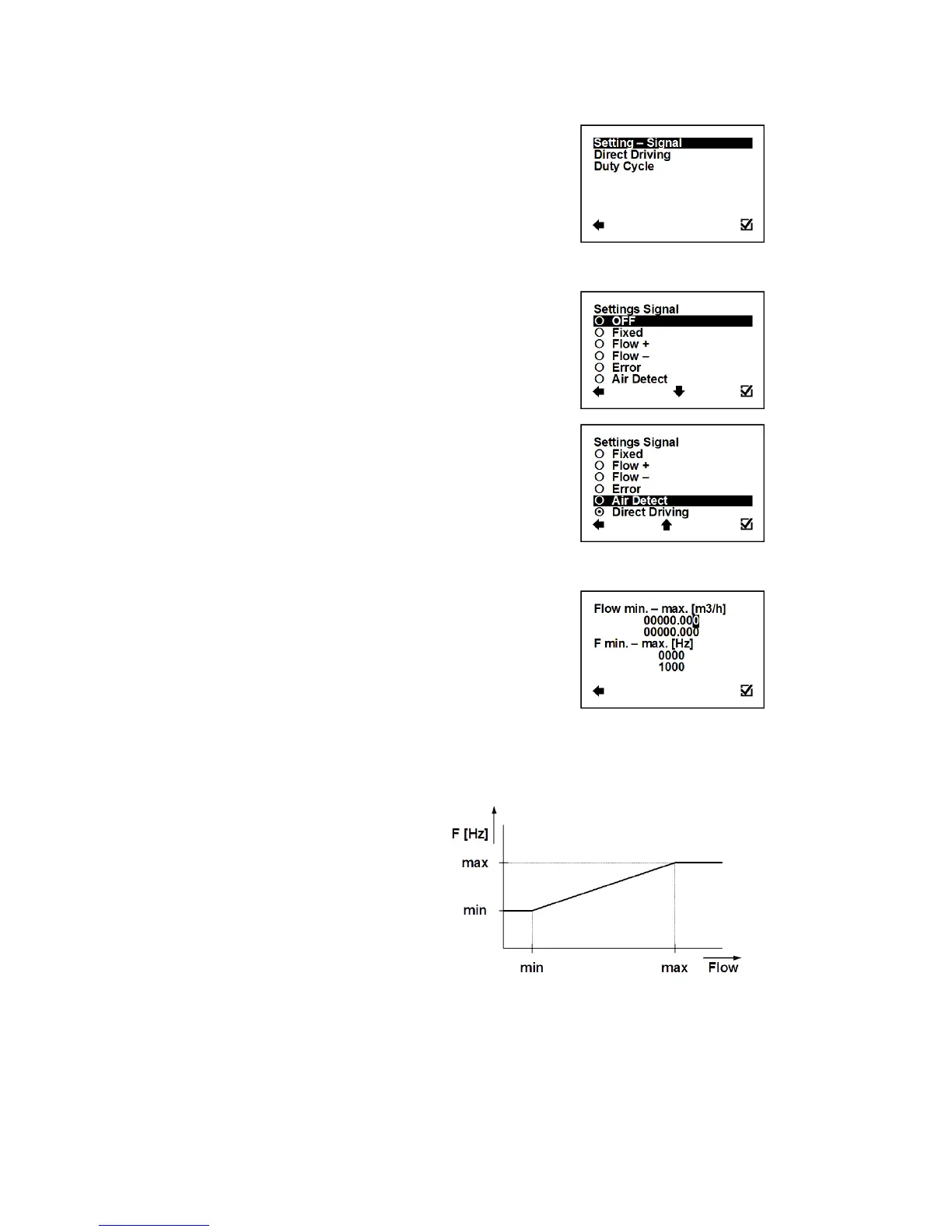
User Settings > Frequency output > Settings Signal
This function serves to select which signal the output should be
giving.
Confirmation of setup and saving to memory
Output: 100Hz fixed output
Output: 100Hz, for any positive flow
Output: 100Hz, for any negative flow
Output: 100Hz, for any error identified by the device
Output: 100Hz, during air detection (empty pipe)
Frequency output changing according to actual flow
User Settings > Frequency output > Direct Driving
This function serves to set flow values in relation to frequency output.
Possible range: 0 – 36000 m3/h; 0 – 1000 Hz
Selection of digit position
Confirmation of setup and saving to memory
Setup of the active flow-range for the Frequency
output module
Configuration of the Frequency output range,
corresponding to the actual flow-rate within the given
range.
Minimal frequency 2 Hz
Maximal frequency 1000 Hz



 To Next Page