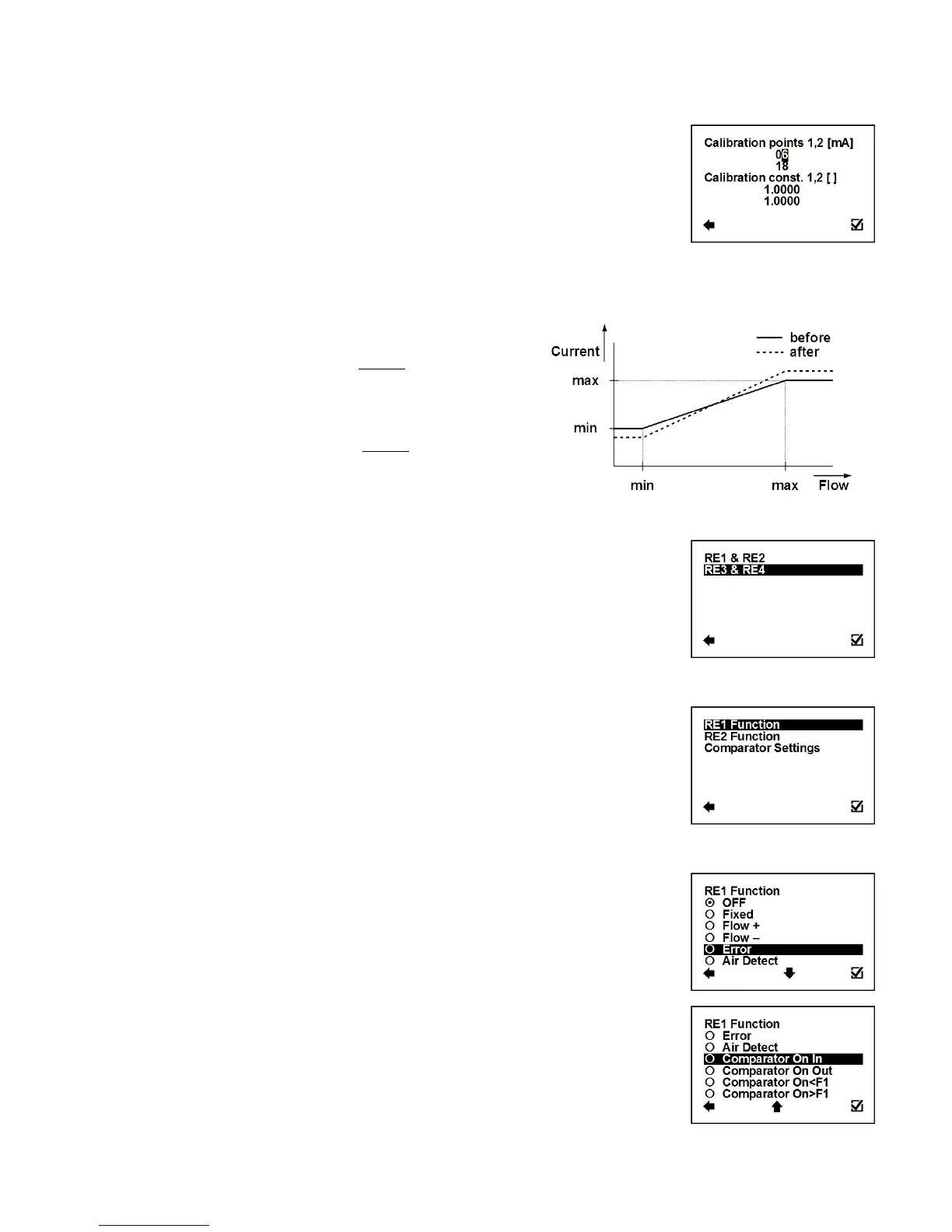
User Settings > Current Loop > Calibration
This function serves to modify current loop output signal.
Possible range: 4 – 20 mA; 0.5000 – 1.5000
Selection of digit position
Confirmation of setup and saving to memory
Setup of calibration point 1, 2. First point must be less
than second point.
Setup of calibration constant for first and for second
calibration point.
Formula for calibration constant calculation:
Expected value: 6 mA, Measured value: 6.1 mA
Calibration point one: 6 mA
Calibration constant one = = 0.9836
Expected value: 18 mA, Measured value: 17.9 mA
Calibration point two: 18mA
Calibration constant two = = 1.0056
3.5.13. User Settings > Pulse Output
Enter this part of the menu
User Settings > Pulse Output > RE1 & RE2
Enter this part of the menu
User Settings > Pulse Output > RE1 & RE2 > RE1 (RE2) function
This function serves to select which signal the output should be
giving. The relays are independent to each other.
Confirmation of setup and saving to memory
Output: OFF, fixed status signal
Output: ON, fixed status signal
Output: ON, for any positive flow
Output: ON, for any negative flow
Output: ON, for any error identified by the device
The signal can be cancelled by pressing any
push button on the flowmeter.
Output: ON, during air detection (empty pipe)
Output: ON, if the actual flow-rate is within the given
range (can be set under Comparator Flow)



 To Next Page