CHAPTER 4 REFERENCE GUIDE
EFD1000 PRO MAX PFD Pilot’s Guide
Page 4-49
091-00005-002 ()
4.7.4 Lightning
The LTNG Hot Key permits display of lightning information on the Nav Map. When configured, Stormscope lightning and/or XM/FIS-B Weather
Lightning is displayed . The Hot Key label, LTNG/CELL/STRK, is green when enabled or blue when disabled. The default setting following a
power cycle of the unit is disabled.
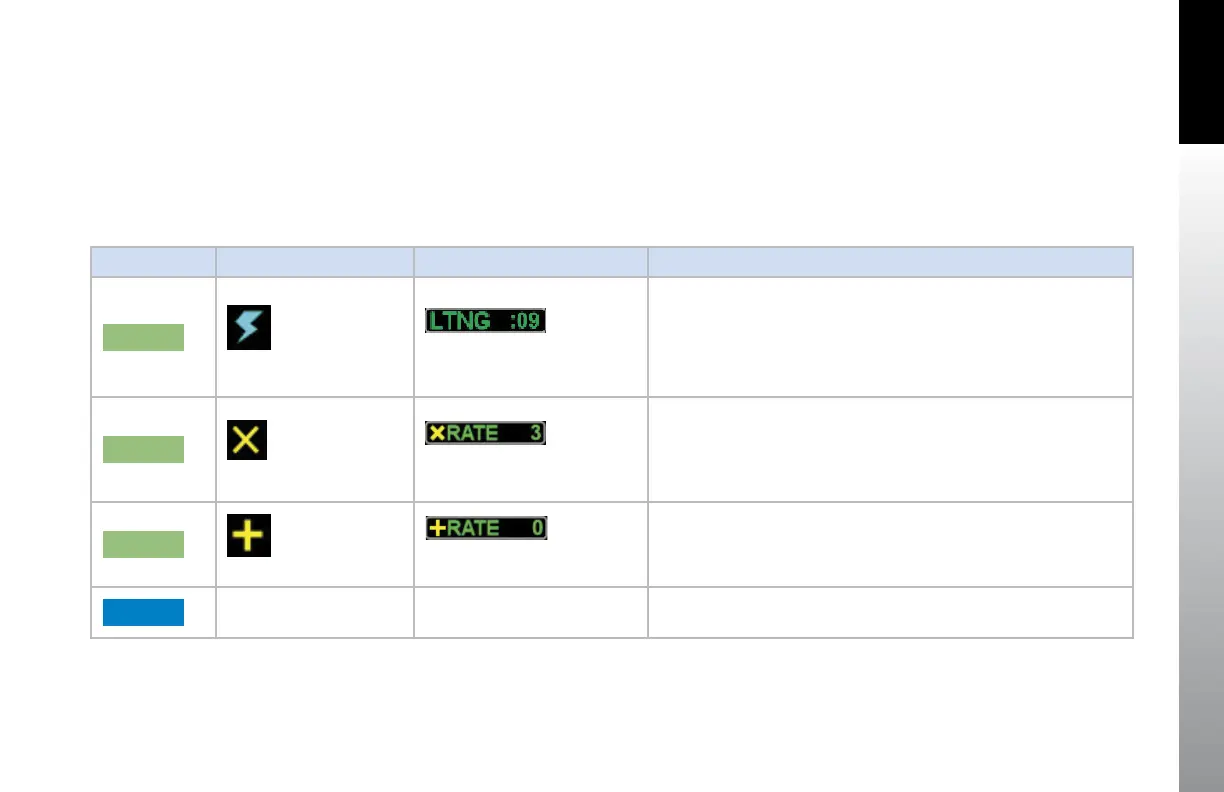
When enabled, the lightning displays as described in Table 4-7 . The Hot Key label is inverse green (green label and dark blue letters) when
enabled or a blue label and green letters when disabled. If neither XM nor Stormscope is configured in the installation, the Hot Key is blank.
Hot Key Label Display Symbol Annunciation Description
LTNG
XM Lightning Symbol
Shows the age of received data.
Symbols are positioned on the display relative to the Ownship Symbol.
Data Link Lightning Symbols display as cyan lighting symbols at full
intensity for 5 minutes after information is received.
After 5 minutes, the symbols will fade over the next 15 minutes.
STRK
WX-500 Strike Symbol
Shows the current strike rate
Symbols are positioned on the display relative to the Ownship Symbol.
CELL
WX-500 Cell Symbol
Shows the current cell rate.
Symbols are positioned on the display relative to the Ownship Symbol.
LTNG
Disabled
Table 4-7 Lighting Display
When Strike or Cell mode is displayed, pressing and holding the CELL or STRK Hot Key will remove all Stormscope symbols from the display and
the RATE will become zero. Resetting the Stormscope data can also be done via the MENU.



 To Next Page